
Hey there, fellow traders! If you’re looking to level up your charting game, you’ve probably heard of the AutoTrendLines indicator for MetaTrader 5. This nifty tool helps you draw trend lines automatically, making your trading experience smoother and more efficient. Let’s break down how it works and what you need to know to get started!
Main Features:
- InpLineType: Choose your line type
- InpLeftExmSide: Set the left extremum side (Types 1 or 2)
- InpRightExmSide: Define the right extremum side (Type 1)
- InpFromCurrent: Offset from the current bar (Type 2)
- InpPrevExmBar: Consider the bar before the extremum (Type 2)
Type 1: Using Two Extremums
- Starting from the second-to-last bar, move left to identify the first extremum point based on the InpRightExmSide parameter.
- From that point, continue left to find the second extremum point using the InpLeftExmSide parameter.
- Draw your trend line connecting these two points.

Type 2: Extremum and Delta
- From the second-to-last bar, look left to find the extremum point as indicated by InpLeftExmSide.
- Starting from the InpFromCurrent bar, search for the bar between the current and the extremum with the lowest delta. You can choose to include or exclude the bar to the right of the extremum.
- Draw your trend line based on your findings.
Option a) Lines are drawn including the bar to the right of the left point.

Option b) Lines are drawn without including the bar to the right of the left point.
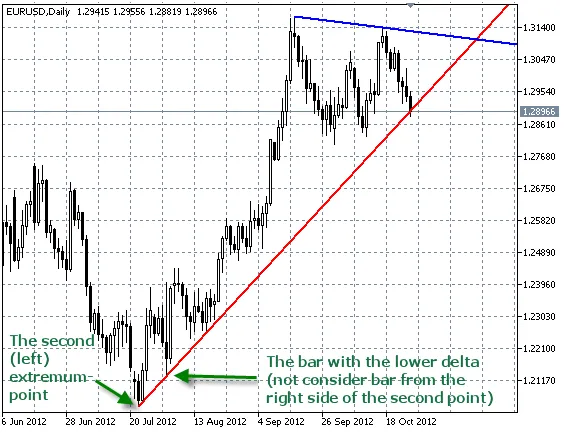
Understanding Extremums:
An extremum refers to a bar that has a certain number of higher lows or lower highs on either side. Essentially, it’s like an N-bar fractal.
Calculating Delta:
Delta is calculated with the following formulas:
For support: (right price - left price) / (right bar index - left bar index)
For resistance: (left price - right price) / (right bar index - left bar index)
Pro Tips:
- Make sure the extremum on the left is more significant than the one on the right; hence, set the parameter higher.
- Test the indicator with smaller parameter values on the M1 timeframe before fully implementing it.
- In my experience, the Type 2 lines (extremum and delta) tend to be more dynamic and better reflect market conditions.
- Each parameter affects specific drawing types, so take note of that (excluding line properties like thickness and color).
Related Posts
- Unlocking MetaCOT 2: Your Ultimate CFTC Indicator Toolkit for MT4
- Unlocking the Power of Master Tools for MetaTrader 4
- Hourly Buffers for Data Collection in MetaTrader 5: A Simple Guide
- Visualize Current Trends Across All Time Frames with This MetaTrader 4 Indicator
- Unlock Trading Insights with Volume Profile + Range v6.0 for MetaTrader 5