
Hey fellow traders!
Today, I want to dive into an essential tool that can help you fine-tune your trading strategy: the Spread Lines indicator for MetaTrader 4. This nifty little indicator has two main functions that can really enhance your trading experience:
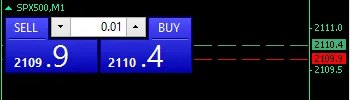
- Customization of Spread Ask and Bid Lines: You can easily tweak the style and thickness of the lines to suit your preferences.
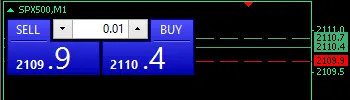
- Second Broker Spread Comparison: This allows you to compare spreads between brokers. Be sure to check the indicator input for detailed instructions on how to set this up!
Check out the images below for a clearer understanding:
- The first image illustrates how you can customize the Ask and Bid spread lines according to your liking.
- The second image showcases the second broker spread comparison. For instance, if the second broker's spread is 8 and your chart shows a spread of 5, you can adjust it by 3 points. This comparison helps you visualize the differences and make informed decisions.
Important Note: The functionality of this indicator depends on a couple of settings. Specifically, it will automatically set the chart to the foreground and toggle the Show Ask feature. You can easily switch these options on or off in the indicator Inputs window.
Using the Spread Lines indicator can give you a competitive edge in your trading game. So why not give it a try and see how it works for you?
Related Posts
- Unlocking the Power of Master Tools for MetaTrader 4
- Visualize Current Trends Across All Time Frames with This MetaTrader 4 Indicator
- Unlocking MetaCOT 2: Your Ultimate CFTC Indicator Toolkit for MT4
- Mastering the FE Fibonacci Expansion Indicator for MetaTrader 4
- Mastering the Open Range Breakout Indicator for MetaTrader 5