
Description:
The ACC+BAL+MARG-INDI indicator is a game-changer for traders using MetaTrader 4. It displays key account metrics such as Account Balance, Equity, Margin, Free Margin, and Account Profit right on your chart.
Positioning Made Easy: You can place the indicator anywhere on your chart, hide individual items, and even insert your preferred currency symbol.
Vertical Positioning
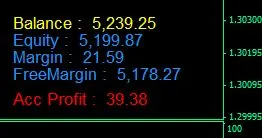
Inputs Window - Option Settings:
- Acc_Currency_Symbol = Axx_Corner = 2;
- Acx_X_distance_Control_All_X = true;
- Acc_Xdistance_Set_All_X = 1350;
- Acc_Y_distance_Control_All_Y = false;
- Acc_Y_distance_Set_All_Y = 1;
- Acc_Font_type = Verdana.
Notes:
- All text is offset from corner 2 (bottom-left) at position X = 1350. (Acc_X_Control_All_X = true, so all text is justified.)
- To ensure vertical justification, you need to set (Acx_X_distance_Control_All_X = true) and (Acc_Y_distance_Control_All_Y = false).
- Text justification depends on the designated corner: Corner 0 (top-left) left-justifies, Corner 1 (top-right) right-justifies, and so on.
Horizontal Positioning

Inputs Window - Option Settings:
- Acc_Currency_Symbol = £
- Axx_Corner = 2
- Acx_X_distance_Control_All_X = false
- Acc_Xdistance_Set_All_X = 1350
- Acc_Y_distance_Control_All_Y = true
- Acc_Y_distance_Set_All_Y = 1
- Acc_Font_type = Arial Bold
- All text is aligned horizontally, with a vertical offset of Y = 1.
- To align all text horizontally, ensure (Acc_Y_distance_Control_All_Y = true) and (Acx_X_distance_Control_All_X = false).
- Insert your currency symbol (e.g., $, £, €, etc.) via the Inputs Window options.
- Acc_Font_Type is set to Bold, specifically Arial Bold (note: case sensitive).
Available Options
- See below +++ START OF DEFAULT OPTIONS ++++
Permanently Change Default Options
- Click HERE for Modification & Edit example (scroll down for details)
- Open ACC+BAL+MARG-INDI.mql4 in MetaEditor to modify Default Options.
- Locate the following code at the top of the ACC+BAL+MARG-INDI.mql4 file.
/ ++++++++++++++++++++++++++++++++ START OF DEFAULT OPTIONS ++++++++++++++++++++++++++++++++++++++++++++++++++++++++
// Account: Balance - Equity - Margin - FreeMargin - Profit
- extern string ACCOUNT_OPTIONS;
- extern string Acc_Currency_Symbol = "£";
- extern int Acc_Corner = 2;
- extern string ______ = "";
- extern bool Acc_X_distance_Control_All_X = true;
- extern int Acc_X_distance_Set_All_X = 1350;
- extern string ______= "";
- extern int Acc_X_distance_Balance = 420;
- extern int Acc_X_distance_Equity = 650;
- extern int Acc_X_distance_Margin = 850;
- extern int Acc_X_distance_Free_Margin = 1050;
- extern int Acc_X_distance_Profit = 1310;
- extern string ________ = "";
- extern string ACC_Y_DISTANCE_VERTICAL;
- extern bool Acc_Y_distance_Control_All_Y = false;
- extern int Acc_Y_distance_Set_All_Y = 1;
- extern string _________ = "";
- extern int Acc_Y_distance_Balance = 86;
- extern int Acc_Y_distance_Equity = 69;
- extern int Acc_Y_distance_Margin = 52;
- extern int Acc_Y_distance_Free_Margin = 35;
- extern int Acc_Y_distance_Profit = 10;
- extern string __________ = "";
- extern color Acc_Color_Balance = Yellow;
- extern color Acc_Color_Equity = DodgerBlue;
- extern color Acc_Color_Margin = DodgerBlue;
- extern color Acc_Color_Free_Margin = DodgerBlue;
- extern color Acc_Color_Profit = LimeGreen;
- extern color Acc_Color_Loss = Red;
- extern color Acc_Color_PnL_Closed = LightSlateGray;
- extern string ___________ = "";
- extern int Acc_Font_Size = 11;
- extern string Acc_Font_Type = "Arial";
- extern string ____________ = "";
- extern bool Acc_HIDE_ALL = false;
- extern bool Acc_HIDE_Balance = false;
- extern bool Acc_HIDE_Equity = false;
- extern bool Acc_HIDE_Margin = false;
- extern bool Acc_HIDE_Free_Margin = false;
- extern bool Acc_HIDE_Profit = false;
// ++++++++++++++++++++++++++++++++ END OF DEFAULT OPTIONS ++++++++++++++++++++++++++++++++++++++++++++++++++++++++++
Related Posts
- Unlocking the Power of Master Tools for MetaTrader 4
- Unlocking MetaCOT 2: Your Ultimate CFTC Indicator Toolkit for MT4
- Hourly Buffers for Data Collection in MetaTrader 5: A Simple Guide
- Unlock Trading Insights with Volume Profile + Range v6.0 for MetaTrader 5
- Visualize Current Trends Across All Time Frames with This MetaTrader 4 Indicator