
The DeleteTradeArrows tool is a game changer for traders using MetaTrader 5. This handy utility lets you clean up your charts by removing arrow objects that mark your trades.
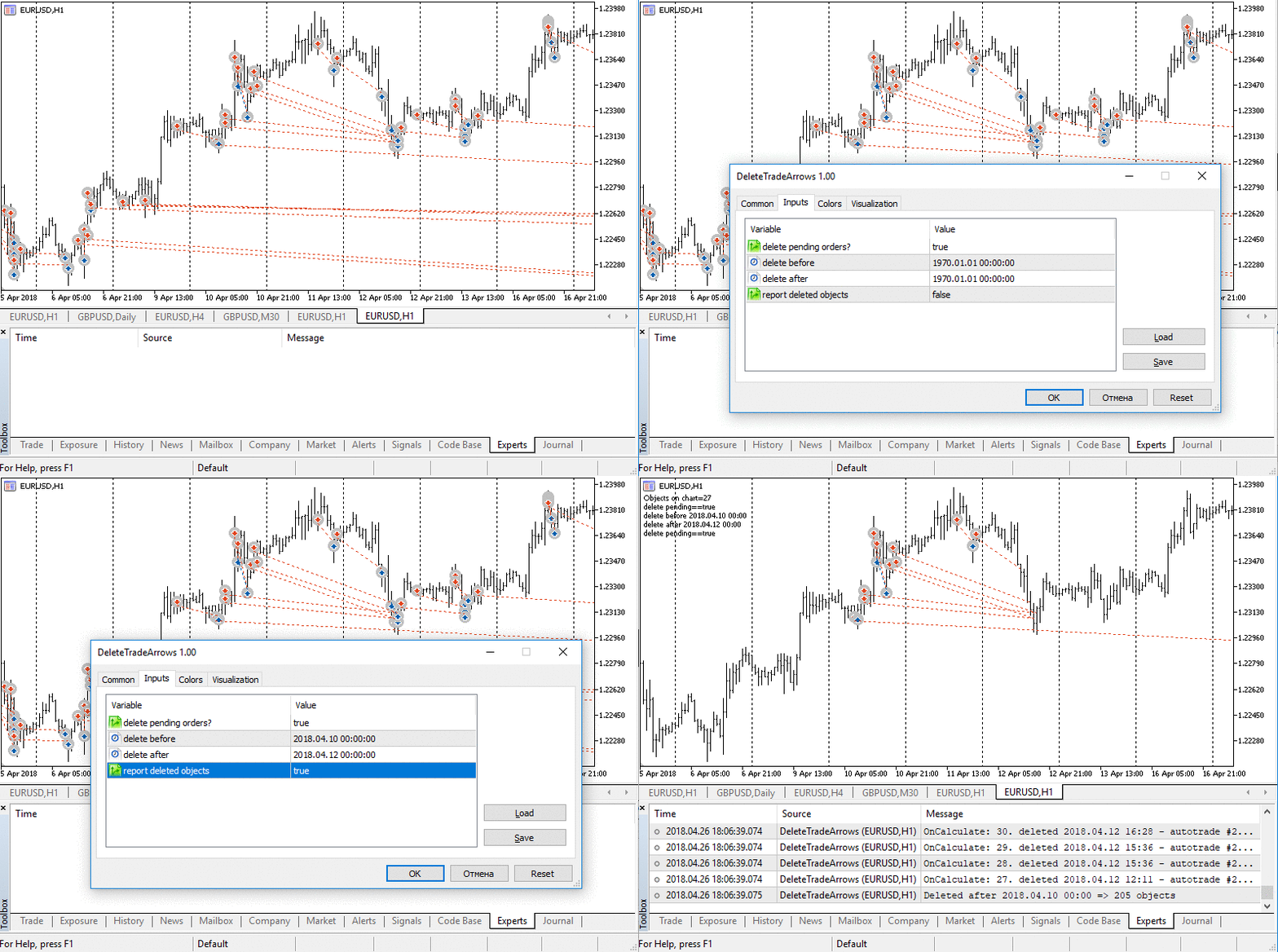
How to Use It: Simply drag and drop your trading history onto the charts. If you find yourself overwhelmed by too many arrows, you can easily delete the excess ones:
- Pending order arrows
- Arrows from a specified date
- Arrows up to a specified date
This tool is also perfect for analyzing your trading history for a particular signal. To do this, head over to the Signals tab in your terminal, select the relevant signal, and then use the Show in Chart command to display the arrow objects.
Check out the screenshot below to see how it works. For your convenience, this utility is set up as an indicator, allowing you to tweak the external parameters on the fly without having to restart. If it were just a script, you'd have to start from scratch to define the limits for removing objects.
Related Posts
- Unlocking MetaCOT 2: Your Ultimate CFTC Indicator Toolkit for MT4
- Unlocking the Power of Master Tools for MetaTrader 4
- Visualize Current Trends Across All Time Frames with This MetaTrader 4 Indicator
- Mastering the Open Range Breakout Indicator for MetaTrader 5
- Hourly Buffers for Data Collection in MetaTrader 5: A Simple Guide