
If you’re looking to enhance your trading strategy, the Divergence Petr indicator for MetaTrader 4 is a game-changer. This nifty tool helps you spot divergences, which can be crucial for predicting market reversals.
What Does the Divergence Petr Indicator Do?
It allows you to choose from 30 different oscillators for detecting divergences effectively. Here’s a quick rundown of the key features:
Indicator Features:
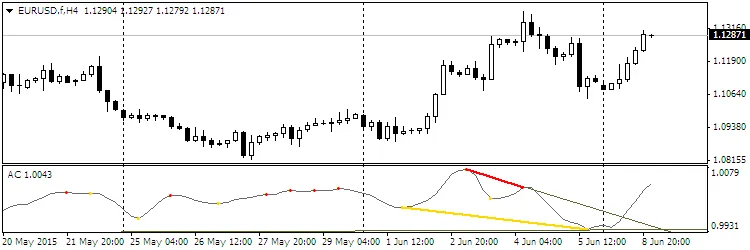
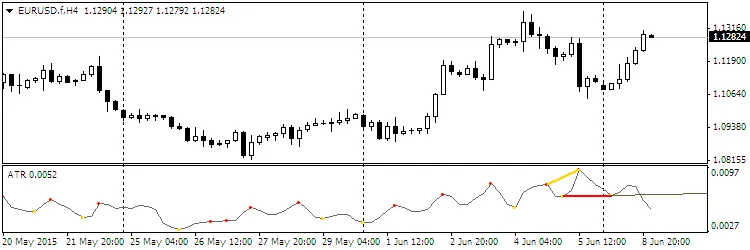
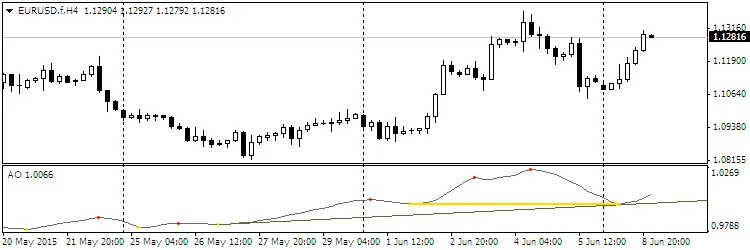
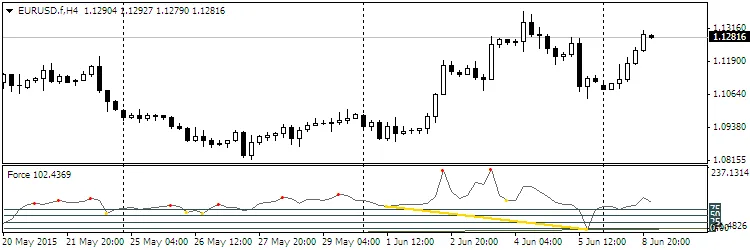
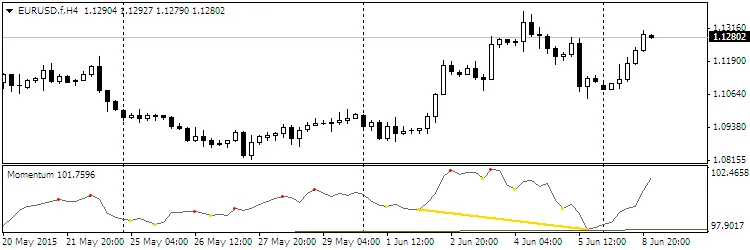
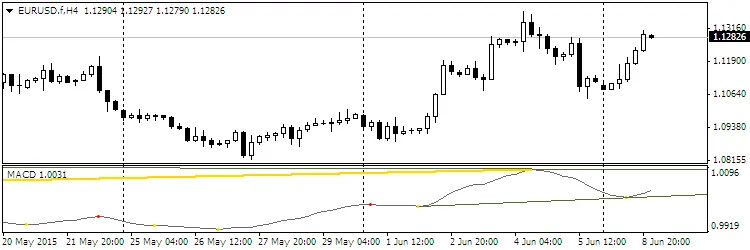
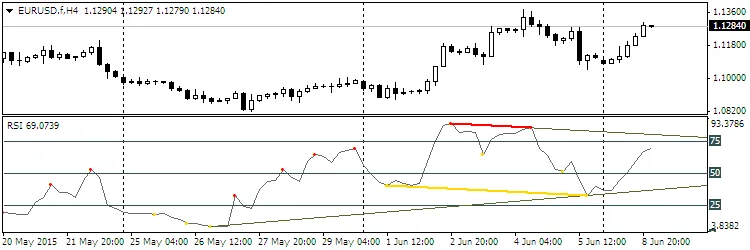
- Extreme points marked (red for highs, yellow for lows);
- Divergence displayed through segments connecting these extremes;
- Support and resistance lines represented as rays through extremes;
- Channels can also be used as rays.
The oscillator you want to use can be selected by entering the oscillator number in the Osc parameter. The default is set to RSI (number 29).
Choosing Your Oscillator
Here’s a list of some oscillators you can use:
- Accelerator
- Accumulation/Distribution
- Average Directional Movement Index
- Average True Range
- Awesome Oscillator
- Bears Power
- Bulls Power
- Commodity Channel Index
- DeMarker
- Force Index
- Momentum
- Money Flow Index
- Moving Averages Convergence/Divergence
- Moving Average of Oscillator
- On Balance Volume
- Relative Vigor Index
- Standard Deviation
- Stochastic Oscillator
- Volume
- Close
- Open
- High
- Low
- (H+L)/2
- (H+L+C)/3
- (H+L+C+C)/4
- (O+C+H+L)/4
- (O+C)/2
- Relative Strength Index
- Larry Williams' Percent Range
Adjustable Parameters
Here’s a list of parameters you can tweak:
- Osc=29 — selects the oscillator;
- TH=true — enables bearish divergence;
- TL=true — enables bullish divergence;
- trend=true — displays support/resistance lines;
- convergen=true — shows hidden divergence;
- Complect=1 — identifies the indicator on the chart;
- BackSteph=0 — steps back for highs;
- BackStepl=0 — steps back for lows;
- BackStep=0 — general steps back;
- qSteps=1 — number of displayed steps, max three;
- LevDPl=5 — DeMark level points;
- LevDPr=1 — DeMark level points;
- period=8 — period for various indicators;
- ma_method=0 — averaging method;
- ma_shift=0 — MA shift;
- applied_price=4 — price applied for several indicators;
- mode=0 — line index;
- fast_ema_period=12 — fast MA period;
- slow_ema_period=26 — slow MA period;
- signal_period=9 — signal line period;
- Kperiod=13 — K line period;
- Dperiod=5 — D line period;
- slowing=3 — slowing for iStochastic;
- price_field=0 — applied price;
- showBars=1000 — shows the indicator on the entire chart if set to 0;
- Trend_Down=true — resistance lines;
- Trend_Up=true — support lines;
- TrendLine=true — support/resistance lines;
- HandyColour=true;
- Highline=Red — color for the HL channel;
- Lowline=DeepSkyBlue — color for the LL channel;
- ChannelLine=false — channels parallel to trend lines;
- Trend=0 — defines trend line conditions;
- Channel=false — channels;
- Regression=true — Linear Regression Channel;
- RayH=true — ray for the High channel;
- RayL=true — ray for the Low channel;
- ChannelH=Red — color of the High channel;
- ChannelL=DeepSkyBlue — color of the Low channel;
- STD_widthH=1.0 — deviation size for the HIGH channel;
- STD_widthL=1.0 — deviation size for the LOW channel;
- comment=false — show comments;
- code=159 — character code for displaying extremums;
- BuyStop=false — BuyStop levels;
- SellLimit=false — SellLimit levels;
- SellStop=false — SellStop levels;
- BuyLimit=false — BuyLimit levels.
Visual Examples
Check out how the Divergence Petr indicator looks in action:


Tips for Best Results
- Customize the color of the oscillator and extremum points in the Colors tab to suit your preference.
- If you're using multiple indicators on the same chart, adjust the Complect parameter for better visibility.
Related Posts
- Unlocking MetaCOT 2: Your Ultimate CFTC Indicator Toolkit for MT4
- Visualize Current Trends Across All Time Frames with This MetaTrader 4 Indicator
- Unlock Trading Insights with Volume Profile + Range v6.0 for MetaTrader 5
- Unlocking the Power of Master Tools for MetaTrader 4
- Mastering the Open Range Breakout Indicator for MetaTrader 5