
If you're looking to level up your trading game, the Wajdyss_Ichimoku_x10 indicator is a tool you definitely want in your arsenal. This nifty indicator displays the color of the Wajdyss_Ichimoku_Candle candlesticks across ten different timeframes, giving you valuable insights right from the get-go.
The way it works is pretty straightforward: trend continuations are represented by squares, while trend changes show up as circles. This visual distinction helps you make quicker decisions on your trades.
Setting Up the Indicator
- Timeframes: You can customize the indicator for various timeframes, from the 1-hour (H1) to the monthly (MN1), allowing you to analyze trends over different periods.
- Signal Bar: Choose the bar number to receive a signal (0 means the current bar), which can enhance your timing for entering or exiting trades.
- Color Customization: The indicator lets you personalize the colors for trends and candlesticks, making it visually tailored to your preferences.
//+----------------------------------------------+
//| Indicator input parameters                   |
//+----------------------------------------------+
input ENUM_TIMEFRAMES TimeFrame0=PERIOD_H1;           //chart 1 period
input ENUM_TIMEFRAMES TimeFrame1=PERIOD_H2;           //chart 2 period
input ENUM_TIMEFRAMES TimeFrame2=PERIOD_H3;           //chart 3 period
input ENUM_TIMEFRAMES TimeFrame3=PERIOD_H4;           //chart 4 period
input ENUM_TIMEFRAMES TimeFrame4=PERIOD_H6;           //chart 5 period
input ENUM_TIMEFRAMES TimeFrame5=PERIOD_H8;           //chart 6 period
input ENUM_TIMEFRAMES TimeFrame6=PERIOD_H12;          //chart 7 period
input ENUM_TIMEFRAMES TimeFrame7=PERIOD_D1;           //chart 8 period
input ENUM_TIMEFRAMES TimeFrame8=PERIOD_W1;           //chart 9 period
input ENUM_TIMEFRAMES TimeFrame9=PERIOD_MN1;          //chart 10 period
input uint SignalBar=1;                               //Bar number to receive a signal (0 - current bar)
//---- Parameters of wajdyss_Ichimoku
input uint Kijun=26;
//---- Indicator drawing parameters
input color  CpColor=clrBlueViolet;                   //indicator name color
input color  UpUpColor=clrDeepSkyBlue;                //color of growing trend and growing candlestick
input color  UpDnColor=clrBlue;                       //color of growing trend and falling candlestick
input color  ZrColor=clrGray;                         //color without changes
input color  DnUpColor=clrBrown;                      //color of falling trend and growing candlestick
input color  DnDnColor=clrMagenta;                    //color of falling trend and falling candlestick
input int    FontSize=15;                             //font size
input type_font FontType=Font14;                      //font type
input ENUM_BASE_CORNER  WhatCorner=CORNER_LEFT_LOWER; //location corner
input uint Y_=20;                                     //vertical location
input uint X_=5;                                      //horizontal location
To get started, make sure to place the Wajdyss_Ichimoku_Candle.ex5 file into your <terminal_data_directory>\MQL5\Indicators folder. This step is essential for the indicator to function properly.
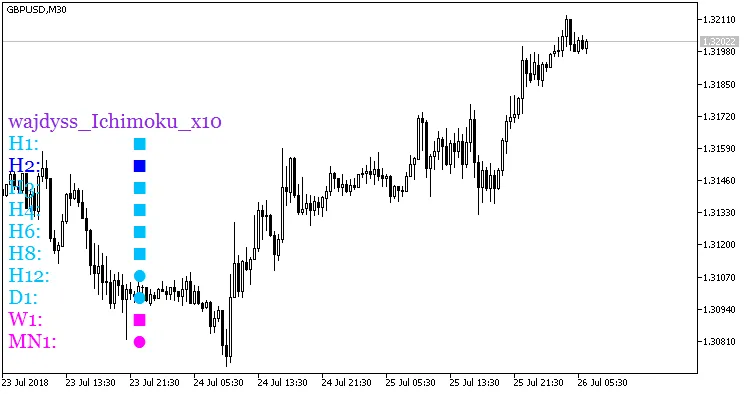
Fig. 1. Wajdyss_Ichimoku_x10
Related Posts
- Unlocking Market Trends with MultiWajdyss_Ichimoku_x10 for MetaTrader 5
- Unlocking the Power of ColorJFatl_Digit_Alert: Your Go-To MT5 Indicator
- Maximize Your Trading Potential with the ColorX2MA_Alert Indicator for MetaTrader 5
- Mastering the Waddah Attar Trend Alert Indicator for MetaTrader 5
- Master Your Trading with ACC+BAL+MARG-INDI for MetaTrader 4