
If you’re looking to enhance your trading strategy, the XMA-XN indicator might be just what you need. It comes with a handy timeframe selection option in the input parameters, allowing you to tailor it to your trading style.
input ENUM_TIMEFRAMES TimeFrame=PERIOD_H4; // Set your desired timeframe for the indicator
To get started with the XMA-XN_HTF repeater indicator, you’ll need the compiled custom indicator file XMA-XN.mq5. Just place it in <terminal_data_folder>\MQL5\Indicators.
Once you've compiled it, the XMA-XN_HTF.ex5 indicator file will embed the XMA-XN.ex5 indicator as a resource. This means you won’t need the original indicator in your terminal folder for it to function properly! The coding makes it all seamless, as the XMA-XN indicator is included directly within the executable file.
The executable file has the necessary resources included at a global level:
#resource \\Indicators\\XMA-XN.ex5
In addition, the string path to the resource indicator has been adjusted in the OnInit() function block:
Ind_Handle=iCustom(Symbol(), TimeFrame, "::Indicators\\XMA-XN", Step, xMA_Method, xLength, xPhase, IPC, 0, PriceShift, ColorWidth);
This means you can use the compiled executable file of the repeater indicator on different trading terminals without needing the original indicator. It's all about making your trading experience smoother!
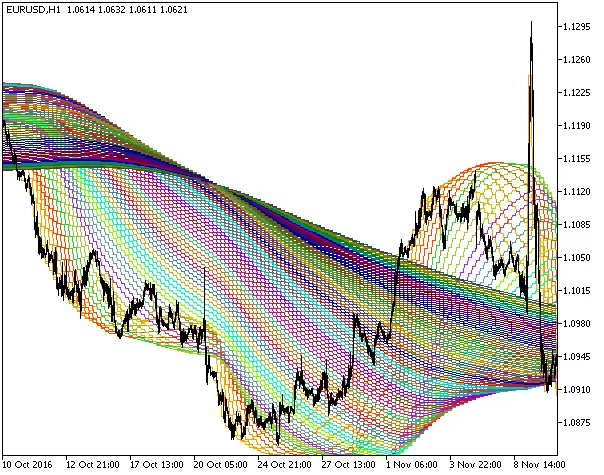
Fig1. The XMA-XN_HTF indicator
Related Posts
- Unlocking MetaCOT 2: Your Ultimate CFTC Indicator Toolkit for MT4
- Mastering the Round Levels: The Round_Levels_XN Indicator for MetaTrader 5
- Unlocking the Power of the XMA-XN Indicator in MetaTrader 5
- Mastering the Open Range Breakout Indicator for MetaTrader 5
- Visualize Current Trends Across All Time Frames with This MetaTrader 4 Indicator