System Trading

Mastering Multi Arbitration: Your Guide to the 1.000 EA for MetaTrader 5
MetaTrader5
Mastering Multi Arbitration: Your Guide to the 1.000 EA for MetaTrader 5

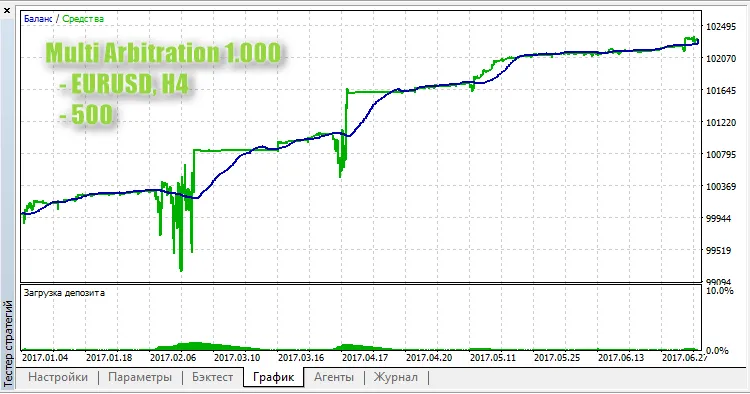
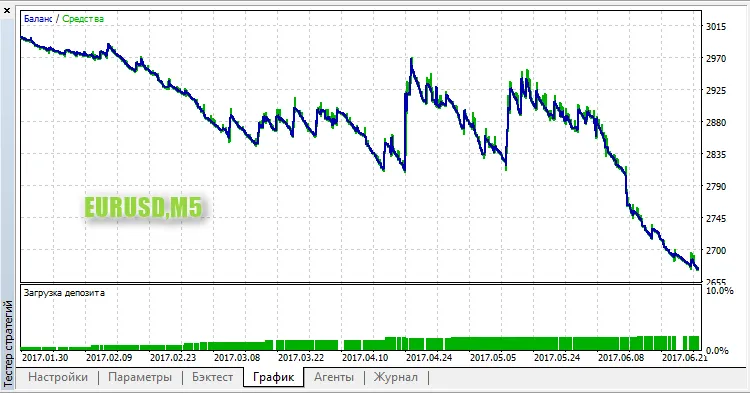
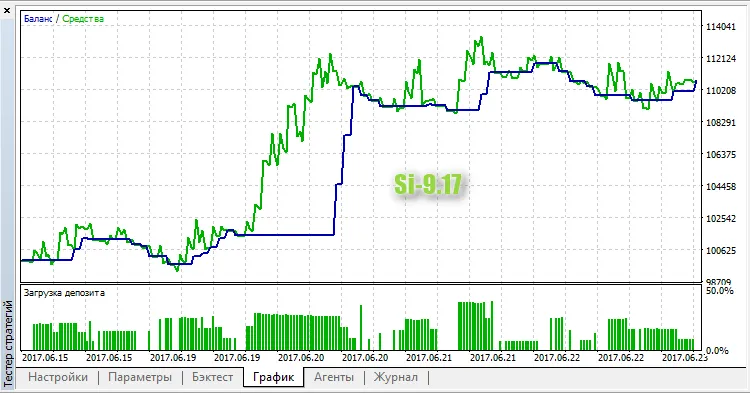
Welcome back, traders! Today, let’s dive into a powerful tool that can give your trading strategy a serious boost: the Multi Arbitration 1.000 Expert Advisor (EA) for MetaTrader 5. At its core, this EA is designed to help you buy low and sell high. Here’s how it works: The current version, 1.000, focuses on trading a single symbol, which you can define using the "Symbol" parameter in the input settings. How to Open Positions Here’s the basic principle for opening positions: If the total profit from all BUY positions is less than that of all SELL positions, we can infer that the market is trending downward, prompting us to open a SELL. Conversely, if the total profit from SELL positions is less than that from BUY positions, it indicates an upward trend, so we should open a BUY.       if(profit_buys<profit_sells) // trend down          m_trade.Buy(m_symbol.LotsMin(),m_symbol.Name());       else if(profit_sells<profit_buys) // trend up       m_trade.Sell(m_symbol.LotsMin(),m_symbol.Name());       else if(profit_buys==0.0 && profit_sells==0.0)          m_trade.Buy(m_symbol.LotsMin(),m_symbol.Name()); Testing Results on EURUSD, H4 It’s worth noting that during prolonged market trends, the load on your account balance can increase significantly. This is something to keep an eye on, as it hasn’t been fully addressed yet. So, there you have it! The Multi Arbitration 1.000 EA can be a game-changer in your trading arsenal. Make sure to test it out and see how it performs for you!

2017.11.03
Maximize Your Tick Data with SaveTicks for MetaTrader 5
MetaTrader5
Maximize Your Tick Data with SaveTicks for MetaTrader 5

Hey there, fellow traders! If you're looking to enhance your trading analysis, let me introduce you to SaveTicks—an invaluable tool for MetaTrader 5. This nifty utility records tick quotes in both text (CSV) and binary (BIN) formats, saving them directly to your MQL5\Files folder. With a consistent sampling frequency, you can conveniently analyze ticks using your favorite mathematical programs. Input Parameters Recording Interval: Set the interval for tick recording in milliseconds. Symbols Selection Method: Choose how you want to select symbols for recording. All Symbols: Records all symbols provided by your broker. MarketWatch Symbols: Records only the symbols currently in your Market Watch. Load List of Symbols from File: Imports a list of symbols from a specified file. Name of File with All Symbol Names: Specify the name of the file containing your symbol list, like InputSymbolList.txt. Recording Format: Choose between CSV or Binary formats. Time Format: Decide whether to use server time or your local computer time. Here's a quick example of how to use the 'Load List of Symbols from File' feature: Run the Expert Advisor (EA) with any parameters and then unload it. Check the file MQL5\Files\AllSymbols_SaveTicks.txt for a list of all symbols provided by your broker. Rename this file to InputSymbolList.txt. Edit InputSymbolList.txt to keep only the symbols you want. Don’t forget, the first line should show the total number of symbols in the file. You can find an example in the download section at the top of this page. Run the EA again with your preferred settings, and it will start recording ticks for the symbols in your list. Head over to the MQL5\Files\ folder, and you should see files named like EURUSD_SaveTicks.csv.

2017.11.03
Mastering Trailing Profit: Your Go-To EA for MetaTrader 5
MetaTrader5
Mastering Trailing Profit: Your Go-To EA for MetaTrader 5

Idea Creator: Vitaly, MQL5 Code Author: barabashkakvn. Have you ever wanted a tool that manages all your open trades in MetaTrader 5? Look no further! This Expert Advisor (EA) takes care of all positions across various symbols, so you can focus on what matters: trading. If your total profit hasn't hit the minimum_profit, this EA will patiently wait. But once it does, it sets a profit drawdown percentage and starts tracking your gains. Let's break it down: the percent_of_profit parameter is expressed in percentage. For instance, if your minimum_profit is set to 1000 and your percent_of_profit is 20, here’s how it works: when your total profit reaches 1000, if it dips to 800 (1000 - 20%), your positions will be closed. But if your profit rises to 2000, the allowable drawdown becomes 400 (2000 - 20%), meaning your positions will close at a total profit of 1600. This EA doesn’t use a fixed drawdown limit, which I find more practical than absolute values. In theory, you can set the percentage to 0, which acts like a total Take Profit. Alternatively, a percentage of 100 functions as a breakeven point. Just remember, as some trades close, others could take a loss. A quick heads-up: This EA operates on a 3-second interval: void OnTick()   { //--- allow work every three seconds    static datetime prev_time=0;    datetime time_current=TimeCurrent();    if(time_current-prev_time<3)       return;    prev_time=time_current; //--- }

2017.08.10
ExpertClor_v01: Your Go-To Assistant EA for MetaTrader 5
MetaTrader5
ExpertClor_v01: Your Go-To Assistant EA for MetaTrader 5

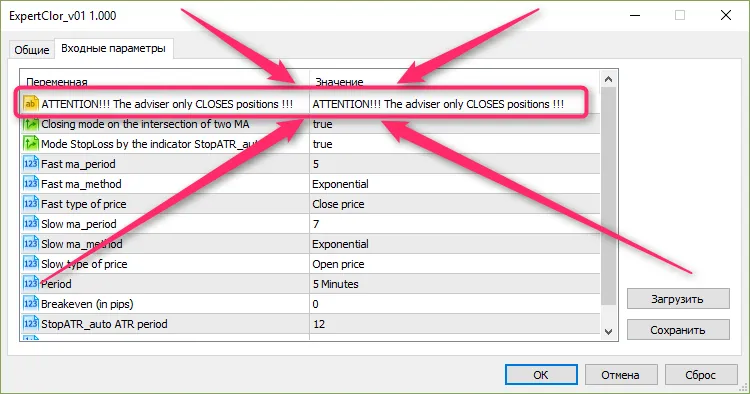
Author of the idea — John Smith, author of the MQL5 code — barabashkakvn. Meet your new trading buddy: ExpertClor_v01, an assistant Expert Advisor designed specifically for MetaTrader 5. This EA focuses solely on closing positions effectively. With ExpertClor, you can rest easy knowing that your positions are automatically shifted to breakeven. The Stop Loss is calculated using the StopATR_auto indicator, and positions will be closed based on the crossover of two Moving Averages (MAs). To get this EA up and running, make sure to place the compiled StopATR_auto indicator file in the following folder: MQL5\Indicators\Downloads: //+------------------------------------------------------------------+ //| Expert initialization function                                   | //+------------------------------------------------------------------+ int OnInit()   { //--- ... //--- create handle of the indicator iCustom    handle_iCustom=iCustom(m_symbol.Name(),TimeFrame,"Downloads\StopATR_auto",                           CountBarsForAverage,                           Target                           ); While this Expert Advisor primarily focuses on closing positions, I've included a snippet of code to open new positions as well: //+------------------------------------------------------------------+ //| Expert tick function                                             | //+------------------------------------------------------------------+ void OnTick()   { //---    if(MQLInfoInteger(MQL_DEBUG) || MQLInfoInteger(MQL_PROFILER) ||       MQLInfoInteger(MQL_TESTER) || MQLInfoInteger(MQL_OPTIMIZATION))      {       static long counter=-50;       static bool trade_buy=true;       if(counter==0)          m_trade.Buy(m_symbol.LotsMin());       else if(counter%1500==0)         {          if(RefreshRates())            {             if(trade_buy)               {                OpenBuy(m_symbol.LotsMin());                trade_buy=false;               }             else               {                OpenSell(m_symbol.LotsMin());                trade_buy=true;               }            }          else             counter=counter-9;         }       counter++;      } //--- This unit is only meant for testing or optimizing this Expert Advisor. A Buy or Sell is initiated after every 1,500 ticks.

2017.08.10
Mastering Trading with the RSI Stochastic MA Expert for MetaTrader 5
MetaTrader5
Mastering Trading with the RSI Stochastic MA Expert for MetaTrader 5

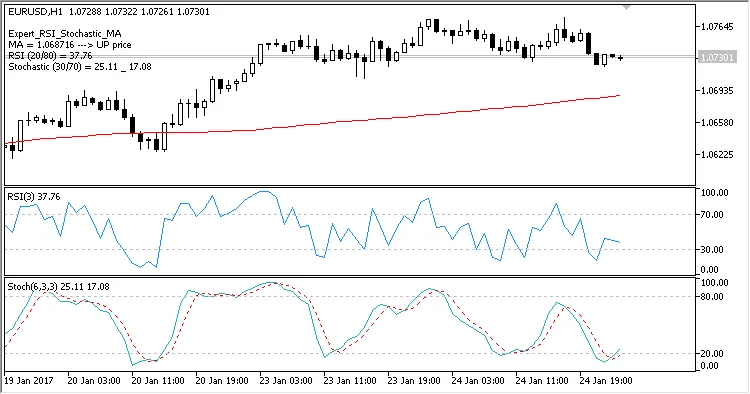
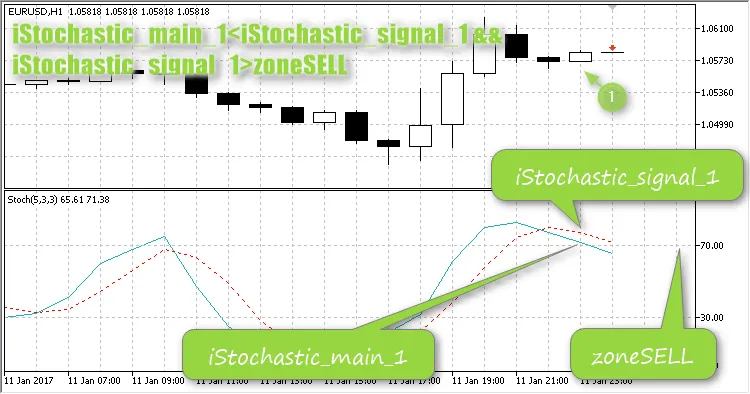
Meet the Creators: The brains behind this trading strategy are Oksana Berenko for the trading idea and barabashkakvn for the mq5 coding.This Expert Advisor (EA) leverages three key indicators: MA(150), RSI(3) with levels set at 80 and 20, and Stochastic(6, 3, 3) with thresholds of 70 and 30. Feel free to tweak these parameters to suit your trading style!1. Determining Trade Entry Direction: The direction for entering trades is guided by the Moving Average (MA). Only one trade will be opened at a time in a single direction.If the Bid price is greater than the MA, look to buy.If the Ask price is less than the MA, consider selling.2. Position Entry Criteria: You’ll enter a position when both RSI and Stochastic conditions align.Buy when RSI is below 20 and Stochastic is below 30.Sell when RSI is above 80 and Stochastic is above 70.3. Exiting Trades: The exit strategy is based on the Stochastic indicator.Exiting with Profit(Trailing Stop = 0) If the trailing stop is set to zero, close the position when the opposite Stochastic level is hit, provided the trade has made a profit in points.Close BUY if Stochastic > 70 and Open Price = Ask(Trailing Stop > 0) If you have a trailing stop set, once the opposite Stochastic level is reached, the stop loss will adjust with each new candlestick while maintaining the specified distance from the price. Be cautious, as this might lead to a loss if the stop loss isn’t moved to break even promptly.Exiting with a Loss(Allow Loss = 0) If 'allow loss' is set to 0, close the position upon hitting the opposite Stochastic level, if the trade has incurred a specified loss in points.Close BUY if Stochastic > 70 and Open Price > Bid Close SELL if Stochastic < 30 and Open Price < Ask(Allow Loss > 0) If 'allow loss' is set and you’ve exited the entry zone according to the Stochastic, the position will close if the trade has a loss that meets or exceeds the specified points.Close BUY if Stochastic > 30 and Open Price - Bid >= allow Loss in points Close SELL if Stochastic < 70 and Ask - Open Price >= allow Loss in pointsHere’s how it performed during testing on the EURUSD H1 timeframe:

2017.08.10
Mastering the Nevalyashka Breakdown Level EA for MetaTrader 5
MetaTrader5
Mastering the Nevalyashka Breakdown Level EA for MetaTrader 5

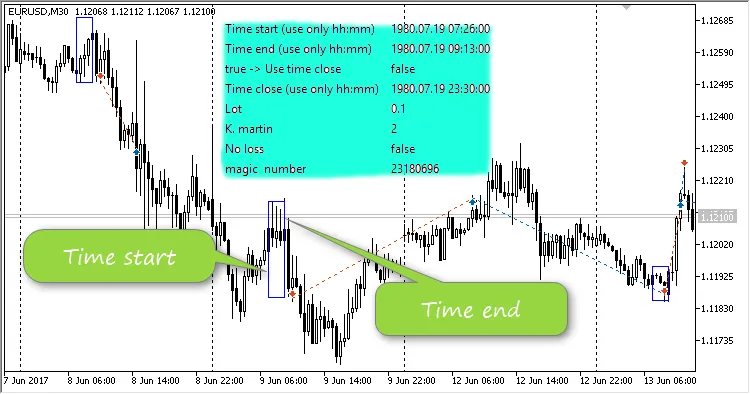
Author of the idea: Vladimir Khlystov, author of the MQL5 code: barabashkakvn. The Nevalyashka Breakdown Level EA operates on a straightforward trading strategy: it identifies breakouts of the High/Low within a defined time period. The EA employs the Nevalyashka strategy, combined with a martingale approach, to boost the lot size when recovering from losing trades. This EA pinpoints the High and Low prices during your specified timeframe, set between Time start and Time end: If the price surpasses the High during this period, a BUY position is triggered. Conversely, if the price dips below the Low, a SELL position is initiated. The Stop Loss is positioned at the opposite boundary of the period—at the Low price for BUY trades and at the High price for SELL trades. The Take Profit is calculated based on the range of the control period. When the Use time close setting is enabled, the Time close parameter activates, determining when to close all positions. Only hours and minutes are considered for the Time start, Time end, and Time close parameters. Stop Loss closure is monitored in OnTradeTransaction. When a DEAL_ENTRY_OUT event occurs, check the comment section of the trade. If the comment contains "sl", it indicates a Stop Loss closure: &nbsp;&nbsp;&nbsp;&nbsp;&nbsp;&nbsp;if(deal_symbol==m_symbol.Name() &amp;&amp; deal_magic==m_magic) &nbsp;&nbsp;&nbsp;&nbsp;&nbsp;&nbsp;&nbsp;&nbsp; if(deal_entry==DEAL_ENTRY_OUT) &nbsp;&nbsp;&nbsp;&nbsp;&nbsp;&nbsp;&nbsp;&nbsp;&nbsp;&nbsp; { &nbsp;&nbsp;&nbsp;&nbsp;&nbsp;&nbsp;&nbsp;&nbsp;&nbsp;&nbsp;&nbsp;&nbsp;MqlDateTime str1; &nbsp;&nbsp;&nbsp;&nbsp;&nbsp;&nbsp;&nbsp;&nbsp;&nbsp;&nbsp;&nbsp;&nbsp;TimeToStruct(TimeCurrent(),str1); &nbsp;&nbsp;&nbsp;&nbsp;&nbsp;&nbsp;&nbsp;&nbsp;&nbsp;&nbsp;&nbsp;&nbsp;//--- this might be a Take Profit closure &nbsp;&nbsp;&nbsp;&nbsp;&nbsp;&nbsp;&nbsp;&nbsp;&nbsp;&nbsp;&nbsp;&nbsp;if(StringFind(deal_comment,"tp",0)!=-1 || deal_profit&gt;=0.0) &nbsp;&nbsp;&nbsp;&nbsp;&nbsp;&nbsp;&nbsp;&nbsp;&nbsp;&nbsp;&nbsp;&nbsp;&nbsp;&nbsp;{ &nbsp;&nbsp;&nbsp;&nbsp;&nbsp;&nbsp;&nbsp;&nbsp;&nbsp;&nbsp;&nbsp;&nbsp;&nbsp;&nbsp;&nbsp;&nbsp;TradeDey=str1.day; &nbsp;&nbsp;&nbsp;&nbsp;&nbsp;&nbsp;&nbsp;&nbsp;&nbsp;&nbsp;&nbsp;&nbsp;&nbsp;&nbsp;&nbsp;&nbsp;return; &nbsp;&nbsp;&nbsp;&nbsp;&nbsp;&nbsp;&nbsp;&nbsp;&nbsp;&nbsp;&nbsp;&nbsp;&nbsp;&nbsp;} &nbsp;&nbsp;&nbsp;&nbsp;&nbsp;&nbsp;&nbsp;&nbsp;&nbsp;&nbsp;&nbsp;&nbsp;//--- this might be a Stop Loss closure &nbsp;&nbsp;&nbsp;&nbsp;&nbsp;&nbsp;&nbsp;&nbsp;&nbsp;&nbsp;&nbsp;&nbsp;if(StringFind(deal_comment,"sl",0)!=-1) &nbsp;&nbsp;&nbsp;&nbsp;&nbsp;&nbsp;&nbsp;&nbsp;&nbsp;&nbsp;&nbsp;&nbsp;&nbsp;&nbsp;{ &nbsp;&nbsp;&nbsp;&nbsp;&nbsp;&nbsp;&nbsp;&nbsp;&nbsp;&nbsp;&nbsp;&nbsp;&nbsp;&nbsp;&nbsp;&nbsp;if(TradeDey!=str1.day) &nbsp;&nbsp;&nbsp;&nbsp;&nbsp;&nbsp;&nbsp;&nbsp;&nbsp;&nbsp;&nbsp;&nbsp;&nbsp;&nbsp;&nbsp;&nbsp;&nbsp;&nbsp; { &nbsp;&nbsp;&nbsp;&nbsp;&nbsp;&nbsp;&nbsp;&nbsp;&nbsp;&nbsp;&nbsp;&nbsp;&nbsp;&nbsp;&nbsp;&nbsp;&nbsp;&nbsp;&nbsp;&nbsp;Print("A StopLoss closure has been detected!"); &nbsp;&nbsp;&nbsp;&nbsp;&nbsp;&nbsp;&nbsp;&nbsp;&nbsp;&nbsp;&nbsp;&nbsp;&nbsp;&nbsp;&nbsp;&nbsp;&nbsp;&nbsp;&nbsp;&nbsp;double loss=MathAbs(deal_profit/m_symbol.TickValue()/deal_volume); &nbsp;&nbsp;&nbsp;&nbsp;&nbsp;&nbsp;&nbsp;&nbsp;&nbsp;&nbsp;&nbsp;&nbsp;&nbsp;&nbsp;&nbsp;&nbsp;&nbsp;&nbsp;&nbsp;&nbsp;if(deal_type==DEAL_TYPE_SELL) // the buy position is closed &nbsp;&nbsp;&nbsp;&nbsp;&nbsp;&nbsp;&nbsp;&nbsp;&nbsp;&nbsp;&nbsp;&nbsp;&nbsp;&nbsp;&nbsp;&nbsp;&nbsp;&nbsp;&nbsp;&nbsp;{ &nbsp;&nbsp;&nbsp;&nbsp;&nbsp;&nbsp;&nbsp;&nbsp;&nbsp;&nbsp;&nbsp;&nbsp;&nbsp;&nbsp;&nbsp;&nbsp;&nbsp;&nbsp;&nbsp;&nbsp;double SL=m_symbol.Bid()+loss*m_symbol.Point(); &nbsp;&nbsp;&nbsp;&nbsp;&nbsp;&nbsp;&nbsp;&nbsp;&nbsp;&nbsp;&nbsp;&nbsp;&nbsp;&nbsp;&nbsp;&nbsp;&nbsp;&nbsp;&nbsp;&nbsp;double TP=m_symbol.Bid()-loss*m_symbol.Point(); &nbsp;&nbsp;&nbsp;&nbsp;&nbsp;&nbsp;&nbsp;&nbsp;&nbsp;&nbsp;&nbsp;&nbsp;&nbsp;&nbsp;&nbsp;&nbsp;&nbsp;&nbsp;&nbsp;&nbsp;double Lot=LotCheck(deal_volume*InpK_martin); &nbsp;&nbsp;&nbsp;&nbsp;&nbsp;&nbsp;&nbsp;&nbsp;&nbsp;&nbsp;&nbsp;&nbsp;&nbsp;&nbsp;&nbsp;&nbsp;&nbsp;&nbsp;&nbsp;&nbsp;if(Lot==0.0) &nbsp;&nbsp;&nbsp;&nbsp;&nbsp;&nbsp;&nbsp;&nbsp;&nbsp;&nbsp;&nbsp;&nbsp;&nbsp;&nbsp;&nbsp;&nbsp;&nbsp;&nbsp;&nbsp;&nbsp;&nbsp;&nbsp;&nbsp;&nbsp;return; &nbsp;&nbsp;&nbsp;&nbsp;&nbsp;&nbsp;&nbsp;&nbsp;&nbsp;&nbsp;&nbsp;&nbsp;&nbsp;&nbsp;&nbsp;&nbsp;&nbsp;&nbsp;&nbsp;&nbsp;OpenSell(SL,TP,Lot,"Nevalyashka"); &nbsp;&nbsp;&nbsp;&nbsp;&nbsp;&nbsp;&nbsp;&nbsp;&nbsp;&nbsp;&nbsp;&nbsp;&nbsp;&nbsp;&nbsp;&nbsp;&nbsp;&nbsp;if(deal_type==DEAL_TYPE_BUY) // the sell position is closed &nbsp;&nbsp;&nbsp;&nbsp;&nbsp;&nbsp;&nbsp;&nbsp;&nbsp;&nbsp;&nbsp;&nbsp;&nbsp;&nbsp;&nbsp;&nbsp;&nbsp;&nbsp;&nbsp;&nbsp;{ &nbsp;&nbsp;&nbsp;&nbsp;&nbsp;&nbsp;&nbsp;&nbsp;&nbsp;&nbsp;&nbsp;&nbsp;&nbsp;&nbsp;&nbsp;&nbsp;&nbsp;&nbsp;&nbsp;&nbsp;double SL=m_symbol.Ask()-loss*m_symbol.Point(); &nbsp;&nbsp;&nbsp;&nbsp;&nbsp;&nbsp;&nbsp;&nbsp;&nbsp;&nbsp;&nbsp;&nbsp;&nbsp;&nbsp;&nbsp;&nbsp;&nbsp;&nbsp;&nbsp;&nbsp;double TP=m_symbol.Ask()+loss*m_symbol.Point(); &nbsp;&nbsp;&nbsp;&nbsp;&nbsp;&nbsp;&nbsp;&nbsp;&nbsp;&nbsp;&nbsp;&nbsp;&nbsp;&nbsp;&nbsp;&nbsp;&nbsp;&nbsp;&nbsp;&nbsp;double Lot=LotCheck(deal_volume*InpK_martin); &nbsp;&nbsp;&nbsp;&nbsp;&nbsp;&nbsp;&nbsp;&nbsp;&nbsp;&nbsp;&nbsp;&nbsp;&nbsp;&nbsp;&nbsp;&nbsp;&nbsp;&nbsp;&nbsp;&nbsp;if(Lot==0.0) &nbsp;&nbsp;&nbsp;&nbsp;&nbsp;&nbsp;&nbsp;&nbsp;&nbsp;&nbsp;&nbsp;&nbsp;&nbsp;&nbsp;&nbsp;&nbsp;&nbsp;&nbsp;&nbsp;&nbsp;&nbsp;&nbsp;&nbsp;&nbsp;return; &nbsp;&nbsp;&nbsp;&nbsp;&nbsp;&nbsp;&nbsp;&nbsp;&nbsp;&nbsp;&nbsp;&nbsp;&nbsp;&nbsp;&nbsp;&nbsp;&nbsp;&nbsp;&nbsp;&nbsp;OpenBuy(SL,TP,Lot,"Nevalyashka"); &nbsp;&nbsp;&nbsp;&nbsp;&nbsp;&nbsp;&nbsp;&nbsp;&nbsp;&nbsp;&nbsp;&nbsp;&nbsp;&nbsp;&nbsp;&nbsp;&nbsp;&nbsp;&nbsp;&nbsp;} &nbsp;&nbsp;&nbsp;&nbsp;&nbsp;&nbsp;&nbsp;&nbsp;&nbsp;&nbsp;&nbsp;&nbsp;&nbsp;&nbsp;&nbsp;&nbsp;return; &nbsp;&nbsp;&nbsp;&nbsp;&nbsp;&nbsp;&nbsp;&nbsp;&nbsp;&nbsp;&nbsp;&nbsp;&nbsp;&nbsp;} &nbsp;&nbsp;&nbsp;&nbsp;&nbsp;&nbsp;&nbsp;&nbsp;&nbsp;&nbsp;} You’ll want to open a position opposite to the one that was closed (if you closed a SELL, you’ll open a BUY, and vice versa), with an increased lot size adjusted by K. martin. If the position closed with a profit, the EA will wait for the next period to start at Time end and repeat the process. No loss parameter refers to breakeven; once half of the position’s profit is achieved, the Stop Loss is adjusted to the entry price. Here’s a quick example if you’re testing on EURUSD, M30:

2017.08.10
Mastering DoubleZigZag: Your Go-To EA for MetaTrader 5
MetaTrader5
Mastering DoubleZigZag: Your Go-To EA for MetaTrader 5

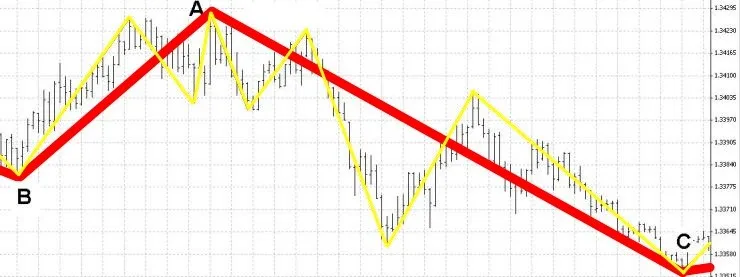
Meet the Minds Behind DoubleZigZag: The innovative concept comes from Maksim, while the coding wizardry was crafted by barabashkakvn. This Expert Advisor employs two ZigZag indicators for thorough market analysis. It utilizes a smaller ZigZag with the settings of (13.5,3) alongside a larger ZigZag, with parameters scaled up by eight: (13*8,5*8,3*8). //--- Create handle for the iCustom indicator &nbsp;&nbsp; handle_iCustom=iCustom(Symbol(),Period(),"Examples\\ZigZag",13,5,3); //--- Check if the handle was successfully created &nbsp;&nbsp; if(handle_iCustom==INVALID_HANDLE) &nbsp;&nbsp;&nbsp;&nbsp; { &nbsp;&nbsp;&nbsp;&nbsp;&nbsp;&nbsp;//--- Report failure and display error code &nbsp;&nbsp;&nbsp;&nbsp;&nbsp;&nbsp;PrintFormat("Failed to create handle of the iCustom indicator for the symbol %s/%s, error code %d", &nbsp;&nbsp;&nbsp;&nbsp;&nbsp;&nbsp;&nbsp;&nbsp;&nbsp;&nbsp;&nbsp;&nbsp;&nbsp;&nbsp;&nbsp;&nbsp;&nbsp;&nbsp;Symbol(), &nbsp;&nbsp;&nbsp;&nbsp;&nbsp;&nbsp;&nbsp;&nbsp;&nbsp;&nbsp;&nbsp;&nbsp;&nbsp;&nbsp;&nbsp;&nbsp;&nbsp;&nbsp;EnumToString(Period()), &nbsp;&nbsp;&nbsp;&nbsp;&nbsp;&nbsp;&nbsp;&nbsp;&nbsp;&nbsp;&nbsp;&nbsp;&nbsp;&nbsp;&nbsp;&nbsp;&nbsp;&nbsp;GetLastError()); &nbsp;&nbsp;&nbsp;&nbsp;&nbsp;&nbsp;//--- Abort if the indicator failed &nbsp;&nbsp;&nbsp;&nbsp;&nbsp;&nbsp;return(INIT_FAILED); &nbsp;&nbsp;&nbsp;&nbsp; } //--- Create handle for the scaled iCustom indicator &nbsp;&nbsp; handle_iCustomX8=iCustom(Symbol(),Period(),"Examples\\ZigZag",13*8,5*8,3*8); //--- Check if the handle was successfully created &nbsp;&nbsp; if(handle_iCustomX8==INVALID_HANDLE) &nbsp;&nbsp;&nbsp;&nbsp; { &nbsp;&nbsp;&nbsp;&nbsp;&nbsp;&nbsp;//--- Report failure and display error code &nbsp;&nbsp;&nbsp;&nbsp;&nbsp;&nbsp;PrintFormat("Failed to create handle of the iCustomX8 indicator for the symbol %s/%s, error code %d", &nbsp;&nbsp;&nbsp;&nbsp;&nbsp;&nbsp;&nbsp;&nbsp;&nbsp;&nbsp;&nbsp;&nbsp;&nbsp;&nbsp;&nbsp;&nbsp;&nbsp;&nbsp;Symbol(), &nbsp;&nbsp;&nbsp;&nbsp;&nbsp;&nbsp;&nbsp;&nbsp;&nbsp;&nbsp;&nbsp;&nbsp;&nbsp;&nbsp;&nbsp;&nbsp;&nbsp;&nbsp;EnumToString(Period()), &nbsp;&nbsp;&nbsp;&nbsp;&nbsp;&nbsp;&nbsp;&nbsp;&nbsp;&nbsp;&nbsp;&nbsp;&nbsp;&nbsp;&nbsp;&nbsp;&nbsp;&nbsp;GetLastError()); &nbsp;&nbsp;&nbsp;&nbsp;&nbsp;&nbsp;//--- Abort if the indicator failed &nbsp;&nbsp;&nbsp;&nbsp;&nbsp;&nbsp;return(INIT_FAILED); &nbsp;&nbsp;&nbsp;&nbsp; } When it comes to making trading decisions, we analyze the two legs of the last peak from the larger ZigZag (13*8,5*8,3*8) and count how many peaks from the smaller ZigZag (13,5,3) fit within those legs. If a signal to open a BUY position comes in, all existing SELL positions are closed, and vice versa. If a signal to open a SELL position is triggered, all BUY positions are closed. Parameters of the Expert Advisor: k: The ratio of the number of peaks from the smaller ZigZag occurring within the legs of the larger ZigZag. k2: The ratio of the price difference at the peaks of the larger ZigZag. Example: In the chart above, the larger ZigZag (13*8,5*8,3*8) is marked in red, while the smaller ZigZag (13,5,3) is shown in yellow. Here, the peaks of the larger ZigZag are labeled as ABC. The legs AB and AC contain nine peaks from the smaller ZigZag (13,5,3). Testing Results on EURUSD, M1:

2017.08.10

Unlock Trading Success with the Exp_XROC2_VG_X2 System for MetaTrader 5
MetaTrader5
Unlock Trading Success with the Exp_XROC2_VG_X2 System for MetaTrader 5

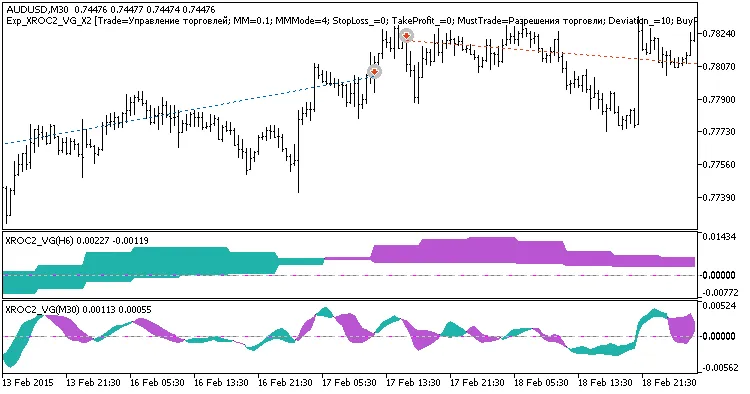
Hey traders! If you're on the lookout for a robust trend-following system, let me introduce you to the Exp_XROC2_VG_X2. This trading system operates by leveraging signals from two XROC2_VG indicators. The first indicator helps identify the direction of the slow trend using the main and signal lines, while the second one kicks in to signal when to open a trade, particularly when those lines cross or touch. An entry signal is generated at the close of a bar when these two conditions align: Fast and slow trend signals are in agreement; Fast trend has reversed direction. Expert Advisor Inputs: //+-------------------------------------------------+ //| Input parameters of the EA indicator | //+-------------------------------------------------+ input string Trade="Trade management";&nbsp;&nbsp;&nbsp;&nbsp;//+================ TRADE MANAGEMENT ================+ input double MM=0.1;&nbsp;&nbsp;&nbsp;&nbsp;&nbsp;&nbsp;&nbsp;&nbsp;&nbsp;&nbsp;&nbsp;&nbsp;&nbsp;&nbsp; //Share of a deposit in a deal input MarginMode MMMode=LOT;&nbsp;&nbsp;&nbsp;&nbsp;&nbsp;&nbsp;//Lot value detection method input uint&nbsp;&nbsp;&nbsp;&nbsp;StopLoss_=1000;&nbsp;&nbsp;&nbsp;&nbsp;&nbsp;&nbsp;//Stop Loss in points input uint&nbsp;&nbsp;&nbsp;&nbsp;TakeProfit_=2000;&nbsp;&nbsp;&nbsp;&nbsp;&nbsp;&nbsp;//Take Profit in points input string MustTrade="Trade permissions";&nbsp;&nbsp;&nbsp;&nbsp;//+=============== TRADE PERMISSIONS ===============+ input int&nbsp;&nbsp;&nbsp;&nbsp;Deviation_=10&nbsp;&nbsp;&nbsp;&nbsp;&nbsp;&nbsp; //Max price deviation in points input bool&nbsp;&nbsp; BuyPosOpen=true;&nbsp;&nbsp;&nbsp;&nbsp; //Permission to enter long positions input bool&nbsp;&nbsp; SellPosOpen=true;&nbsp;&nbsp;&nbsp;&nbsp;//Permission to enter short positions //+-------------------------------------------------+ //| Input parameters of the filter indicator&nbsp;&nbsp;&nbsp;&nbsp;&nbsp;&nbsp;&nbsp;&nbsp;| //+-------------------------------------------------+ input string Filter="SLOW TREND PARAMETERS";&nbsp;&nbsp;&nbsp;&nbsp;//+============== TREND PARAMETERS ==============+ input ENUM_TIMEFRAMES TimeFrame=PERIOD_H6;&nbsp;&nbsp;//1 Chart period for the trend input uint ROCPeriod1=8; input Smooth_Method MA_Method1=MODE_JJMA;&nbsp;&nbsp;&nbsp;&nbsp;&nbsp;&nbsp;&nbsp;&nbsp;&nbsp;&nbsp;//Method of averaging of the first indicator input uint Length1=5;&nbsp;&nbsp;&nbsp;&nbsp;&nbsp;&nbsp;&nbsp;&nbsp;&nbsp;&nbsp;&nbsp;&nbsp;&nbsp;&nbsp;&nbsp;&nbsp;&nbsp;&nbsp;&nbsp;&nbsp;&nbsp;&nbsp;&nbsp;&nbsp;&nbsp;&nbsp;&nbsp;&nbsp;&nbsp;&nbsp;//The depth of the first smoothing&nbsp;&nbsp;&nbsp;&nbsp;&nbsp;&nbsp;&nbsp;&nbsp;&nbsp;&nbsp;&nbsp;&nbsp;&nbsp;&nbsp;&nbsp;&nbsp;&nbsp;&nbsp;&nbsp;&nbsp; input int Phase1=15;&nbsp;&nbsp;&nbsp;&nbsp;&nbsp;&nbsp;&nbsp;&nbsp;&nbsp;&nbsp;&nbsp;&nbsp;&nbsp;&nbsp;&nbsp;&nbsp;&nbsp;&nbsp;&nbsp;&nbsp;&nbsp;&nbsp;&nbsp;&nbsp;&nbsp;&nbsp;&nbsp;&nbsp;&nbsp;&nbsp; //The parameter of the first smoothing, //---- for JJMA within the range of -100 ... +100, it influences the quality of the transition process; //---- for VIDIA it is a CMO period, for AMA it is a slow average period input uint ROCPeriod2=14; input Smooth_Method MA_Method2=MODE_JJMA;&nbsp;&nbsp;&nbsp;&nbsp;&nbsp;&nbsp;&nbsp;&nbsp;&nbsp;&nbsp;//Method of averaging of the second indicator input uint Length2 = 5;&nbsp;&nbsp;&nbsp;&nbsp;&nbsp;&nbsp;&nbsp;&nbsp;&nbsp;&nbsp;&nbsp;&nbsp;&nbsp;&nbsp;&nbsp;&nbsp;&nbsp;&nbsp;&nbsp;&nbsp;&nbsp;&nbsp;&nbsp;&nbsp;&nbsp;&nbsp;&nbsp;&nbsp;&nbsp;&nbsp;//The depth of the second smoothing input int Phase2=15;&nbsp;&nbsp;&nbsp;&nbsp;&nbsp;&nbsp;&nbsp;&nbsp;&nbsp;&nbsp;&nbsp;&nbsp;&nbsp;&nbsp;&nbsp;&nbsp;&nbsp;&nbsp;&nbsp;&nbsp;&nbsp;&nbsp;&nbsp;&nbsp;&nbsp;&nbsp;&nbsp;&nbsp;&nbsp;&nbsp; //The parameter of the second smoothing, //---- for JJMA within the range of -100 ... +100, it influences the quality of the transition process; //---- for VIDIA it is a CMO period, for AMA it is a slow average period input ENUM_TYPE ROCType=MOM; input uint SignalBar=1; //Bar index to receive the entry signal input bool&nbsp;&nbsp; BuyPosClose=true;&nbsp;&nbsp;&nbsp;&nbsp; //Permission to exit long positions by trend input bool&nbsp;&nbsp; SellPosClose=true;&nbsp;&nbsp;&nbsp;&nbsp;//Permission to exit short positions by trend //+-------------------------------------------------+ //| Input parameters of the entry indicator &nbsp;&nbsp;&nbsp;&nbsp;&nbsp;&nbsp;&nbsp;&nbsp;| //+-------------------------------------------------+ input string Input="ENTRY PARAMETERS";&nbsp;&nbsp;&nbsp;&nbsp;&nbsp;&nbsp; //+=============== ENTRY PARAMETERS ==============+&nbsp;&nbsp; input ENUM_TIMEFRAMES TimeFrame_=PERIOD_M30;&nbsp;&nbsp;//2 Chart period for entry input uint ROCPeriod1_=8; input Smooth_Method MA_Method1_=MODE_JJMA;&nbsp;&nbsp;&nbsp;&nbsp;&nbsp;&nbsp;&nbsp;&nbsp;&nbsp;&nbsp;//Method of averaging of the first indicator input uint Length1_=5;&nbsp;&nbsp;&nbsp;&nbsp;&nbsp;&nbsp;&nbsp;&nbsp;&nbsp;&nbsp;&nbsp;&nbsp;&nbsp;&nbsp;&nbsp;&nbsp;&nbsp;&nbsp;&nbsp;&nbsp;&nbsp;&nbsp;&nbsp;&nbsp;&nbsp;&nbsp;&nbsp;&nbsp;&nbsp;&nbsp;//The depth of the first smoothing&nbsp;&nbsp;&nbsp;&nbsp;&nbsp;&nbsp;&nbsp;&nbsp;&nbsp;&nbsp;&nbsp;&nbsp;&nbsp;&nbsp;&nbsp;&nbsp;&nbsp;&nbsp;&nbsp;&nbsp; input int Phase1_=15;&nbsp;&nbsp;&nbsp;&nbsp;&nbsp;&nbsp;&nbsp;&nbsp;&nbsp;&nbsp;&nbsp;&nbsp;&nbsp;&nbsp;&nbsp;&nbsp;&nbsp;&nbsp;&nbsp;&nbsp;&nbsp;&nbsp;&nbsp;&nbsp;&nbsp;&nbsp;&nbsp;&nbsp;&nbsp;&nbsp; //The parameter of the first smoothing, //---- for JJMA within the range of -100 ... +100, it influences the quality of the transition process; //---- for VIDIA it is a CMO period, for AMA it is a slow average period input uint ROCPeriod2_=14; input Smooth_Method MA_Method2_=MODE_JJMA;&nbsp;&nbsp;&nbsp;&nbsp;&nbsp;&nbsp;&nbsp;&nbsp;&nbsp;&nbsp;//Method of averaging of the second indicator input uint Length2_ = 5;&nbsp;&nbsp;&nbsp;&nbsp;&nbsp;&nbsp;&nbsp;&nbsp;&nbsp;&nbsp;&nbsp;&nbsp;&nbsp;&nbsp;&nbsp;&nbsp;&nbsp;&nbsp;&nbsp;&nbsp;&nbsp;&nbsp;&nbsp;&nbsp;&nbsp;&nbsp;&nbsp;&nbsp;//The depth of the second smoothing input int Phase2_=15;&nbsp;&nbsp;&nbsp;&nbsp;&nbsp;&nbsp;&nbsp;&nbsp;&nbsp;&nbsp;&nbsp;&nbsp;&nbsp;&nbsp;&nbsp;&nbsp;&nbsp;&nbsp;&nbsp;&nbsp;&nbsp;&nbsp;&nbsp;&nbsp;&nbsp;&nbsp;&nbsp;&nbsp;&nbsp;&nbsp; //The parameter of the second smoothing, //---- for JJMA within the range of -100 ... +100, it influences the quality of the transition process; //---- for VIDIA it is a CMO period, for AMA it is a slow average period input ENUM_TYPE ROCType_=MOM; input uint SignalBar_=1;//Bar index to receive an entry signal input bool&nbsp;&nbsp; BuyPosClose_=false;&nbsp;&nbsp;&nbsp;&nbsp; //Permission to exit long positions by signal input bool&nbsp;&nbsp; SellPosClose_=false;&nbsp;&nbsp;&nbsp;&nbsp;//Permission to exit short positions by signal The string variables in the code help enhance the visualization of the EA's input parameters. The XROC2_VG_HTF indicators are there to make trend visualization easier within the strategy tester, but they won't be active in other modes. To get the compiled Expert Advisor working smoothly, don't forget to add the XROC2_VG.ex5 and XROC2_VG_HTF.ex5 indicator files to your &lt;terminal_data_folder&gt;\MQL5\Indicators. A quick heads-up: the TradeAlgorithms.mqh library file allows you to utilize Expert Advisors with brokers offering nonzero spread and gives you the option to set Stop Loss and Take Profit at the time of position opening. You can grab additional versions of the library at this link: Trade Algorithms. The default input parameters of the Expert Advisor were used in the tests detailed below. During testing, Stop Loss and Take Profit settings were not applied. Fig. 1. Examples of deals on the chart Here are the testing results for 2015 on AUDUSD, utilizing a slow trend on H6, with entries based on the fast trend on M30: Fig. 2. Testing results chart

2017.08.10
Mastering the Exp_XROC2_VG Expert Advisor for MetaTrader 5
MetaTrader5
Mastering the Exp_XROC2_VG Expert Advisor for MetaTrader 5

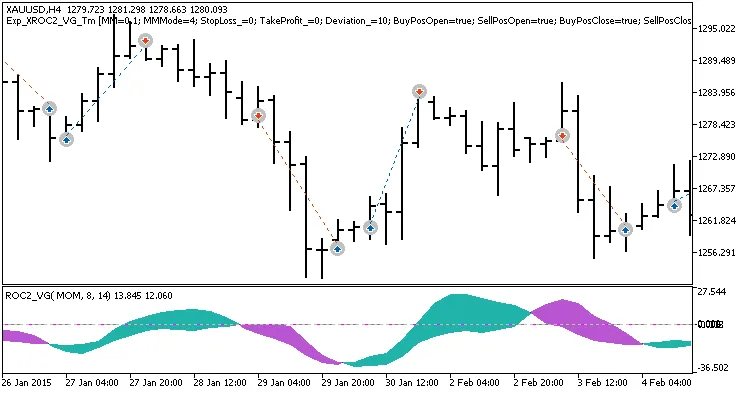
If you're looking to enhance your trading game, the Exp_XROC2_VG_Digit_Tm Expert Advisor is definitely worth considering. This EA operates based on signals produced by the XROC2_VG oscillator, allowing you to fine-tune your trading strategies with a strict time interval. Here’s how it works: a trade signal pops up when a bar closes, provided there’s a color change in the indicator (specifically, when the main indicator line crosses the signal line). You can customize your trading sessions by setting specific trading hours in the input parameters: input bool&nbsp;&nbsp; TimeTrade=true;&nbsp;&nbsp;&nbsp;&nbsp;&nbsp;&nbsp;//Enable trading within the specified interval input HOURS&nbsp;&nbsp;StartH=ENUM_HOUR_0;&nbsp;&nbsp;//Set trading start hour input MINUTS StartM=ENUM_MINUT_0; //Set trading start minute input HOURS&nbsp;&nbsp;EndH=ENUM_HOUR_23;&nbsp;&nbsp; //Set trading end hour input MINUTS EndM=ENUM_MINUT_59;&nbsp;&nbsp;//Set trading end minute These parameters allow you to specify both the start and end times of your trading sessions. By default, the EA is set to trade the entire session from 00:00 to 23:59. If you set a start time that’s later than the end time, don’t worry! The Expert Advisor will simply close any open positions the next day at the designated time. To ensure the Exp_XROC2_VG works like a charm, make sure to save the XROC2_VG.ex5 compiled indicator file to your &lt;terminal_data_folder&gt;\\MQL5\Indicators. Also, keep in mind that the TradeAlgorithms.mqh library file is essential for using Expert Advisors with brokers offering a nonzero spread and the option to set Stop Loss and Take Profit during position openings. You can find more variations of this library at this link: Trade Algorithms. In the testing results below, we used the default input parameters for the Expert Advisor. Notably, no Stop Loss or Take Profit settings were applied during the tests. Fig. 1. Examples of deals on the chart Here are the testing results for 2015, focusing on the XAUUSD on the H4 timeframe: Fig. 2. Testing results chart

2017.08.10
Mastering the Evening Star Pattern with MetaTrader 5 EA
MetaTrader5
Mastering the Evening Star Pattern with MetaTrader 5 EA

The Evening Star Expert Advisor is designed specifically to trade the iconic "Evening Star" pattern. For those unfamiliar, this pattern is a powerful signal in technical analysis, indicating potential reversals in price action.One key feature of this EA is that it doesn’t clutter your chart with indicators; instead, it operates behind the scenes, executing trades based on the Evening Star pattern.When it comes to managing your trades, the EA calculates the lot size based on your specified risk percentage of the available margin, allowing you to stay in control of your trading strategy.If you're looking to dive deeper into the mechanics of the Evening Star pattern, I recommend checking out the EveningStar indicator code for a comprehensive overview.Expert Advisor ParametersHere’s a rundown of the key parameters you can customize in the EA:Evening Star - Choose the type of position to open (either Buy or Sell).Take Profit (in pips).Stop Loss (in pips).Risk in percent for a deal - This sets how much risk you're willing to take per trade as a percentage of your free margin.Shift in bars (ranging from 1 to 255).Gap - Set to true if you want gaps to be considered in trading decisions.Candle 2 type - Toggle true to consider the type of the second candle in the pattern.Candle sizes - Set to true to factor in the sizes of the candles.true -&gt; close opposite positions - This option helps manage any opposing positions effectively.Magic number - A unique identifier for the EA to manage its trades.Keep in mind, this EA only triggers trades when a new bar forms, ensuring that you're making decisions based on the latest market conditions.

2017.08.10
First Previous 24 25 26 27 28 29 30 31 32 33 34 Next Last