System Trading

Mastering the Disaster EA for MetaTrader 5: A Trader's Guide
MetaTrader5
Mastering the Disaster EA for MetaTrader 5: A Trader's Guide

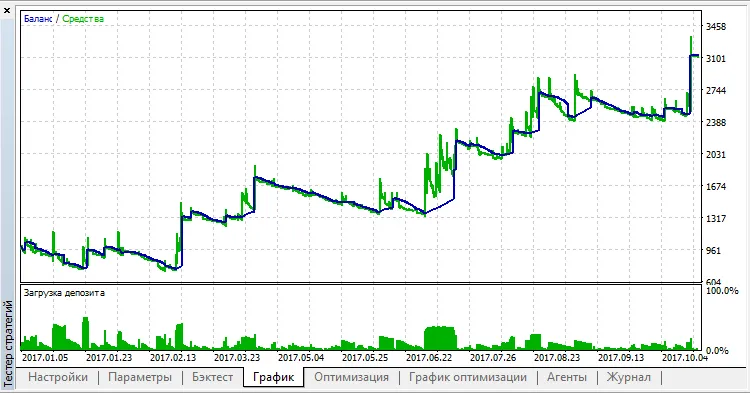
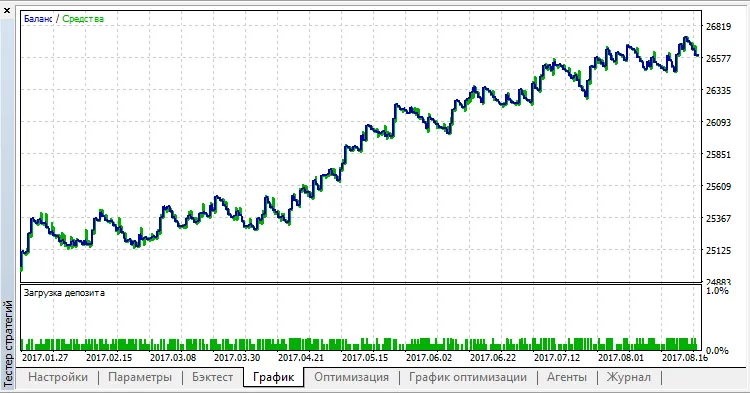
The brains behind this strategy: Maxym Kondratiuk, with coding expertise by barabashkakvn. This trading strategy hinges on a simple yet effective observation: when the price crosses the Moving Average (MA) line and travels a certain distance, it often continues moving in that direction. It's a classic trader's intuition at play! The EA (Expert Advisor) employs pending Buy Stop and Sell Stop orders. These pending orders are adjusted to track the current price at a defined Distance from MA for setting a pending order. This adjustment occurs every Timeout seconds. Once an order is activated and becomes a live position, the EA stops modifying it. Input Parameters Stop Loss Take Profit Trailing Step Distance from MA for setting a pending order - the minimum gap between the current price and the MA indicator (590) Timeout Magic number - a unique identifier for the EA. Here are the testing results from the past year (from January 1, 2017, to October 31, 2017) using the M1 timeframe: Symbol Pass Result Profit Expected Payoff Profit Factor Recovery Factor Sharpe Ratio Custom Equity DD % Trades USDCAD 8 2,912.82 1,912.82 2.66 1.81 3.09 0.05 0 32.64 718 GBPUSD 1 2,498.00 1,498.00 1.53 1.31 0.91 0.03 0 69.25 980 USDCNH 4 2,423.50 1,423.50 0.48 1.29 0.60 0.02 0 53.66 2,983 USDCHF 2 1,461.92 461.92 0.98 1.21 0.70 0.04 0 33.33 469 NZDUSD 7 969.68 -30.32 -0.08 0.98 -0.04 0.01 0 52.90 394 AUDUSD 6 677.71 -322.29 -0.95 0.77 -0.39 -0.04 0 64.30 339 EURUSD 0 661.05 -338.95 -0.48 0.89 -0.28 0.00 0 70.87 701 GBPCAD 10 197.41 -802.59 -2.61 0.38 -0.42 -0.14 0 92.23 307 USDJPY 3 195.22 -804.78 -2.24 0.61 -0.52 0.00 0 88.95 360 USDRUB 5 8.45 -991.55 -13.05 0.00 -1.00 -0.52 0 99.24 76 USDSEK 9 6.67 -993.33 -1.16 0.38 -0.72 -0.27 0 99.53 860 For a closer look, here’s the chart for USDCAD:

2018.01.22
MAMACD: A Game-Changer for MetaTrader 5 Traders
MetaTrader5
MAMACD: A Game-Changer for MetaTrader 5 Traders

Idea Contributor: Yuri, Code Author: barabashkakvn. The MAMACD system utilizes two key iMA (Moving Average) indicators with periods of 85 and 75, calculated using the Low prices, while a third iMA with a period of 5 is based on Close prices. A trade is triggered when the fast iMA (period 5) crosses above both slow iMAs. For an up trade, it's essential that the MACD is positioned above zero or is showing upward momentum. Visually, having two MAs is crucial for effective trading. We set a modest take profit target of 15-20 points, which can vary based on currency volatility. Sure, some might argue that’s a small gain, but when you’re trading larger lot sizes across various pairs, those small wins can add up significantly. With a stop loss set at 10-15 points, you’ll find that it rarely gets hit. Let's take a look at the testing results over the past year (from 01 January 2017 to 31 October 2017) on the M15 timeframe: Symbol Pass Result Profit Expected Payoff Profit Factor Recovery Factor Sharpe Ratio Custom Equity DD % Trades USDJPY 3 3,247.67 247.67 0.48 1.07 1.25 0.04 0 6.60 521 EURJPY 14 2,610.75 -389.25 -0.69 0.90 -0.65 -0.05 0 19.56 563 EURGBP 11 2,566.31 -433.69 -0.86 0.92 -0.63 -0.04 0 22.42 506 EURUSD 0 2,482.42 -517.58 -0.93 0.89 -0.66 -0.06 0 25.07 557 AUDUSD 5 2,468.08 -531.92 -0.96 0.88 -0.66 -0.06 0 26.54 554 USDCAD 4 2,250.59 -749.41 -1.25 0.81 -0.98 -0.10 0 25.47 601 GBPUSD 1 2,001.58 -998.42 -1.70 0.80 -0.84 -0.11 0 38.63 586 EURCHF 13 1,985.18 -1,014.82 -2.22 0.76 -0.91 -0.12 0 37.14 458 EURCAD 16 1,791.18 -1,208.82 -2.12 0.71 -0.88 -0.15 0 45.92 569 USDCHF 2 1,790.78 -1,209.22 -2.13 0.76 -0.91 -0.13 0 43.78 568 EURAUD 12 1,678.28 -1,321.72 -2.22 0.70 -0.88 -0.16 0 49.82 596 AUDJPY 9 1,531.42 -1,468.58 -2.57 0.70 -0.99 -0.17 0 49.66 572 CHFJPY 10 1,493.13 -1,506.87 -2.29 0.73 -0.98 -0.15 0 51.05 658 AUDCHF 8 1,432.25 -1,567.75 -3.02 0.70 -0.94 -0.15 0 55.85 519 CADCHF 19 1,300.63 -1,699.37 -3.41 0.67 -0.94 -0.17 0 60.54 499 AUDCAD 7 1,142.15 -1,857.85 -3.32 0.60 -0.97 -0.22 0 63.60 560 GBPJPY 18 865.69 -2,134.31 -3.43 0.63 -1.00 -0.20 0 71.21 622 GBPCHF 17 122.78 -2,877.22 -5.22 0.55 -1.00 -0.17 0 95.91 551 EURNZD 15 100.52 -2,899.48 -6.50 0.39 -1.00 -0.27 0 96.65 446 AUDNZD 6 70.66 -2,929.34 -5.28 0.43 -1.00 -0.23 0 97.64 555 As you can see, the only currency pair that yielded a positive result was USDJPY. Now, let's review the performance results from the last year (from 01 January 2017 to 31 October 2017) on the H1 timeframe: Symbol Pass Result Profit Expected Payoff Profit Factor Recovery Factor Sharpe Ratio Custom Equity DD % Trades USDCAD 4 3,142.27 142.27 0.97 1.18 0.98 0.08 0 4.80 146 EURUSD 0 3,114.56 114.56 0.83 1.12 0.57 0.06 0 6.56 138 AUDJPY 9 3,024.26 24.26 0.17 1.02 0.17 0.01 0 4.55 139 AUDCHF 8 3,009.49 9.49 0.07 1.01 0.04 0.01 0 8.35 140 EURJPY 14 2,955.84 -44.16 -0.33 0.95 -0.21 -0.02 0 6.99 133 USDCHF 2 2,815.92 -184.08 -1.30 0.85 -0.64 -0.08 0 9.29 142 USDJPY 3 2,815.05 -184.95 -1.18 0.84 -0.61 -0.08 0 10.00 157 EURAUD 12 2,717.65 -282.35 -1.78 0.75 -0.64 -0.13 0 14.57 159 AUDUSD 5 2,669.29 -330.71 -2.09 0.76 -0.68 -0.13 0 16.25 158 EURCAD 16 2,627.66 -372.34 -2.47 0.67 -0.85 -0.20 0 14.45 151 GBPCHF 17 2,622.02 -377.98 -3.20 0.69 -0.75 -0.18 0 16.80 118 GBPUSD 1 2,620.28 -379.72 -2.47 0.73 -0.72 -0.15 0 17.17 154 EURGBP 11 2,566.81 -433.19 -3.09 0.73 -0.81 -0.15 0 17.65 140 AUDCAD 7 2,508.89 -491.11 -2.98 0.63 -0.89 -0.22 0 18.29 165 CADCHF 19 2,500.84 -499.16 -3.42 0.67 -0.84 -0.19 0 19.67 146 GBPJPY 18 2,360.00 -640.00 -4.74 0.52 -0.99 -0.32 0 21.51 135 AUDNZD 6 2,343.57 -656.43 -4.03 0.53 -0.92 -0.31 0 23.87 163 The takeaway? The MAMACD system shows promise, but results can vary widely by currency pair. Always do your due diligence and consider testing on a demo account before going live!

2018.01.22

Unlocking Trading Success: Larry Conners' RSI 2 Strategy for MetaTrader 5
MetaTrader5
Unlocking Trading Success: Larry Conners' RSI 2 Strategy for MetaTrader 5

If you're looking to boost your trading game, the Larry Conners RSI 2 strategy could be the ticket. This system incorporates three key indicators: the Relative Strength Index (RSI), a fast Moving Average (5-period), and a slow Moving Average (200-period). The essence of this strategy is simple: identify the overall trend using the slow Moving Average (MA 200) and then capitalize on price fluctuations—buying on dips and selling on rallies. Long Entry Rules RSI (2-period) reads below 6. The close of the previous candle is above the slow Moving Average. Long Exit Rules The close is above the fast Moving Average. Short Entry Rules RSI (2-period) reads above 95. The close of the previous candle is below the slow Moving Average. Short Exit Rules The close is below the fast Moving Average. Input Parameters input double   lot = 1;                  //Lots input int      shortSmaPeriods = 5;      //Fast MA period input int      longSmaPeriods = 200;     //Slow MA period input int      RSIPeriods = 2;           //RSI Period input int      RSILongEntry = 6;         //RSI Long Entry input int      RSIShortEntry = 95;       //RSI Short Entry input int      slippage=3; input bool     useStopLoss=true;       //Use Stop Loss input double   stopLossPips=30;        //Stop Loss (pips) input bool     useTakeProfit=true;     //Use Take Profit input double   takeProfitPips=60;      //Take Profit (pips) For best results, try this strategy on the EUR/USD pair using a 1-hour timeframe. Don’t hesitate to tweak the input parameters to find what works best for you!

2017.12.13
Mastering MACD Stochastic: Your Go-To Trading Expert for MetaTrader 5
MetaTrader5
Mastering MACD Stochastic: Your Go-To Trading Expert for MetaTrader 5

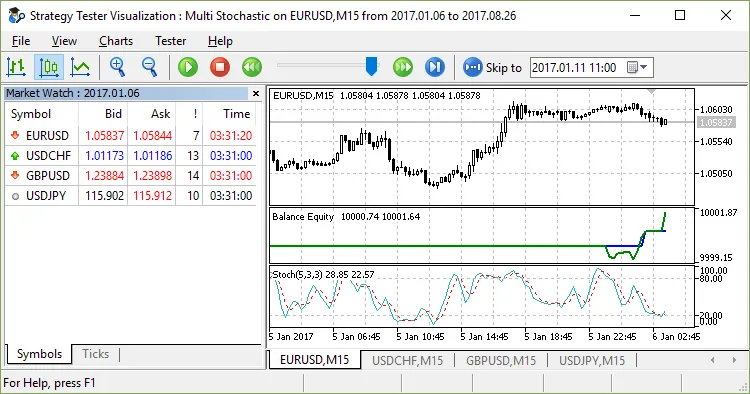
The brains behind this strategy: Firmin, with the coding skills of barabashkakvn. This Expert Advisor (EA) leverages the power of two key indicators: the iMACD (Moving Average Convergence/Divergence) and the iStochastic (Stochastic Oscillator). It’s designed to open only one position per bar while analyzing three different time frames to pinpoint the best entry points. Input Parameters MACD: Fast Average Period - This is your fast moving average period. MACD: Slow Average Period - This indicates your slow moving average period. MACD: Difference Averaging Period - The period used for averaging the MACD difference. Enable Stochastic - Toggle to enable or disable the Stochastic indicator. Number of Bars for Stochastic - The count of bars used to calculate the Stochastic signal. STO: K-Period - The number of bars for the K calculation. STO: D-Period - The period for the first smoothing of the Stochastic indicator. STO: Final Smoothing - The last step in smoothing the Stochastic indicator. STO: Smoothing Type - Choose your preferred smoothing method. STO: Calculation Method - Method for calculating the Stochastic indicator. Lots - Volume of the position to be opened. Stop Loss (in pips) - Set your Stop Loss value here. Take Profit (in pips) - Define your Take Profit target. Trailing Stop (in pips) - Set your trailing stop distance. Trailing Step (in pips) - The step value for the trailing stop. Max Positions - Limit the maximum number of open positions. No Loss Stop (in pips) - Specify your breakeven level. Min Distance for Breakeven (in pips) - The minimum distance from the price to set the breakeven point. Start Time #1 (HH:MM format) - Define the start time for period #1. End Time #1 (HH:MM format) - Define the end time for period #1. Start Time #2 (HH:MM format) - Define the start time for period #2. End Time #2 (HH:MM format) - Define the end time for period #2. Start Time #3 (HH:MM format) - Define the start time for period #3. End Time #3 (HH:MM format) - Define the end time for period #3. Here are the testing results across various currency pairs from March 6, 2017, to October 8, 2017: Currency Pair Pass Count Result Total Profit Expected Payoff Profit Factor Recovery Factor Sharpe Ratio Custom Metric Max Drawdown % Trade Count GBPJPY 19 11,120.25 1,120.25 28.01 1.86 2.96 0.31 0 3.70 40 EURAUD 13 11,070.28 1,070.28 22.30 1.84 2.29 0.31 0 4.64 48 CHFJPY 11 10,819.40 819.40 16.39 1.44 1.11 0.18 0 7.19 50 GBPCHF 18 10,661.42 661.42 21.34 1.54 1.39 0.22 0 4.60 31 EURJPY 15 10,602.62 602.62 13.70 1.35 1.28 0.14 0 4.61 44 NZDUSD 0 10,540.46 540.46 16.89 1.39 1.03 0.17 0 5.01 32

2017.11.03
Unlocking the Nova EA for MetaTrader 5: A Trader's Guide
MetaTrader5
Unlocking the Nova EA for MetaTrader 5: A Trader's Guide

Meet the Creators: The genius behind this idea is Vit, while the mastermind who crafted the mq5 code is barabashkakvn. Input Parameters Explained N-seconds ago - How many seconds back you want to analyze price movements. Step (in pips) - The step value you’ll be using for your strategy. Lots - The volume of your position. Stop Loss (in pips) - Your predefined risk limit. Take Profit (in pips) - Your target profit level. Coefficient if Stop Loss is Triggered - The ratio by which your lot size will increase after hitting a stop loss. This Expert Advisor (EA) takes a deep dive into the last 'N-seconds ago' seconds of data and compares it with the current price action. It keeps a close eye on whether your Stop Loss or Take Profit levels get triggered by utilizing the robust enumeration found in the ENUM_DEAL_REASON: Identifier Description *** DEAL_REASON_SL This deal was executed due to Stop Loss activation. DEAL_REASON_TP This deal was executed due to Take Profit activation. *** When a Stop Loss is triggered, your next position's lot size will increase based on the 'Coefficient if Stop Loss is Triggered' parameter. Position Opening Rules BUY - Ensure bar #1 is bullish (Close > Open) and that the current price is above the price from 'N-seconds ago' by at least 'Step'. SELL - Confirm bar #1 is bearish (Close < Open) and that the current price is below the price from 'N-seconds ago' by at least 'Step'.

2017.11.03
Unlocking the Power of e-Skoch: Your Go-To EA for Pending Orders in MetaTrader 5
MetaTrader5
Unlocking the Power of e-Skoch: Your Go-To EA for Pending Orders in MetaTrader 5

Author of the Idea: Skoch, MQ5 Code Author: barabashkakvn. The e-Skoch Expert Advisor (EA) is designed to execute trades right at the opening of a bar, steering clear of the tick analysis during the bar's lifespan. This makes it a reliable tool for traders looking to automate their strategy without getting bogged down in the noise of intra-bar price action. This EA specializes in placing pending orders based on specific market conditions: Buy Stop: Activated when the high of bar #2 on the D1 timeframe surpasses the high of bar #1 on the same timeframe, and the current timeframe's high of bar #2 also exceeds the high of bar #1. Sell Stop: Triggered when the low of bar #2 on the D1 timeframe falls below the low of bar #1, and the low of bar #2 on the current timeframe is less than the low of bar #1. Input Parameters Lots: Choose your lot size. Take Profit for BUY (in pips): Set your take profit level for pending buy orders. Stop Loss for BUY (in pips): Define your stop loss level for pending buy orders. Take Profit for SELL (in pips): Set your take profit level for pending sell orders. Stop Loss for SELL (in pips): Define your stop loss level for pending sell orders. Indenting Price from High (in pips): Specify the distance from the high of the bar on the current timeframe. Indenting Price from Low (in pips): Specify the distance from the low of the bar on the current timeframe. True -> If there is a position, do not place a pending order: This setting prevents new pending orders if an open position already exists. Percent Equity: Profit expressed as a percentage of equity. Magic Number: A unique identifier for the Expert Advisor.

2017.11.03
Mastering the Locker EA for MetaTrader 5: Your Guide to Profitable Trading
MetaTrader5
Mastering the Locker EA for MetaTrader 5: Your Guide to Profitable Trading

Meet the Creators: Vitaliy, the visionary behind this concept, and the coding genius: barabashkakvn. The Locker Expert Advisor (EA) is designed to turn losing trades into winning ones by effectively locking in positions. It’s a game changer for those of us who want to manage risk while still aiming for profit. To get the most out of the Locker EA, it's crucial to set your minimum profit correctly using the "Profit percentage" parameter. Make sure it aligns with your account balance and the size of your trades, specifically the "Starting lot" and "Secondary lots" parameters. input double&nbsp;&nbsp; NeedProfit&nbsp;&nbsp;= 0.001;&nbsp;&nbsp;&nbsp;&nbsp;&nbsp;&nbsp;&nbsp;&nbsp;&nbsp;&nbsp;// Set your profit target percentage input double&nbsp;&nbsp; StartLot&nbsp;&nbsp;&nbsp;&nbsp;= 0.5;&nbsp;&nbsp;&nbsp;&nbsp;&nbsp;&nbsp;&nbsp;&nbsp;&nbsp;&nbsp;&nbsp;&nbsp;// Define your starting lot size input double&nbsp;&nbsp; StepLot&nbsp;&nbsp;&nbsp;&nbsp; = 0.2;&nbsp;&nbsp;&nbsp;&nbsp;&nbsp;&nbsp;&nbsp;&nbsp;&nbsp;&nbsp;&nbsp;&nbsp;// Set your secondary lot increment input ushort&nbsp;&nbsp; InpStep&nbsp;&nbsp;&nbsp;&nbsp; = 5;&nbsp;&nbsp;&nbsp;&nbsp;&nbsp;&nbsp;&nbsp;&nbsp;&nbsp;&nbsp;&nbsp;&nbsp;&nbsp;&nbsp;// Steps for locking positions input bool&nbsp;&nbsp;&nbsp;&nbsp; InpHelpMe&nbsp;&nbsp; = true;&nbsp;&nbsp;&nbsp;&nbsp;&nbsp;&nbsp;&nbsp;&nbsp;&nbsp;&nbsp; // Enable assistance feature

2017.11.03
Unlocking Profit Potential with HarVesteR for MetaTrader 5
MetaTrader5
Unlocking Profit Potential with HarVesteR for MetaTrader 5

Author of the Idea: Yuri, MQ5 Code Author: barabashkakvn. The HarVesteR EA is a game-changer for traders using MetaTrader 5. This intuitive Expert Advisor smartly closes half of your profitable positions when a specific condition is met: the distance between the current price and the opening price equals StopLoss * ratio "Half-of-position closing ratio" Additionally, the EA will move your position to breakeven, ensuring you lock in profits while minimizing risk. Input Parameters MACD: Fast Average Period - Set this for the fast moving average calculation. MACD: Slow Average Period - Choose the period for the slow moving average. MACD: Difference Averaging Period - Define the period for averaging the MACD difference. Number of Bars MACD (only >= 1) - This sets how many MACD bars to analyze for highs and lows. MA #1: Averaging Period - Specify the averaging period for Moving Average #1. MA #2: Averaging Period - Specify the averaging period for Moving Average #2. Minimal Indentation (in pips) - This is the minimum gap between the price and the Moving Average. Number of Bars for Stop Loss (only >= 1) - This determines how many bars to use for calculating the stop loss. ADX Enable: true → use ADX, false → const "60" - Decide whether to use values from the ADX indicator. Buy Level ADX (use only if "ADX Enable == true") - Set the ADX value for initiating BUY positions. Sell Level ADX (use only if "ADX Enable == true") - Set the ADX value for initiating SELL positions. ADX Period - Define the averaging period for the Average Directional Movement Index. Half-of-Position Closing Ratio (only >= 2) - This is the ratio for increasing your stop loss. Lots - Set your desired position volume.

2017.11.03
Unlocking the Flat Channel EA for MetaTrader 5: Your Guide to Breakout Trading
MetaTrader5
Unlocking the Flat Channel EA for MetaTrader 5: Your Guide to Breakout Trading

Idea Creator: JS_Sergey, Code Developer: barabashkakvn. The Flat Channel EA is designed to capitalize on breakouts from flat channels. When it identifies a flat channel or senses a slowdown in the market, this EA sets a pending order in anticipation of a breakout. The stop-loss level is set to twice the width of the channel, making it a robust choice for traders. We recommend using it with the EUR/USD pair on the M30 timeframe for optimal results. Input Parameters Time Work (true → on, false → off) - Toggle the time filter on or off. Trade on Tuesday - Enable or disable trading on Tuesdays. Trade on Wednesday - Enable or disable trading on Wednesdays. Trade on Thursday - Enable or disable trading on Thursdays. Start Trading on Monday - Set the start time for trading on Mondays. Stop Trading on Friday - Determine when to cease trading on Fridays. Money Management - Enable or disable automated money management features. Risk in % for a Deal from a Free Margin - Define the risk percentage per trade (if Money Management is set to false). Lots - Specify the lot size for trades. Lifetime - Set the duration for pending orders. Magic Number - Assign a unique identifier for the EA. StdDev Averaging Period - Determine the averaging period for the Standard Deviation indicator. Flat Bars - Specify the minimum number of bars required to identify a flat. Channel Min (in pips) - Set the minimum channel size. Channel Max (in pips) - Set the maximum channel size. Breakeven - Enable or disable the breakeven function. Fibo Trail - Define the minimum distance from the current price for adjusting a position to breakeven.

2017.11.03
Unlock Trading Success with the MT45 EA for MetaTrader 5
MetaTrader5
Unlock Trading Success with the MT45 EA for MetaTrader 5

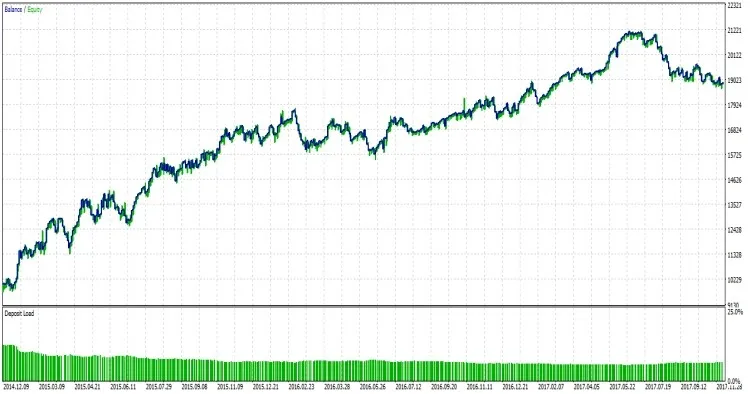
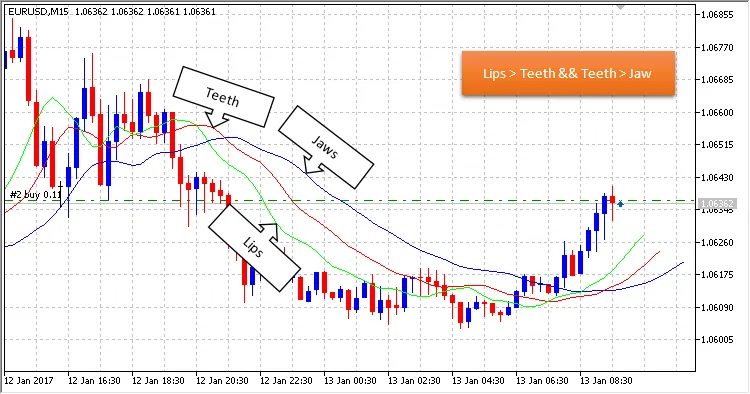
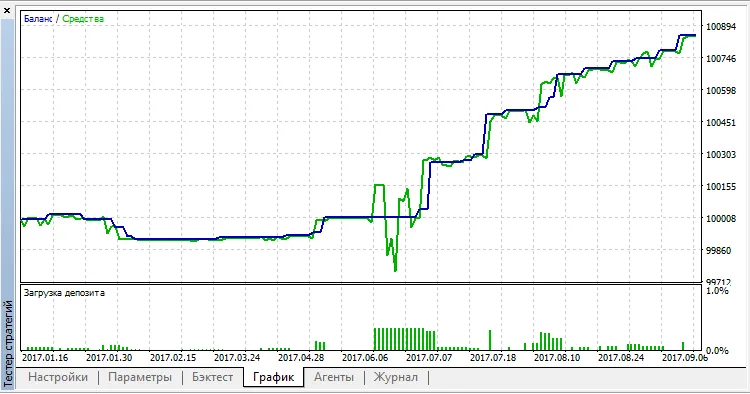
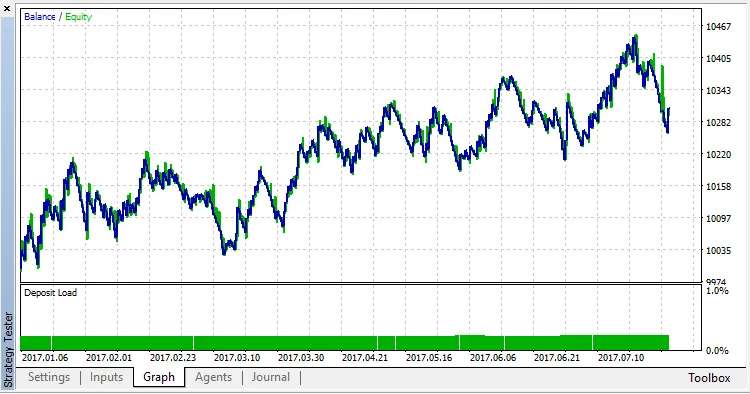
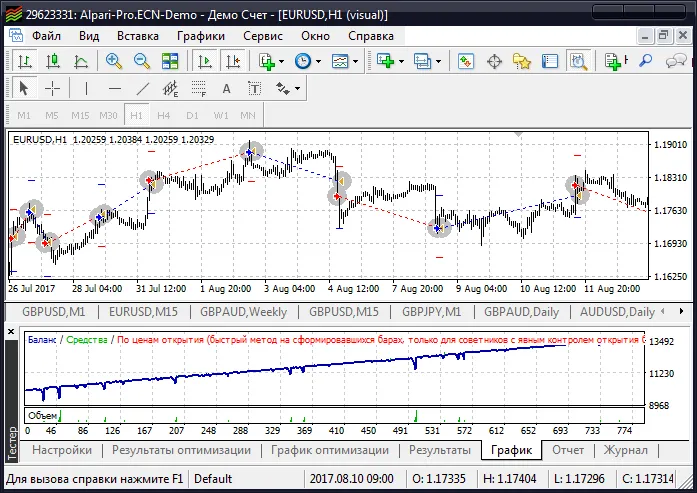
Trading Strategy After a losing trade, the MT45 EA jumps back in with a larger lot size for the next trade. It kicks things off with a Buy order; from there, it alternates between buying and selling. The EA opens positions at the start of each candlestick. Following a Stop Loss, the EA ramps up the lot size by a KL coefficient until it hits the maximum lot size, ML. Once it reaches that cap, it resets back to the initial lot size, LT. This strategy is tailored for the EURUSD pair on the H1 timeframe and has been optimized over the period from January 11, 2014, to September 9, 2017. Expert Advisor Settings input int&nbsp;&nbsp;&nbsp;&nbsp;Stop = 600;&nbsp;&nbsp;// Stop Loss input int&nbsp;&nbsp;&nbsp;&nbsp;Take = 700;&nbsp;&nbsp;// Take Profit input int&nbsp;&nbsp;&nbsp;&nbsp;Slip = 100;&nbsp;&nbsp;// Slippage input int&nbsp;&nbsp;&nbsp;&nbsp;MN&nbsp;&nbsp; = 123;&nbsp;&nbsp;// Magic input double LT&nbsp;&nbsp; = 0.01; // Lot input double KL&nbsp;&nbsp; = 2;&nbsp;&nbsp;&nbsp;&nbsp;// Lot increase ratio input double ML&nbsp;&nbsp; = 10;&nbsp;&nbsp; // Maximum lot Features This EA comes with a cross-platform mode powered by preprocessor directives. Here’s how the Martingale function works: //+------------------------------------------------------------------+ //|&nbsp;&nbsp;&nbsp;&nbsp;&nbsp;&nbsp;&nbsp;&nbsp;&nbsp;&nbsp;&nbsp;&nbsp;&nbsp;&nbsp;&nbsp;&nbsp;&nbsp;&nbsp;&nbsp;&nbsp;&nbsp;&nbsp;&nbsp;&nbsp;&nbsp;&nbsp;&nbsp;&nbsp;&nbsp;&nbsp;&nbsp;&nbsp;&nbsp;&nbsp;&nbsp;&nbsp;&nbsp;&nbsp;&nbsp;&nbsp;&nbsp;&nbsp;&nbsp;&nbsp;&nbsp;&nbsp;&nbsp;&nbsp;&nbsp;&nbsp;&nbsp;&nbsp;&nbsp;&nbsp;&nbsp;&nbsp;&nbsp;&nbsp;&nbsp;&nbsp;&nbsp;&nbsp;&nbsp;&nbsp;&nbsp;&nbsp;| //+------------------------------------------------------------------+ double Lot() &nbsp;&nbsp;{ &nbsp;&nbsp; double lot=LT; //---&nbsp;&nbsp;MQL4 #ifdef __MQL4__ &nbsp;&nbsp; if(OrderSelect(OrdersHistoryTotal()-1,SELECT_BY_POS,MODE_HISTORY)) &nbsp;&nbsp;&nbsp;&nbsp; { &nbsp;&nbsp;&nbsp;&nbsp;&nbsp;&nbsp;if(OrderProfit()&gt;0) lot=LT; &nbsp;&nbsp;&nbsp;&nbsp;&nbsp;&nbsp;if(OrderProfit()&lt;0) lot=OrderLots()*KL; &nbsp;&nbsp;&nbsp;&nbsp; } #endif //---&nbsp;&nbsp;MQL5 #ifdef __MQL5__ &nbsp;&nbsp; if(HistorySelect(0,TimeCurrent())) &nbsp;&nbsp;&nbsp;&nbsp; { double profit=HistoryDealGetDouble(HistoryDealGetTicket(HistoryDealsTotal()-1),DEAL_PROFIT); double LastLot=HHistoryDealGetDouble(HistoryDealGetTicket(HistoryDealsTotal()-1),DEAL_VOLUME); if(profit&gt;0) lot=LT; if(profit&lt;0) lot=LastLot*KL; &nbsp;&nbsp;&nbsp;&nbsp; } #endif &nbsp;&nbsp; if(lot&gt;ML)lot=LT; &nbsp;&nbsp; return(lot); &nbsp;&nbsp;} Backtests Check out the performance on the MetaTrader 4 terminal: And here’s how it looks on the MetaTrader 5 terminal: Tips It’s best to use this EA as a foundation for crafting your own trading strategy.

2017.11.03
Master Your Trades with OpenTime for MetaTrader 5
MetaTrader5
Master Your Trades with OpenTime for MetaTrader 5

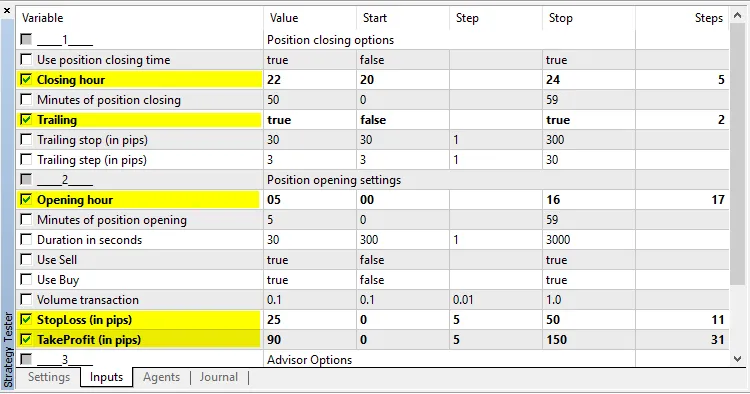
Author of the idea: Iurii Tokman, mq5 code author: barabashkakvn. Are you ready to take your trading to the next level? OpenTime is an innovative Expert Advisor (EA) designed for MetaTrader 5, allowing you to open and close positions at specified times. You can customize settings for both Buy and Sell positions, giving you flexibility in your trading strategy. Plus, you can set stop loss, take profit, and trailing stops to manage your risk effectively. Input Parameters Position Closing Options Use Position Closing Time - Toggle this option to enable or disable time-based position closing. Closing Hour - Specify the hour for closing your positions. Minutes of Position Closing - Set the minutes for when the position will close. Trailing - Activate the trailing stop function. Trailing Stop (in pips) - Define your trailing stop value. Trailing Step (in pips) - Set your trailing step value. Position Opening Settings Opening Hour - The hour you want to open your position. Minutes of Position Opening - The minutes for opening the position. Duration in Seconds - Time period for position opening. Use Sell - Allow the EA to open Sell positions. Use Buy - Allow the EA to open Buy positions. Volume Transaction - Set the volume of your positions. StopLoss (in pips) - Define your Stop Loss level. TakeProfit (in pips) - Set your Take Profit level. Advisor Options MagicNumber - Your unique identifier for the EA. For best results, it's advisable to optimize the EA in two steps. Start by focusing on the key parameters in the first step: Once you've identified the best configurations, disable the settings from the first step and enable the remaining parameters. Here’s one of the results using EURUSD on the H1 timeframe:

2017.11.03
First Previous 22 23 24 25 26 27 28 29 30 31 32 Next Last