
If you’re on the lookout for a powerful trading companion, look no further than the Terminator_v2.0. This Expert Advisor (EA), crafted by the talented Alejandro Galindo and Tom Maneval, has been expertly rewritten from MQL4. You can check out the original publication by Scriptor, or visit the source here.
How Terminator_v2.0 Works
This EA opens trading positions based on signals derived from various indicators. Here’s what you need to know:
Required Indicators:
Trade Signals Breakdown:
- MACD: Buy when the MACD indicator rises, sell when it falls.
- Pivot Lines TimeZone: Buy if the price is above the Pivot level, sell if it’s below.
- Support and Resistance: Buy when the price breaks above the resistance level, sell if it breaks below support.
- i_Trend and RSI: Buy when the i_Trend green line is above the red line, and RSI is rising. Sell when the opposite is true.
- i_Trend, RSI, and Stochastic: Buy when all indicators are aligned positively, and sell when they align negatively.
- i_Trend, RSI, Stochastic, and MFI: Similar to the above, buy when all indicators point up, and sell when they point down.
The initial position volume is determined by the Lots variable or calculated based on your available assets (using the MaximumRisk variable when Lots=0). If the position goes south, the EA will increase the volume by a pip step from the last trade price, provided there’s a corresponding trade signal.
Initially, the volume is doubled for the first increase. The number of consecutive trades that can multiply the lot size by 2 is set by the DoubleCount variable, after which it multiplies by 1.5.
Key Features:
- Take Profit: Each position opens with a Take Profit, and the TakeProfit2 variable adjusts this when volume increases.
- Stop Loss: The StopLoss variable sets your stop loss; if it’s set to 0, no stop loss will be applied.
- Trailing Stop: If you want to secure your profits, the TrailingStop variable can be utilized.
The results of the EA’s performance can be tracked in the tester. Here’s a quick snapshot of what you can expect:
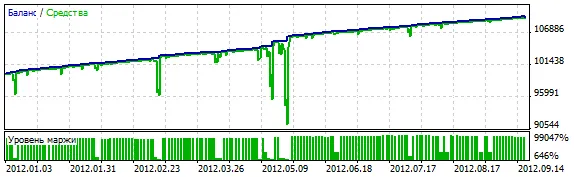
Parameter Overview
- Trade_ON: Allows opening positions.
- Lots: The lot size; if set to 0, the MaxRisk parameter is used.
- MaximumRisk: The risk level (default is Lots=0).
- StopLoss: Stop Loss in points; 0 means no Stop Loss.
- TakeProfit: Initial Take Profit in points.
- TakeProfit2: Take Profit for added positions in points.
- MaxCount: Maximum number of open positions in one direction; -1 means unlimited.
- DoubleCount: Number of trades where Lot size is multiplied by 2; others use a 1.5 multiplier.
- Pips: Level in points for adding positions.
- Trailing: Trailing stop level; 0 disables trailing.
- Shift: Bar for indicator checks: 0 is the current bar, 1 is the first formed bar.
- ReverseCondition: Toggles buy and sell signals.
- OPEN_POS_BASED_ON: Defines the type of trade signals.
- MACD_FastPeriod: Fast period for MACD.
- MACD_SlowPeriod: Slow period for MACD.
- MACD_Price: Price type for MACD.
- Pivot_DayStartHour: Start hour for the day.
- Pivot_DayStartMinute: Start minute for the day.
- Pivot_AttachSundToMond: Attach Sunday bars to Monday.
- SupRes_iPeriod: Period for the Support and Resistance indicator.
- iT_Price: Price type for i_Trend.
- iT_BBPeriod: Period for Bollinger Bands.
- iT_BBShift: Shift for Bollinger Bands.
- iT_BBDeviation: Deviation for Bollinger Bands.
- iT_BBPrice: Price for Bollinger Bands.
- iT_BBLine: Line used for Bollinger Bands.
- iT_BullsBearsPeriod: Period for Bulls Bears Power.
- RSI_Period: Period for RSI.
- RSI_Price: Price for RSI.
- St_KPeriod: K period for Stochastic.
- St_DPeriod: D period for Stochastic.
- St_SPeriod: S period for Stochastic.
- St_Method: Method for Stochastic.
- St_Price: Price for Stochastic.
- St_UpperLevel: Upper level for Stochastic.
- St_LowerLevel: Lower level for Stochastic.
- MFI_Period: Period for MFI.
- MFI_Volume: Volume for MFI.




Comments 0