
Hey there, fellow traders! If you’re on the lookout for a reliable scalping tool, let me introduce you to the Gonna Scalp Expert Advisor (EA). This powerhouse works across all time frames and is compatible with major forex pairs as well as stocks on NASDAQ.
Key Features of Gonna Scalp
- Demo Test First: Always try it on a demo account before diving in with real money.
- Open Candle Trading: This EA executes trades based solely on the price of the open candle!
- No Lot Size Increase: If you prefer not to increase lot sizes after a losing trade, simply set IncreaseFactor=0.
Inputs You Can Customize
- Use_TP_In_Money: Enable Take Profit in money (true/false).
- TP_In_Money: Set your Take Profit in money (values: 10-100).
- Use_TP_In_Percent: Enable Take Profit in percent (true/false).
- TP_In_Percent: Set your Take Profit in percent (values: 10-100).
- ------------Money Trailing Stop for Multiple Trades----------------------
- Enable_Trailing: Activate trailing with money (true/false).
- Take Profit In Money: Set in current currency (values: 25-200).
- Stop Loss In Money: Set in current currency (values: 1-20).
- --------------------------------------------------------------------------------------
- Exit: Close trades if the trend is against you to manage drawdown (true/false).
- Lots: Choose your lot size (values: 0.01-1).
- Lots Size Exponent: (values: 1.01-2).
- IncreaseFactor: Determines how much to increase lots from total margin after a loss (values: 0.001-0.1).
- Stop_Loss: Set Stop Loss (values: 30-500). Set value 600 for multiple trades.
- MagicNumber: Assign a magic number (values: 1-100000).
- TakeProfit: Set Take Profit (values: 50-200). Set value 600 for multiple trades.
- FastMA: Fast Moving Average (values: 1-20).
- SlowMA: Slow Moving Average (values: 50-200).
- Mom_Sell: Momentum Sell trigger (values: 0.1-0.9).
- Mom_Buy: Momentum Buy trigger (values: 0.1-0.9).
- ---------------------Control Draw Down-----------------------------
- UseEquityStop: (values:true/false).
- TotalEquityRisk: (values: 0.01-20).
- -------------------------------------------------------------------------------
- Max_Trades: Set max trades (1-12).
- ----------------If Using Only 1 Trade:-----------------------
- //////////////////////////////////////////////////
- TrailingStop: Set a value from 40 to 100 to activate trailing stop loss & take profit; "0" will not activate trailing stop loss.
- Enable "Break Even": (true/false).
- Move "Break Even": (values: 5-30).
- How Much Pips to Move "Break Even": (values: 5-30).
Make sure to optimize this EA every few months, using the same settings as mentioned above. Whether you decide to use it as a hedging grid EA or for single trades, it's a versatile tool in your trading arsenal.
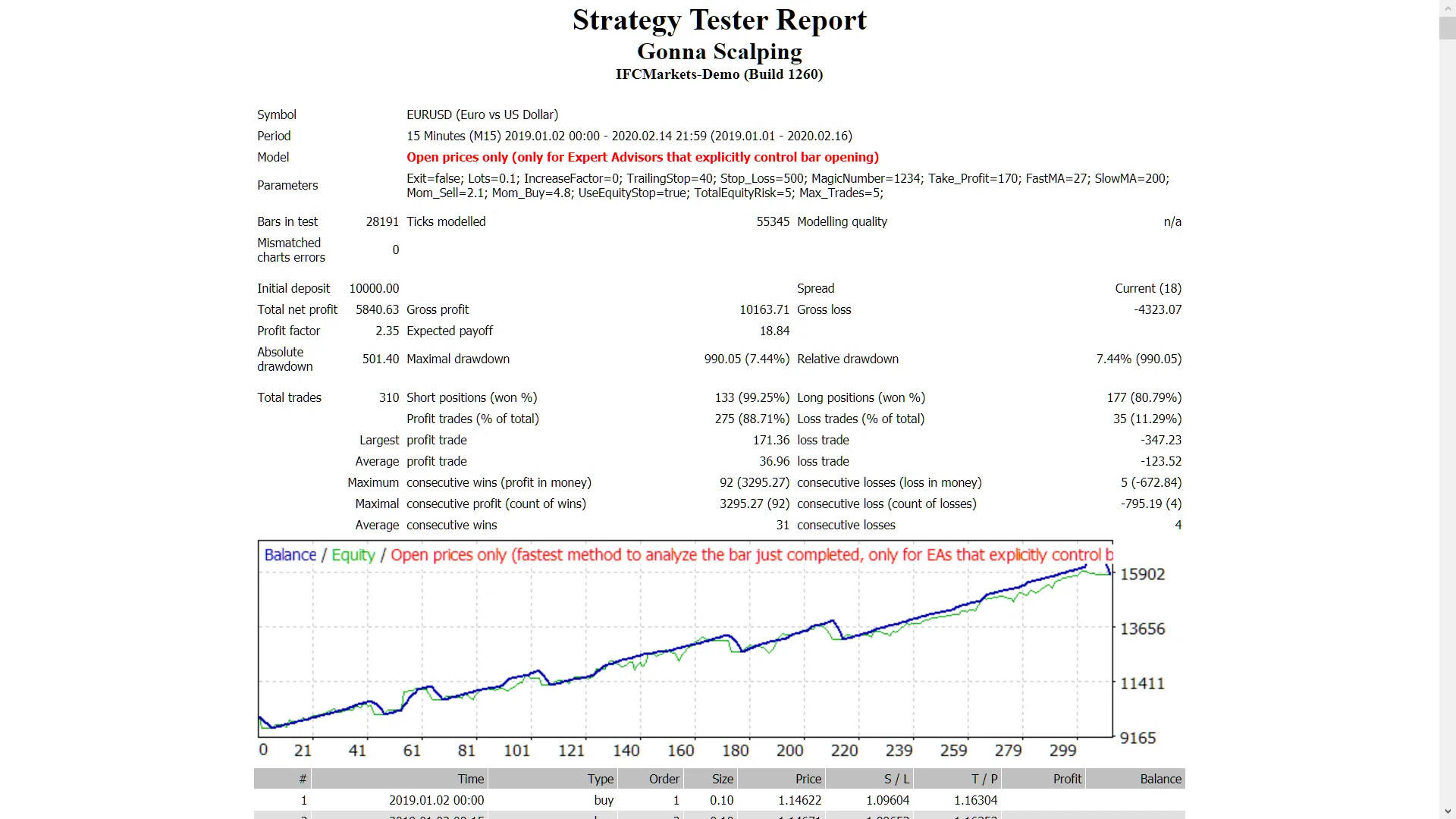
Want to backtest it? Check out this backtesting guide.




Comments 0