
In the world of trading, having the right tools at your disposal can make all the difference. Today, we’re diving into how to utilize the Fixed Parabolic SAR to set up a trailing stop in MetaTrader 5. This powerful technique allows you to specify the starting point of your Parabolic SAR directly, enhancing your trading strategy.
Parameters
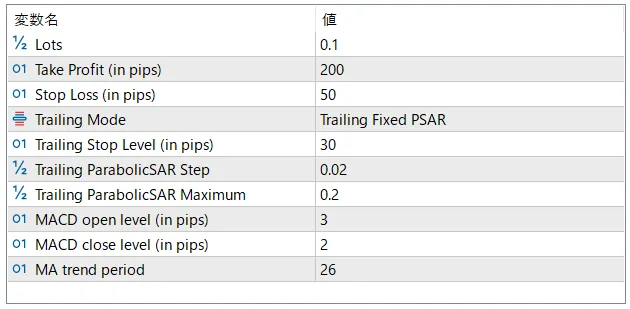
- Trailing Mode: None / Trailing Fixed / Trailing Fixed Parabolic SAR
Let’s take a closer look at how the calculations work for the Parabolic SAR:
bool CSampleExpert::LongModifiedEx(void)
{
    bool res=false;
    //--- check for trailing stop
    if(m_trailing_max < m_last_bar.high)
    {
        double tp=m_position.TakeProfit();
        double sl=m_position.StopLoss();

        //--- calculate ParabolicSAR
        m_trailing_max = m_last_bar.high;
        m_trailing_step = fmin(InpPSAR_Maximum, m_trailing_step + InpPSAR_Step);
        double sar_stop = sl + (m_trailing_max - sl)* m_trailing_step;
        sar_stop=NormalizeDouble(sar_stop,m_symbol.Digits());
        //---

        if((sl==0.0 || sl < sar_stop) && sar_stop < m_symbol.Bid())
        {
            //--- modify position
            if(m_trade.PositionModify(Symbol(),sar_stop,tp))
                printf("Long position by %s to be modified",Symbol());
            else
            {
                printf("Error modifying position by %s : '%s'",Symbol(),m_trade.ResultComment());
                printf("Modify parameters : SL=%f,TP=%f",sar_stop,tp);
            }
            //--- modified and must exit from expert
            res=true;
        }
    }
    //--- result
    return(res);
}
Using the Fixed Parabolic SAR to manage your trailing stops can help lock in profits while minimizing losses. Keep experimenting with these parameters to find what works best for your trading style. Happy trading!




Comments 0