
Are you ready to leverage the classic Head and Shoulders pattern in your trading? Our Head and Shoulders EA is designed to help you trade this powerful price action strategy effectively on MetaTrader 4. This EA draws two mini trend lines using fractals right on your charts, making it easier than ever to spot potential trading opportunities.
Whether you're trading major forex pairs or stocks in the NASDAQ, this EA works seamlessly across all time frames. It includes features like Trailing Stop Loss and Take Profit, so you can manage your risk while maximizing your profits.
The Key Features of Our Head and Shoulders EA:
- Test it in demo mode before jumping into live trading.
- This EA trades solely based on the price of the open candle.
- If you prefer not to increase your lot size on losing trades, simply set IncreaseFactor=0.
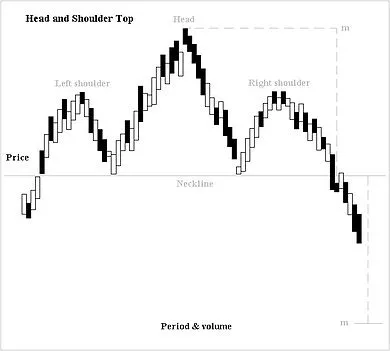
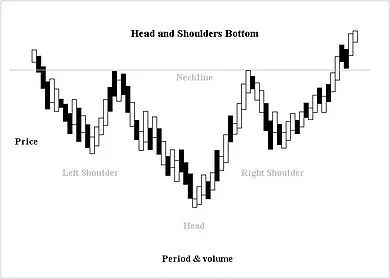
The Head and Shoulders pattern is confirmed when the price declines from the third peak and falls below the lowest valley between the three peaks. This is where the real trading action begins!
How This EA Works:
- We've combined a straightforward EA with two moving averages and trend lines.
- The trend lines won't function in test mode but will be active in live trading.
- During tests, the EA will only draw trend lines on the screen in visual mode.
- In live trading, the trend lines and moving averages work together to increase your chances of winning trades.
Input Settings:
- Use_TP_In_Money: Enable Take Profit in money (true/false).
- TP_In_Money: Set Take Profit in money (10-100).
- Use_TP_In_percent: Enable Take Profit in percent (true/false).
- TP_In_Percent: Set Take Profit in percent (10-100).
- Enable_Trailing: Enable trailing stop (true/false).
- Take Profit In Money: Amount in current currency (25-300).
- Stop Loss In Money: Amount in current currency (1-20).
- Lots: Lot size (0.01-1).
- Stop_Loss: Set Stop Loss (30-500).
- MagicNumber: Assign a unique magic number (1-100000).
- And many more adjustable settings to tailor the EA to your trading style!
Don't forget to optimize this EA every few months and use the exact same inputs mentioned above. It can be utilized as a hedging grid EA or for single trades, depending on your strategy.
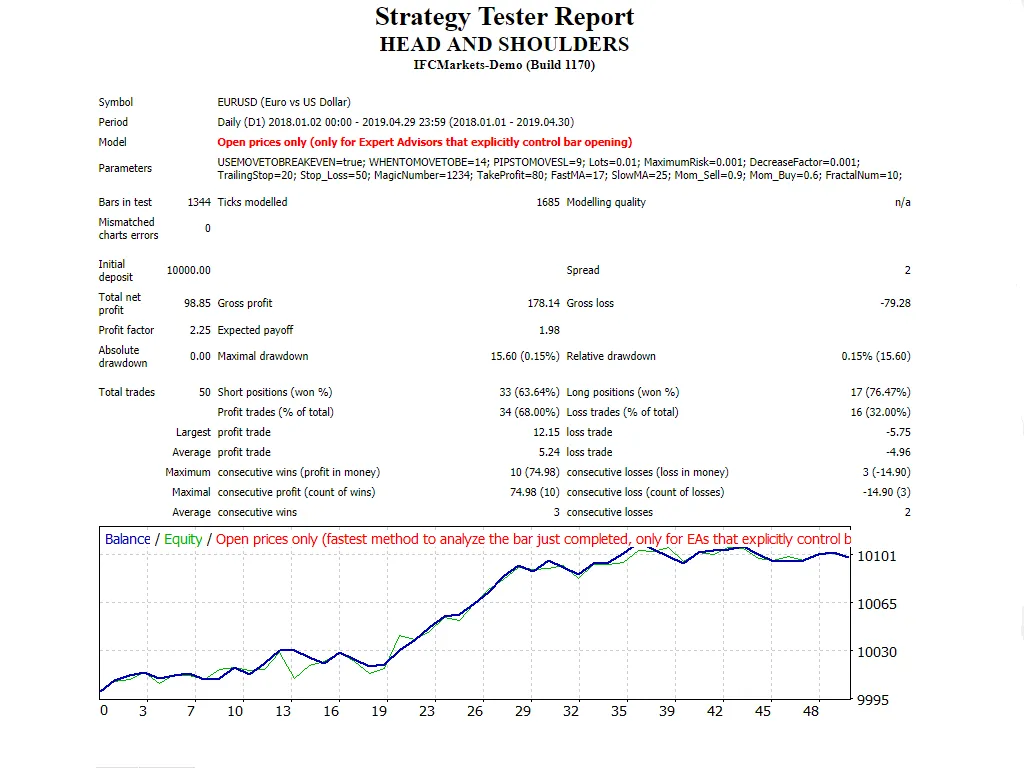
Want to dive deeper? Check out our guide on how to perform backtests.




Comments 0