
If you’re diving into multicurrency trading with MetaTrader 5, you’ve probably noticed that the standard OnTick() handler only captures ticks for a single symbol. This can be a limitation, especially when you want to monitor multiple pairs. In many cases, receiving ticks for all symbols in the "Market Watch" window is essential.
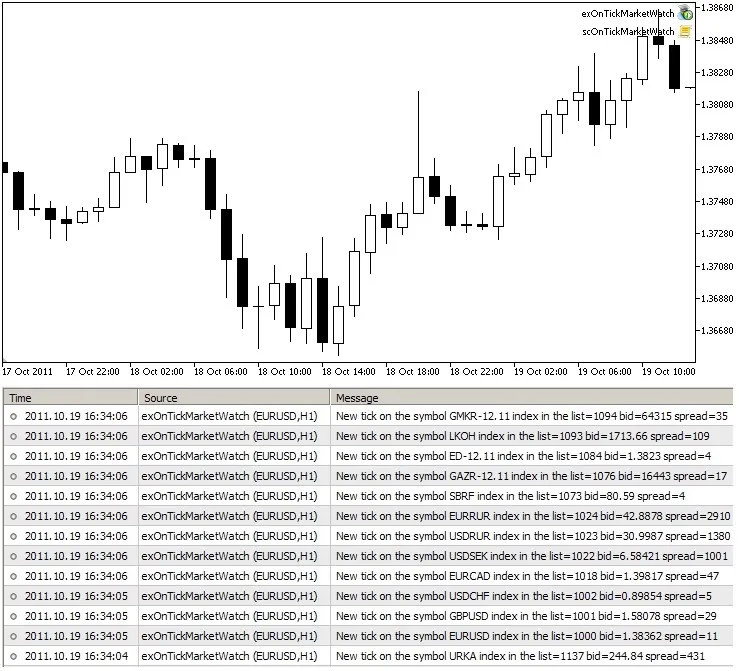
To tackle this, we have the Expert Advisor, exOnTickMarketWatch.mq5. It utilizes the built-in event handler OnChartEvent() to provide you with vital information:
- Index of the symbol in the "Market Watch" window
- Name of the symbol
- Current Bid price
- Spread for the symbol
To get started, just run the scOnTickMarketWatch.mq5 script, and you’ll begin receiving ticks from the "Market Watch" window.
Tips for Traders:
- This multicurrency event handler can be resource-intensive. You can optimize CPU usage by increasing the delay variable in the script, but be aware that this may result in missing some ticks.
- Once the script and the Expert Advisor are up and running, you can customize which symbols to track by adding them to the "Market Watch" window.
- Feel free to tweak the code to suit your needs—like setting it up to receive the Ask price instead of just the spread.
P.S. This tool has also been discussed on the Russian forum.




Comments 0