
Welcome, fellow traders! Today, we're diving into the fascinating world of the Mean Reversion strategy, a powerful tool for trading major forex pairs on the daily time frame.
Getting Started with Mean Reversion
- Test It Out First: Always give it a whirl on a demo account before jumping in with real cash.
- Trade with Open Candle Prices: This EA operates solely based on the price of the open candle!
- Manage Your Lots: If you're not keen on increasing your lot size after a losing trade, simply set
IncreaseFactor=0.
Now, let’s explore some key inputs you can tweak to optimize your trading experience:
- Use_TP_In_Money: Enable Take Profit in monetary terms (values: true/false).
- TP_In_Money: Set your Take Profit in money (values: 10-100).
- Use_TP_In_Percent: Enable Take Profit in percentage (values: true/false).
- TP_In_Percent: Set your Take Profit in percentage (values: 10-100).
- ---------------------Money Trailing Stop for Multiple Trades----------------------
- Enable_Trailing: Enable trailing with money (values: true/false).
- Take Profit In Money: Set this in your current currency (values: 25-200).
- Stop Loss In Money: Set this in your current currency (values: 1-20).
- --------------------------------------------------------------------------------------
- Exit: Close trades if the trend goes against you to control drawdown (values: true/false).
- BarsToCount: Specify how many bars to count (values: 1-20).
- Lots: Set your lot size (values: 0.01-1).
- Lots Size Exponent: Define the exponent for lot size (values: 1.01-2).
- IncreaseFactor: Determine how much to increase lots from total margin after a loss (values: 0.001-0.1).
- Stop_Loss: Set your stop loss (values: 30-500). Use a value of 600 for multiple trades.
- MagicNumber: Assign a magic number (values: 1-100000).
- TakeProfit: Set your take profit (values: 50-200). Again, use 600 for multiple trades.
- FastMA: Define your fast moving average (values: 1-20).
- SlowMA: Define your slow moving average (values: 50-200).
- Mom_Sell: Set the momentum sell trigger (values: 0.1-0.9).
- Mom_Buy: Set the momentum buy trigger (values: 0.1-0.9).
- ---------------------Control Drawdown-----------------------------
- UseEquityStop: Toggle equity stop (values: true/false).
- TotalEquityRisk: Set this value (values: 0.01-20).
- -------------------------------------------------------------------------------
- Max_Trades: Define the maximum number of trades (values: 1-12).
- FractalNum: Set the number of highs and lows (values: 1-10).
- ----------------If You Use Only 1 Trade:-----------------------
- /////////////////////////////////////////////////////////////////////
- USETRAILINGSTOP: Enable trailing stop (values: true/false).
- WHENTOTRAIL: Decide when to trail (values: 40-100).
- TRAILAMOUNT: Set the trail amount (values: 40-100).
- Distance From Candle: Specify the distance from the candle (values: 1-100).
- USECANDELTRAIL: Enable trailing stop based on the candle (values: true/false).
- X: Number of candles to consider (values: 1-100).
- USEMOVETOBREAKEVEN: Enable the break-even feature (values: true/false).
- WHENTOMOVETOBE: Set when to move to break-even (values: 1-30).
- PIPSTOMOVESL: Specify how many pips to move the stop loss (values: 1-30).
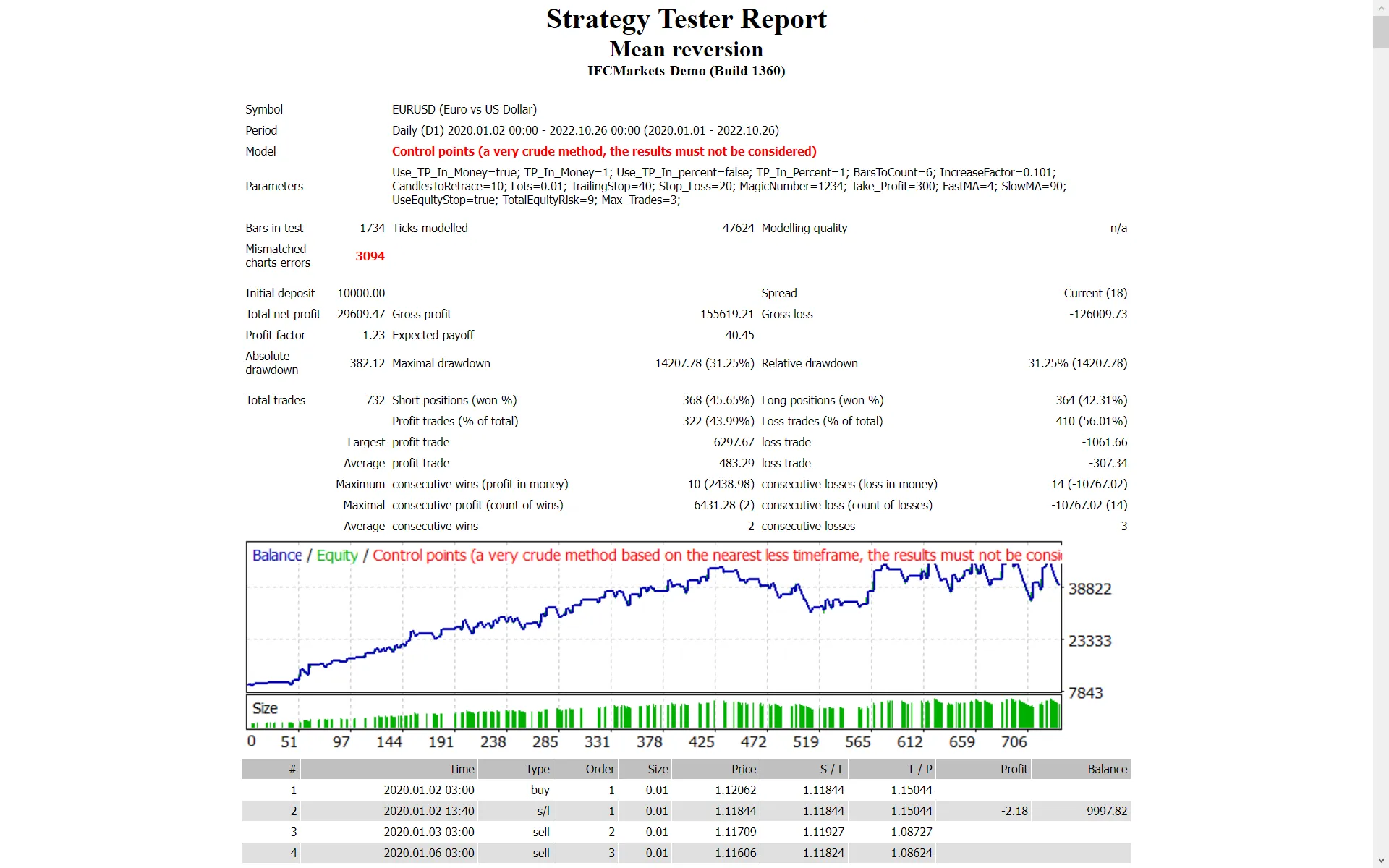
Remember, it's wise to optimize this EA every few months using the same inputs mentioned above. You can utilize it as either a hedging grid EA or a single trade EA.
If you're looking to perform a backtest, check out this helpful link: Backtest Guide.
Happy trading!




Comments 0