
Let’s talk about a nifty trading tool that can really streamline your trading experience. This Expert Advisor (EA) is essentially a graphical trading panel that comes packed with features.
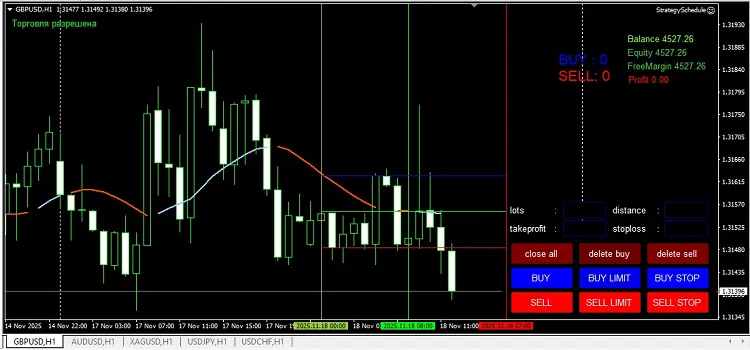
With nine buttons at your fingertips, it’s designed to assist you in your manual trading efforts. Here’s what you need to know:
- Lots: Set your profit targets here.
- Distance: Specify the distance from the current price for pending orders.
- Take Profit: Enter the price in pips at which your order will close with a profit.
- Stop Loss: Set the price in pips where your order will close to minimize losses.
Now, let’s break down the buttons:
- Close All: This button closes all active orders with a single click.
- Delete Buy: Removes any pending buy orders.
- Delete Sell: Removes any pending sell orders.
- BUY: Opens a market order to buy.
- BUY LIMIT: Opens a pending limit order to buy.
- BUY STOP: Opens a pending stop order to buy.
- SELL: Opens a market order to sell.
- SELL LIMIT: Opens a pending limit order to sell.
- SELL STOP: Opens a pending stop order to sell.
This EA can seriously enhance your trading efficiency, making it easier to manage your trades without missing a beat!




Comments 0