
Hey fellow traders! If you’ve ever felt overwhelmed by the sheer number of settings in expert advisors (EAs) and custom indicators, you’re not alone. Take the Blessing 3 EA with its 118 input lines or The Beast EA boasting a whopping 155. As new versions roll out, these numbers only climb. And let’s face it, the MT4 platform was designed ages ago, sporting a dialog box that only shows 8 lines of input. For most traders, this isn’t a big deal since they set their parameters once and forget about them. But if you’re someone who enjoys testing, optimizing, and tweaking settings regularly, you might find InputResizer to be a game changer.
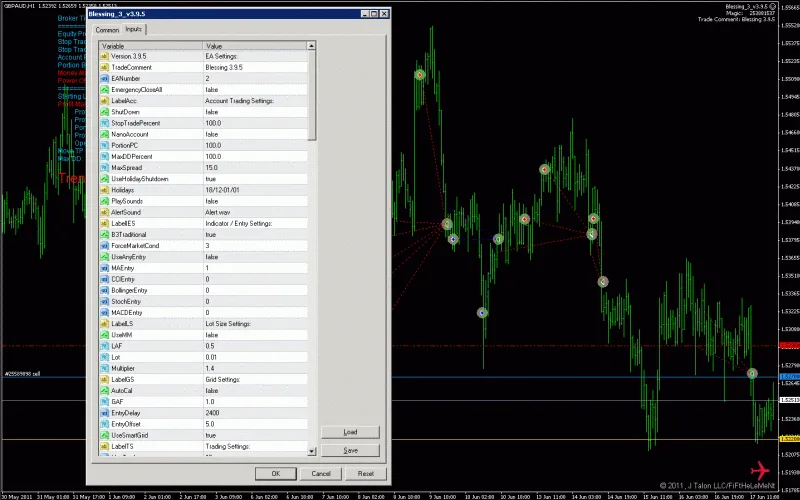
InputResizer is a practical utility that you set up once and then forget about. Simply attach it to a single chart, and voilà! All input windows across your MT4 instances on your PC or VPS become resizable.
There are two versions available: the indicator and the EA. Remember, don’t use both at the same time!
Indicator Variant - InputResizer.mq4:
This version depends on incoming ticks. So, if you decide to go with this option, just know you’ll need to wait for a tick for the indicator to recognize the window you’ve opened. If you’re looking for reliable tick data, pairs like EURJPY and GBPJPY are solid choices.
EA Variant - InputResizerEA.mq4:
The EA version has a clear edge; it operates in loop mode and doesn’t rely on ticks. It checks for windows every 300 milliseconds by default, ensuring you won’t be left waiting. However, if you fire up your MT4 when the market is closed, remember to switch on the WeekendMode (details below) or use a tick generator utility. Just a heads up: the EA occupies a chart, meaning you can’t use that chart for another EA, so it’s best to attach it to a dedicated chart (M1-W1, pair doesn’t matter), minimize it, and keep it free for other uses.
Setup:
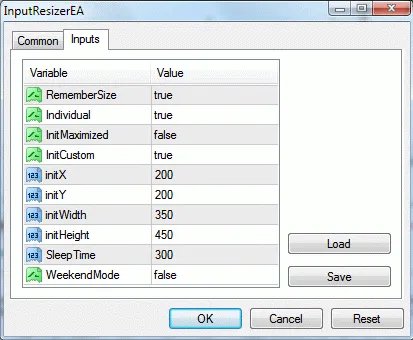
By default, InputResizer will place and resize every input window on its first appearance to specified coordinates (in pixels, relative to the upper left corner of your screen). If the input window reappears (on any chart/platform), the position and size from the last window close will be applied.
If RememberSize=false: All windows will open with InitCustom coordinates (if true), maximized if InitMaximized=true (InitMaximized takes precedence), or at default size and position if both are false.
If RememberSize=true: This applies only the first time a window appears. The coordinates are stored at each window close and reapplied next time. Stored coordinates take priority over InitCustom and InitMaximized.
If Individual=true: Coordinates will be stored for each EA/indicator name separately. This only matters if RememberSize=true.
SleepTime: (EA only) This is the time between scans in milliseconds. A lower number means quicker responses but can increase CPU load.
WeekendMode: (EA only) Setting this to true means you won’t need a tick simulator to get it running. This is great for weekend testing! Set it back to false during normal trading hours to avoid unexpected behavior. Note: Start() is called from within Init() in WeekendMode, which is a quick but not necessarily correct way to get an EA running. This mode isn’t available in the "_600" versions. If you need this EA to operate independently from incoming ticks, you’ll have to use a tick simulator.
Final Notes:
- For InputResizer to work, DLLs must be enabled. Otherwise, you’ll get an alert message.
- The first time you open an input window of an indicator/EA, it won’t resize until you select the input tab.
- If you’re using the EA version and want to change settings while it’s running (F7), switch to the Monthly timeframe, adjust what you need, and then switch back to any lower timeframe.
- Coordinates are stored in global variables and remain until you delete them. You can clear these anytime by hitting F3 and deleting all global variables starting with 'iRes'.
UPDATES:
2011.06.25: Bugfix for "z" character typo (thanks to symr for spotting this!).
2011.06.29: Upgrade for more reliable operation and the ability to handle multiple open input windows across different MT4 instances.
2011.07.10: Bugfix for indicator input boxes opened from the indicators list (Ctrl+I) not being found.
2014.02.08: Important upgrade to work with MT4 build 600 and hopefully newer versions.




Comments 0