
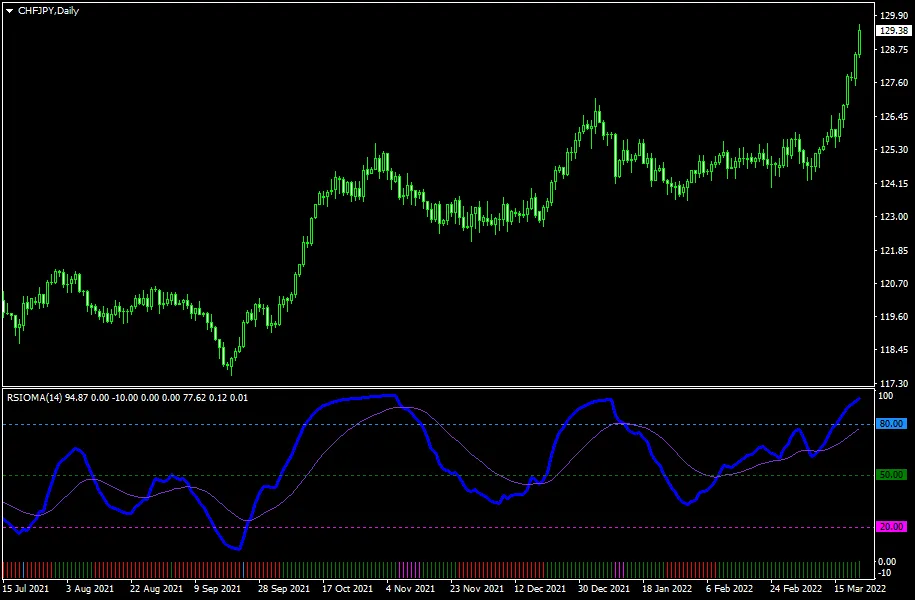
RSIOMA Indicator for MetaTrader 4 — If you're looking to enhance your trading strategy, the RSIOMA indicator might just be the tool you need. This clever indicator combines two moving averages, computes the RSI (Relative Strength Index), and adds a moving average of that RSI. What you get is a powerful visual tool that accurately signals trend changes. You'll see these lines in a separate window, ranging from 0 to 100, allowing for a clear understanding of market movements. Plus, there's an auxiliary histogram that gives you a quick snapshot of the current trend. Good news for traders: this indicator works seamlessly with both the MT4 and MT5 versions of the MetaTrader platform.
Input Parameters
- RSIOMA Period (default = 14) — This sets the period for both the RSI and the moving averages used in the calculation. Want smoother signals? Increase the period. Prefer more frequent signals? Decrease it.
- RSIOMA Mode (default = MODE_EMA) — Choose the method of moving averages used for the RSI calculations.
- RSIOMA Price (default = PRICE_CLOSE) — This determines the price levels used for the moving averages that feed into the RSI.
- MA of RSIOMA Period (default = 21) — This sets the period for the moving average of the RSI itself.
- MA of RSIOMA Mode (default = MODE_EMA) — Select the mode for the moving average of the RSI.
- BuyTrigger (default = 20) — This is your oversold trigger level, signaling potential buying opportunities.
- SellTrigger (default = 80) — This sets the overbought trigger level, indicating when to consider selling.
- BuyTriggerColor (default = clrMagenta) — The color for the oversold line, making it easy to spot.
- SellTriggerColor (default = clrDodgerBlue) — The color for the overbought line, helping you visualize market conditions.
- MainTrendLong (default = 50) — If the RSIOMA is above this level, the trend is bullish.
- MainTrendShort (default = 50) — If the RSIOMA is below this level, the trend is bearish.
- MainTrendLongColor (default = clrRed) — This color indicates a bullish trend separator.
- MainTrendShortColor (default = clrGreen) — This color signifies a bearish trend separator.
- MainAlerts (default = false) — Set to true to receive alerts when the RSIOMA crosses overbought or oversold levels.
- AuxiliaryAlerts (default = false) — Enable this to get alerts when the histogram signals a potential trend reversal.
- EnableNativeAlerts (default = false) — If set to true, you'll receive native MetaTrader popup alerts for the above conditions.
- EnableEmailAlerts (default = false) — This sends an email alert when conditions are met, assuming your MetaTrader email settings are configured correctly via Tools -> Options -> Email.
- EnablePushAlerts (default = false) — If enabled, you'll receive push notifications on your mobile device for alert conditions, provided you've set up notifications in Tools -> Options -> Notifications.
- TriggerCandle (default = Previous) — Choose whether alerts are based on the most recently closed candle or the current, still-forming candle.




Comments 0