
If you're looking to elevate your trading game, the T3.Lnx indicator might just be what you need. This powerful tool utilizes Heiken Ashi signals to help you make informed decisions.
To get started with the T3.Lnx, you'll need to install a couple of files. First, place T3Series.mqh and PriceSeries.mqh into the MetaTrader\experts\include directory. Then, make sure to add the Heiken Ashi#.mq4 file into your MetaTrader\indicators folder.
Inputs for the T3.Lnx Indicator
Once you've installed the indicator, you'll want to tweak some settings to fit your trading style. Here are the inputs you can customize:
- T3Period = 14; // This sets the averaging period for the T3 Bollinger Bands
- MA_method = 0; // This defines the averaging method
- MA_Smooth = 20; // Smoothing depth for the Moving Averages
- Bands_Smooth = 20; // Smoothing depth for the Bollinger Bands
- Smooth_Curvature = 100; // This parameter ranges from -100 to +100 and impacts the transition quality
- Bands_Shift = 0; // This shifts the indicator along the time axis
- Input_Price_Customs = 0; // Choose the prices that the indicator will be calculated on
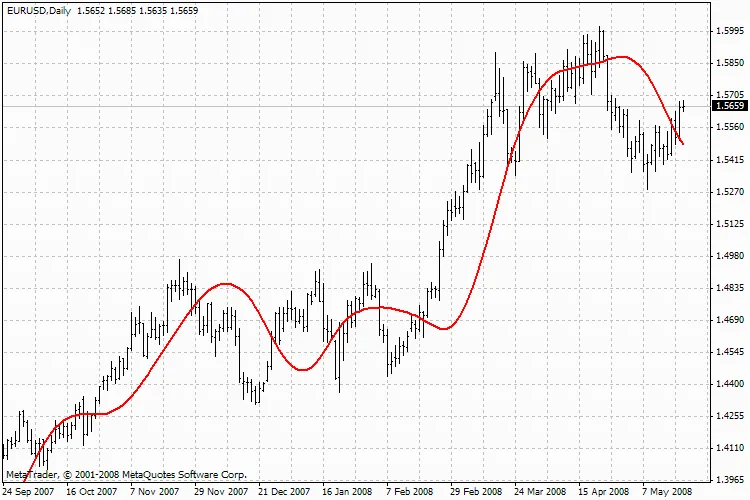
T3.Lnx Indicator Overview
With the T3.Lnx, you can enhance your trading strategies and potentially increase your profitability. So why not give it a shot?
Related Posts
- Unlocking the Power of the Hodrick-Prescott Filter for Trading Predictions
- Unlocking MetaCOT 2: Your Ultimate CFTC Indicator Toolkit for MT4
- Unlocking the Power of Master Tools for MetaTrader 4
- NxBreakout Indicator for MetaTrader 5: A Trader's Guide
- Unlock Trading Potential with NxBars Indicator for MetaTrader 5