
Main Features
Dynamic Volume Categorization:
- The indicator sorts volume into various categories, using distinct colors for easy visual interpretation:
- Buying Climax (clrCrimson): Highlights periods of exceptionally high volume with a price increase.
- Selling Climax (clrLimeGreen): Indicates strong selling pressure accompanied by high volume.
- Churn (clrGold): Captures high volatility without a clear price trend.
- Climax Churn (clrMagenta): Merges buy/sell climaxes with churn, showcasing extreme volatility.
- Weak Candle (clrDarkTurquoise): Identifies candles with low volume in the lookback period.
- Volume Balance (clrWhiteSmoke): Represents standard volume without any special characteristics, serving as a "base color" when no other patterns are present.
- The indicator sorts volume into various categories, using distinct colors for easy visual interpretation:
Moving Average Volume:
- A smoothed moving average line (clrMaroon) helps you spot volume trends over time.
Advanced Customization:
- Moving Average Period: Tailor the moving average period to fit your trading style.
- Lookback Window: Adjust the lookback window to compare current volume with recent values.
- Volume Type: Choose between real volume (VOLUME_REAL) or tick volume (VOLUME_TICK) based on the asset's characteristics.
Clear Visual Interface:
- A colored histogram (DRAW_COLOR_HISTOGRAM) displays volume categories intuitively for quick analysis.
Flexibility for Different Timeframes:
- This indicator works seamlessly across any timeframe, whether you're trading intraday or looking at weekly/monthly charts.
How to Interpret the Signals
- Buy/Sell Climax: Marks strong accumulation or distribution moments, hinting at potential trend reversals or continuations.
- Churn: Reflects high volatility without a clear direction, indicating market uncertainty.
- Weak Candles: Represents low market activity, often seen during consolidations or indecision periods.
- Volume Balance: Shows normal market behavior, providing insights into stability without significant anomalies.
Configuration and Use
Better Volume is straightforward to set up and use:
- Add the indicator to your chart in MetaTrader 5.
- Adjust the parameters as needed:
- Moving Average Period: Controls the smoothness of the moving average line.
- Lookback Window: Sets the number of candles for comparison.
- Volume Type: Select between real volume or tick volume.
- Keep an eye on the signals from the histogram and moving average line to make informed trading decisions.
Why Use Better Volume?
- Volume Flow Analysis: Gain insights into market participants' behavior based on volume trends.
- Pattern Identification: Spot buy/sell climaxes, churn, and other critical patterns that can guide your trading choices.
- Ease of Use: The intuitive visual interface and customization options make this indicator accessible for both beginners and seasoned traders.
Application Example
- Utilize the indicator to confirm entry and exit signals within volume-based strategies.
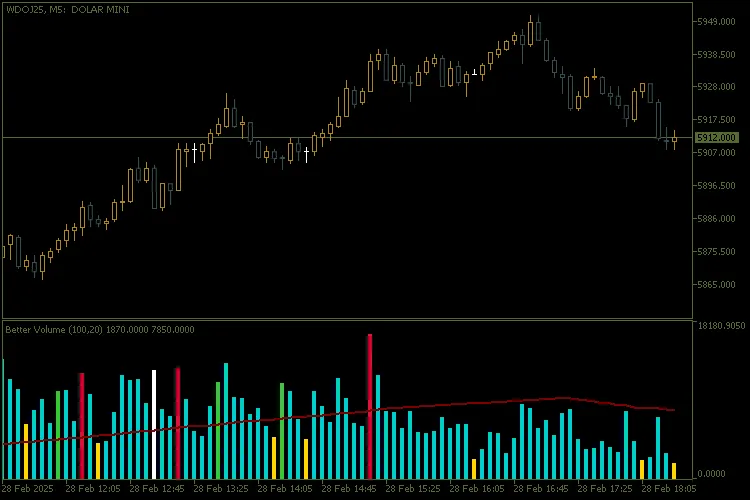
For more details, check out this chart example.




Comments 0