
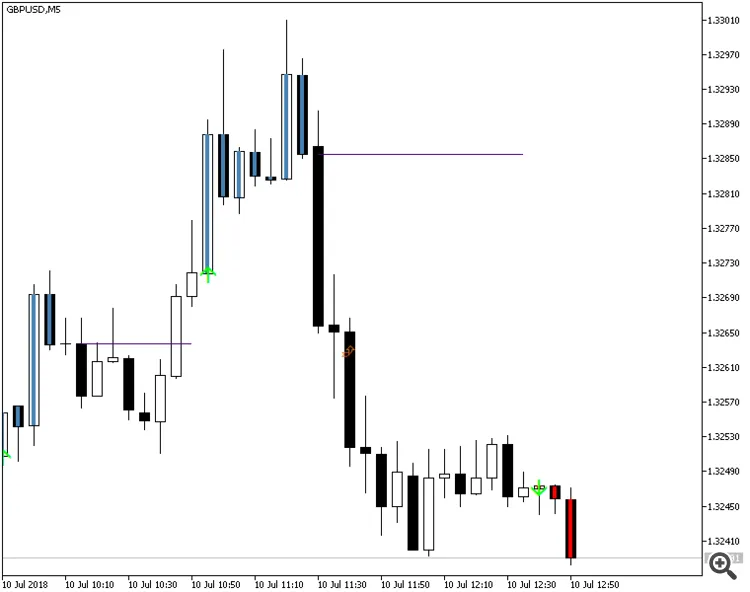
Easy Trend Visualizer is your go-to indicator for MetaTrader 4 that does just what it says on the tin! It helps you pinpoint where trends start, where they end, and even shows you when there's no trend at all. Built on the reliable ADX (Average Directional Index) framework, this tool is designed to keep up with the fast-paced world of trading. You’ll find the Easy Trend Visualizer right in your main chart window, making it an essential part of your trading toolkit.
Key Features
This nifty indicator also offers a variety of alerts to keep you in the loop:
- Horizontal Line Alerts: Get notified when a horizontal line appears or when price crosses it.
- Arrow Alerts: Watch for up and down arrows that signal potential trading opportunities.
- Previous Line Cross Alerts: Stay ahead of the game by getting alerts when prices cross previous horizontal lines.
Input Parameters
- ADXperiod1 (default = 10) — Sets the period for the first ADX indicator.
- ADXperiod2 (default = 14) — Sets the period for the second ADX indicator.
- ADXperiod3 (default = 20) — Sets the period for the third ADX indicator.
- UseAlertHorizontalLine (default = false) — Enables alerts for horizontal line beginnings.
- UseAlertUpDownArrows (default = false) — Alerts when up or down arrows pop up.
- UseAlertHorizontalLineCrossCurrent (default = false) — Alerts when a candle crosses the current horizontal line.
- UseAlertHorizontalLineCrossPrevious (default = false) — Alerts when a candle crosses a previous horizontal line.
- NumberPHLtoTrack (default = 0) — Sets how many previous horizontal lines to track for alerts.
- IgnorePHLShorterThan (default = 2) — Minimum length for previous lines to qualify for alerts.
- PHLC_Arrow_Color (default = clrChocolate) — Choose the color for previous line cross alert arrows.
- CHLC_Arrow_Color (default = clrFireBrick) — Choose the color for current line cross alert arrows.
- NativeAlerts (default = true) — Enables native pop-up alerts from the indicator.
- SendEmails (default = true) — Sends alerts to your email, provided you've set it up under Tools -> Options -> Email.
- SendNotifications (default = true) — Sends push notifications to your mobile device (make sure notifications are set up under Tools -> Options -> Notifications).




Comments 0