
What Is MA Cross Alert?
MA Cross Alert is a handy custom indicator for MetaTrader 4 that tackles a common issue: while MetaTrader’s built-in Moving Average displays the line, it doesn’t notify you when the price crosses it.
This tool fills that gap by providing instant notifications whenever the price moves above or below the MA line. Whether you’re following trends or looking for reversal signals, this indicator has got your back.
Why Is It Useful?
With MA Cross Alert, you can say goodbye to staring at charts waiting for price movements!
It alerts you the moment a crossover occurs.
It draws arrows on the chart displaying buy or sell signals at each crossover.
Compatible with all major MA types: Simple (SMA), Exponential (EMA), Smoothed (SMMA), Linear Weighted (LWMA).
This makes it a versatile tool for traders of all levels who depend on MAs.
Alerts & Notifications
You get to choose how you'd like to be notified:
On-Screen Alerts – Pop-up messages in your MT4 platform.
Mobile Push Notifications – Alerts sent directly to your MT4 mobile app.
Email Notifications – Receive emails whenever a crossover is detected.
⚠️ Note: To receive mobile and email alerts, you'll need to configure your MT4 notification settings.
Signals on Chart
Beyond alerts, this indicator marks signals visually:
Buy Arrow → when the price crosses above the MA.
Sell Arrow → when the price crosses below the MA.
Optional labels for reviewing past signals.
This feature makes it easy to backtrack and analyze how frequently these crossovers occur.
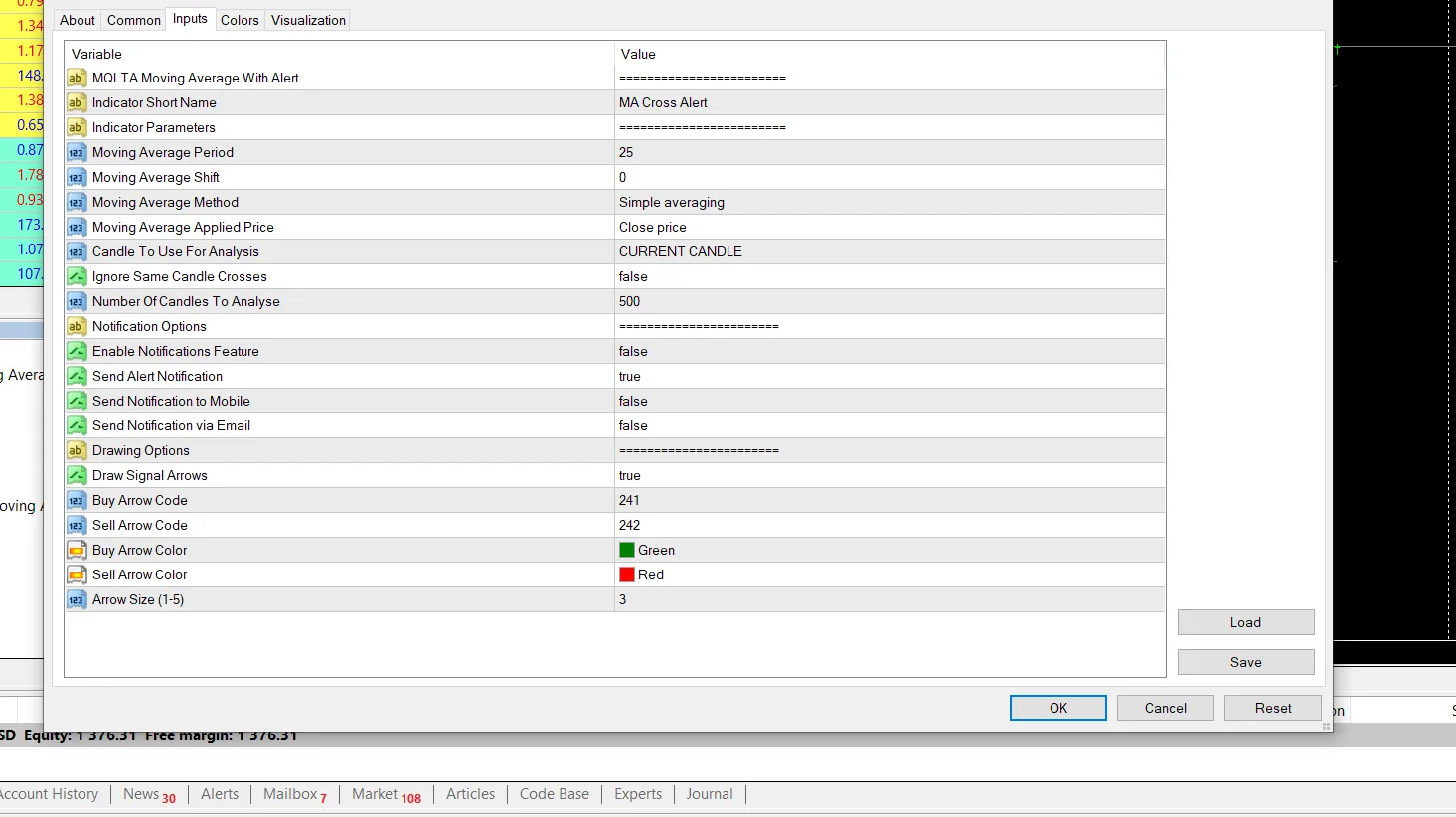
Input Parameters
Moving Average Settings
MA Method – Choose from SMA, EMA, SMMA, LWMA, or Hull MA.
MA Period – Set the number of candles for MA calculation.
Applied Price – Options include Close, Open, High, Low, Median, Typical, or Weighted price.
Signal Settings
Candle To Use For Analysis –
Current Candle: Triggers alerts as soon as price touches/crosses the MA (fast but may repaint).
Previous Candle: Confirms only after a candle closes across the MA (safer with fewer false signals).
Ignore Same Candle Crosses – Filters out whipsaw signals from candles that open on one side and close on the other.
Number Of Candles To Analyze – Limit checks to the most recent N candles for quicker performance.
Notifications
Enable Notifications Feature – Master switch for alerts.
Send Alert Notification – On-screen alerts.
Send Notification To Mobile – Push notifications to your MT4 app.
Send Notification Via Email – Email alerts for cross detections.
Display Options
Show Arrows On Cross – Draw buy/sell arrows on the chart.
Show Signal Labels – Display labels with crossover information.
Example Use Cases
1. Trend Following Strategy
A trader sets the 50 EMA as their baseline.
When the price closes above the EMA, MA Cross Alert shows a Buy Arrow and sends an alert.
When the price closes below the EMA, it shows a Sell Arrow.
✅ Perfect for riding the larger trend.
2. Reversal Strategy
A trader utilizes the 200 SMA.
When the price crosses back below the 200 SMA, it indicates a potential reversal.
Instant alerts ensure the trader doesn’t miss the action.
✅ Great for identifying turning points at critical levels.
3. Multi-Timeframe Trading
Set alerts on both the 15M chart (for short-term moves) and the H4 chart (for long-term trends).
✅ Aligning signals across timeframes offers stronger confirmation.




Comments 0