
ผู้เขียนจริง:
DVYU inc.
Indicator นี้จะแสดงระดับ Pivot และใช้สีพื้นหลังพิเศษสำหรับเซสชันที่ระดับเหล่านั้นถูกคำนวณขึ้น
พารามิเตอร์การตั้งค่า Indicator:
//+----------------------------------------------+
//| พารามิเตอร์การตั้งค่า Indicator                   |
//+----------------------------------------------+
input Hour   StartHour=H08;              // ชั่วโมงเริ่มต้นของเซสชัน
input Min    StartMinute=M00;            // นาทีเริ่มต้นของเซสชัน
input uint   SessionTime=400;            // เวลาของเซสชัน (นาที)
input color  Color_Session = clrPlum;    // สีของเซสชัน
input color  Color_Res = clrBlue;        // สีของระดับความต้านทาน
input color  Color_R30 = clrGreen;       // สีของระดับ R30
input color  Color_R20 = clrGreen;       // สีของระดับ R20
input color  Color_R10 = clrGreen;       // สีของระดับ R10
input color    Color_P=clrDarkOrchid;    // สีของระดับ P
input color  Color_S10 = clrRed;         // สีของระดับ S10
input color  Color_S20 = clrRed         // สีของระดับ S20
input color  Color_S30 = clrRed         // สีของระดับ S30
input color  Color_Sup = clrMagenta     // สีของการสนับสนุน
//---
input STYLE  Style_Res = SOLID_;         // สไตล์เส้นความต้านทาน
input STYLE  Style_R30 = SOLID_;         // สไตล์เส้นระดับ R30
input STYLE  Style_R20 = SOLID_;         // สไตล์เส้นระดับ R20
input STYLE  Style_R10 = SOLID_;         // สไตล์เส้นระดับ R10
input STYLE    Style_P = DASH_;          // สไตล์เส้นระดับ P
input STYLE  Style_S10 = SOLID_;         // สไตล์เส้นระดับ S10
input STYLE  Style_S20 = SOLID_;         // สไตล์เส้นระดับ S20
input STYLE  Style_S30 = SOLID_;         // สไตล์เส้นระดับ S30
input STYLE  Style_Sup = SOLID_;         // สไตล์เส้นการสนับสนุน
//---
input Width  Width_Res = Width_2;        // ความกว้างของเส้นความต้านทาน
input Width  Width_R30 = Width_1;        // ความกว้างของเส้นระดับ R30
input Width  Width_R20 = Width_2;        // ความกว้างของเส้นระดับ R20
input Width  Width_R10 = Width_3;        // ความกว้างของเส้นระดับ R10
input Width    Width_P = Width_1;        // ความกว้างของเส้นระดับ P
input Width  Width_S10 = Width_3;        // ความกว้างของเส้นระดับ S10
input Width  Width_S20 = Width_2;        // ความกว้างของเส้นระดับ S20
input Width  Width_S30 = Width_1;        // ความกว้างของเส้นระดับ S30
input Width  Width_Sup = Width_2;        // ความกว้างของเส้นการสนับสนุน
Indicator นี้ถูกพัฒนาขึ้นครั้งแรกด้วย MQL4 และเผยแพร่ใน Code Base ที่ mql4.com เมื่อวันที่ 30 มกราคม 2008
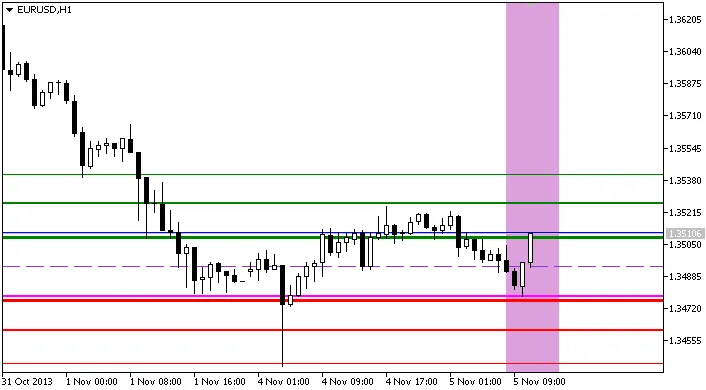
Indicator Pivot_RS_session
โพสต์ที่เกี่ยวข้อง
- เครื่องมือ Open Range Breakout สำหรับ MetaTrader 5
- FX Multi-Meter II: เครื่องมือช่วยเทรดที่ครบครันสำหรับนักลงทุน
- เครื่องมือ MetaCOT 2 CFTC ToolBox - ชุดตัวชี้วัดสำหรับการวิเคราะห์ใน MetaTrader 4
- ช่องทางการเทรดเต่ากับ MetaTrader 4: ระบบการติดตามแนวโน้มที่คุณควรรู้
- วิธีใช้ iExposure.mq4 ในการติดตามสถานะการเทรดใน MetaTrader 5