
真实作者:
DVYU inc.
Pivot_RS_session 指标能够显示关键的支撑位和阻力位,并且通过独特的背景颜色展示计算这些水平时所处的交易时段。
指标输入参数:
//+----------------------------------------------+
//| 指标输入参数                   |
//+----------------------------------------------+
input Hour   StartHour=H08;              // 开盘时段小时
input Min    StartMinute=M00;            // 开盘时段分钟
input uint   SessionTime=400;            // 会话时长(分钟)
input color  Color_Session = clrPlum;    // 会话颜色
input color  Color_Res = clrBlue;        // 阻力位颜色
input color  Color_R30 = clrGreen;       // R30 级别颜色
input color  Color_R20 = clrGreen;       // R20 级别颜色
input color  Color_R10 = clrGreen;       // R10 级别颜色
input color    Color_P=clrDarkOrchid;    // P 级别颜色
input color  Color_S10 = clrRed;         // S10 级别颜色
input color  Color_S20 = clrRed;         // S20 级别颜色
input color  Color_S30 = clrRed;         // S30 级别颜色
input color  Color_Sup = clrMagenta;     // 支撑位颜色
//---
input STYLE  Style_Res = SOLID_;         // 阻力线样式
input STYLE  Style_R30 = SOLID_;         // R30 级别线样式
input STYLE  Style_R20 = SOLID_;         // R20 级别线样式
input STYLE  Style_R10 = SOLID_;         // R10 级别线样式
input STYLE    Style_P = DASH_;          // P 级别线样式
input STYLE  Style_S10 = SOLID_;         // S10 级别线样式
input STYLE  Style_S20 = SOLID_;         // S20 级别线样式
input STYLE  Style_S30 = SOLID_;         // S30 级别线样式
input STYLE  Style_Sup = SOLID_;         // 支撑线样式
//---
input Width  Width_Res = Width_2;        // 阻力线宽度
input Width  Width_R30 = Width_1;        // R30 级别线宽度
input Width  Width_R20 = Width_2;        // R20 级别线宽度
input Width  Width_R10 = Width_3;        // R10 级别线宽度
input Width    Width_P = Width_1;        // P 级别线宽度
input Width  Width_S10 = Width_3;        // S10 级别线宽度
input Width  Width_S20 = Width_2;        // S20 级别线宽度
input Width  Width_S30 = Width_1;        // S30 级别线宽度
input Width  Width_Sup = Width_2;        // 支撑线宽度
该指标最初是在 MQL4 中实现,并于 2008 年 1 月 30 日发布在 mql4.com 的代码库 上。
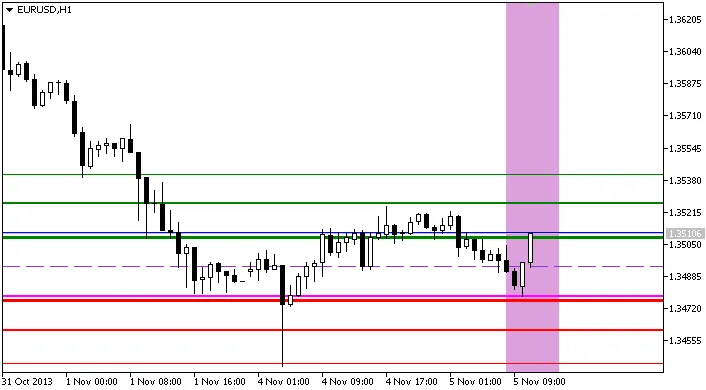
Pivot_RS_session 指标