
Schaff Trend Cycle Indicator for MetaTrader 4 — This cyclical oscillator is designed to help you navigate the market by calculating a stochastic over stochastic on top of a MACD line. What sets it apart is its smooth performance during trends, allowing for quick reactions to market changes. Developed by Doug Schaff, this nifty tool gained popularity after its algorithm was made public in 2008. The Schaff Trend Cycle integrates two distinct methods for spotting trend direction changes — the MACD and a smoothed stochastic oscillator. Its values range from 0 to 100, with key trigger levels at 25 and 75. Plus, you can set up alerts to keep you in the loop. You can easily download this indicator for MT4 and MT5.
Input Parameters
Main Settings
- MAShort (default = 23) — This is the period for the fast moving average used in the MACD line calculation. It should be less than MALong.
- MALong (default = 50) — This is the period for the slow moving average in the MACD line calculation. It needs to be greater than MAShort.
- Cycle (default = 10) — This indicates the length of the cycle in chart periods. Note that the resulting cycle length is double since two stochastics are calculated in sequence.
Alerts
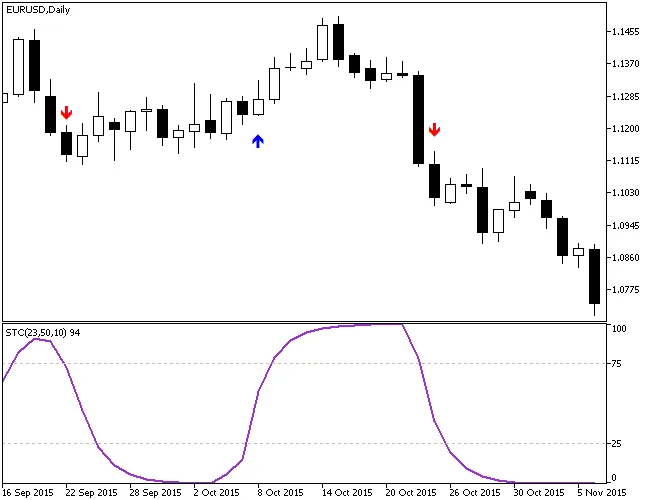
- ShowArrows (default = false) — If set to true, this will draw arrows above or below the respective bars where a signal is generated.
- UpColor (default = clrBlue) — This defines the color of the bullish signal arrow.
- DownColor (default = clrRed) — This sets the color for the bearish signal arrow.
- ShowAlerts (default = false) — If set to true, a display alert will pop up when a signal is generated.
- SoundAlerts (default = false) — If set to true, you'll hear a sound alert when a signal is triggered.
- EmailAlerts (default = false) — If set to true, you'll receive an email alert when a signal is generated.
- PushAlerts (default = false) — If set to true, a push notification alert will be sent right to your device when a signal is generated.
Trading Strategy
The simplest way to use the Schaff Trend Cycle in your trading is to sell when the line dips below 75 and buy when it climbs above 25. To filter out some less reliable signals, Doug Schaff suggests an additional method: for a buy signal, the bar following the trigger bar should close above the high of the trigger bar; for a sell signal, the bar following the trigger bar should close below the low of the trigger bar. Remember, the trigger bar is formed when the Schaff Trend Cycle crosses above 25 or drops below 75.




Comments 0