
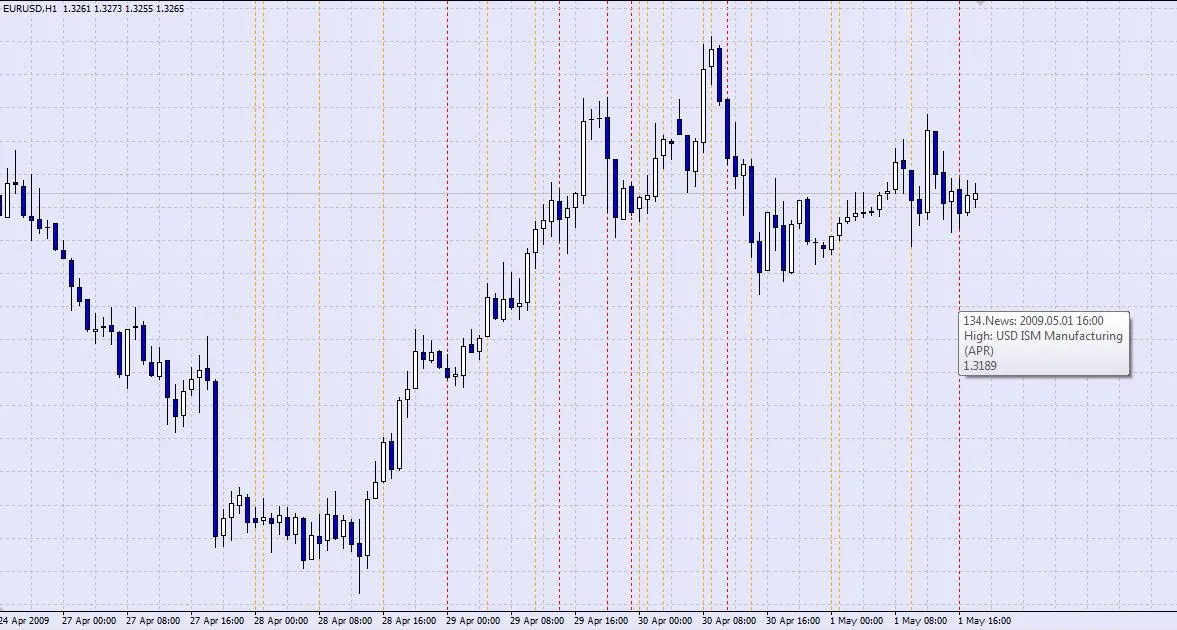
Hey traders! If you’re looking to level up your trading game, the News Plotter indicator is a must-have tool in your arsenal. This nifty indicator helps you keep track of upcoming economic news events that can affect the market. Let’s dive into its features!
Key Features of the News Plotter Indicator
- Customizable Alerts: Set audio notifications to alert you right before a news event hits.
- Event Rating Display: Choose to show only high-rated events, so you can focus on what really matters.
- Clean Chart: Automatically removes old news lines from your chart, keeping it clutter-free.
- Local Time Adjustment: Adjusts GMT to your local time using the GMT_Offset setting.
- 24-Hour Time Format: Converts AM/PM times to 24-hour format for accurate plotting.
- Prioritization of Events: Ensures higher-rated events are displayed prominently, avoiding any overlap with lower-rated ones (as long as you’ve selected the right timeframe).
- Descriptive Events: Object descriptions are populated for easy reference.
To get started with the News Plotter, you’ll need to download the file from the DailyFx website and save it in the right folder:
File Location: C:\Program Files\Broker MetaTrader\experts\files
Download Link: DailyFX Global Economic Calendar
Make sure to save it as News.csv for the current week. After that, you can tweak the external inputs in the code to fit your preferences and recompile.
Heads up: there might be a few bugs, but I’ve worked out most of the kinks. The best way to find out is to give it a spin! 😉
Related Posts
- Unlocking the Power of Master Tools for MetaTrader 4
- Unlocking MetaCOT 2: Your Ultimate CFTC Indicator Toolkit for MT4
- Mastering the Open Range Breakout Indicator for MetaTrader 5
- Mastering Support and Resistance: Essential Indicator for MetaTrader 4
- ID Lite Info MA: A Comprehensive Indicator for MetaTrader 5