
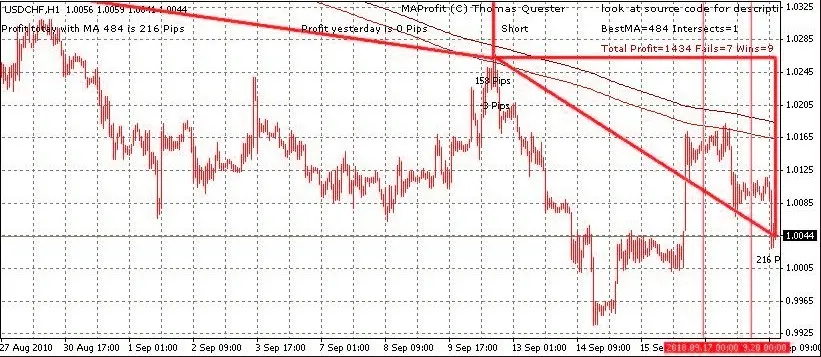
If you're looking to streamline your trading strategy, optimizing with a single Moving Average might just be the ticket. Unlike the more complex cross-moving average systems, this approach simplifies your analysis and speeds up your optimization process.
Utilizing a single moving average allows you to quickly evaluate all moving averages between 10 and 1000. This efficiency means you can get to the heart of your trading strategy in no time!
Understanding the Signals
When trading with a single moving average, you’ll typically receive three key signals:
- Buy Signal: The curve is below the candles.
- Sell Signal: The curve is above the candles.
- Close Position: The curve is horizontal and frequently crosses the candles. In this case, it’s best to close your positions and wait for a clearer signal.
By adjusting the period of the moving average, you can recalibrate your strategy. Checking different time frames—like minute, hourly, or daily—can help confirm the strength of a signal. Generally, signals that align across multiple time frames are more robust. You can also switch to lower time frames to identify precise entry points for long or short trades.
Indicator Features
This indicator showcases four types of triangles to help visualize your trades:
- Red Triangle (Thick Border): Indicates a winning short trade.
- Red Triangle (Thin Border): Indicates a losing short trade.
- Green Triangle (Thick Border): Indicates a winning long trade.
- Green Triangle (Thin Border): Indicates a losing long trade.
Whenever a new signal is available, the indicator can provide alerts, or you can use voice output by utilizing the speak.dll file, which you can find on MQL5.
Optimization Modes
You can optimize your strategy in two different modes:
- Simulated Trading: This mode identifies the best moving average based on profitability.
- Counting Intersections: This approach focuses on minimizing the number of times the moving average intersects with the candles, aiming for the most effective average.
Parameters to Consider
Here are some parameters to keep in mind when using this strategy:
extern bool bOptimize=true; // Enable to find the best single MA by optimizing (switch time frame to re-optimize)
extern bool bOptimizeIntersect=true; // Optimize for minimum intersections, otherwise aim for max profit
extern int PeriodMA=400; // Set a specific period if not optimizing
extern int Method=0; // MA method: 0 = Simple, 1 = Exponential, 2 = Smoothed, 3 = Linear Weighted
extern bool DrawTringles=true; // Draw triangles for simulated trading
extern int MinMA=5; // Minimum MA for optimization
extern int MaxMA=500; // Maximum MA for optimization
extern int StepMA=1; // Step size during optimization, 1 tests every MA, 10 every tenth MA, etc.
extern int CountOptimize=300; // Number of candles for optimization
extern int RepaintBars=3000; // Candles on which triangles are drawn and win/loss calculated
extern bool Alarm=true; // Visible alert for new signals
extern bool bSpeak=true; // Voice alert with gspeak
While moving average trading can yield solid signals, it also comes with its fair share of false signals. I’m currently exploring more filtering techniques to enhance my moving average expert advisor.
As always, trade at your own risk!
Related Posts
- Unlocking MetaCOT 2: Your Ultimate CFTC Indicator Toolkit for MT4
- Unlocking the Power of Master Tools for MetaTrader 4
- Mastering the Open Range Breakout Indicator for MetaTrader 5
- ID Lite Info MA: A Comprehensive Indicator for MetaTrader 5
- Discover AllAverages v4.9: The Essential Indicator for MetaTrader 4