
Hey fellow traders! Today, I’m excited to share insights on a fantastic MT5 custom indicator: wd.Range_DailyAvg.mq5. This tool is based on the MT4 indicator 'TSR_Ranges.mq4' by Ogeimais and is designed to help you gauge price movements more effectively.
So, what’s the deal with this indicator? Well, it calculates the Average Daily Range (ADR) by analyzing 20 days' worth of historical price data, both highs and lows. Its main goal? To give you a clearer picture of today’s potential price action and help spot those golden profit opportunities based on past trading ranges.
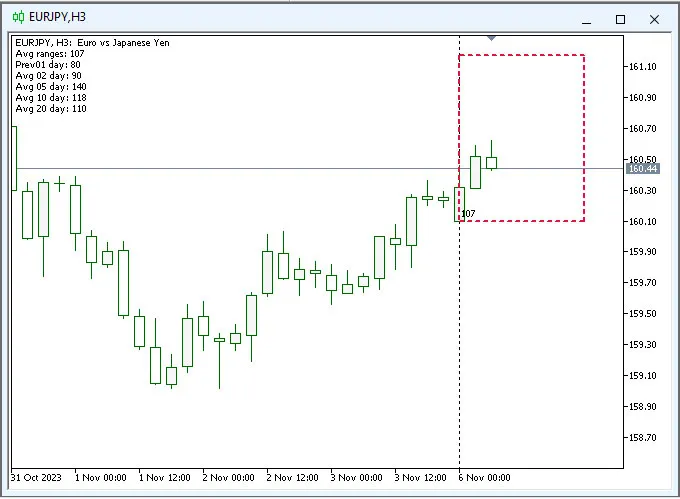
Here’s how the indicator works:
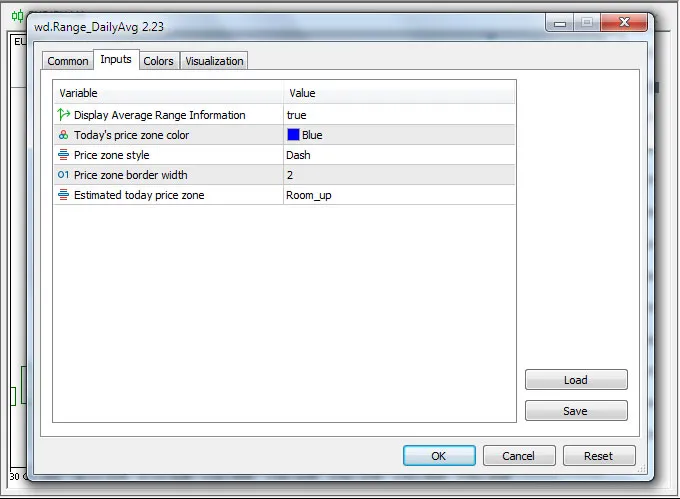
- Input Parameters:
- Display Average Range Information:
This option lets you show or hide the Average Range Information on the upper left of your chart. - Today's Price Zone Color:
Choose the color for the rectangle that indicates today’s estimated price zone, plus customize the border style and width. - Estimated Today’s Price Zone:
Select the anchor for the price zone. You can choose 'Room_up' if you’re bullish or 'Room_down' if you’re bearish, depending on market trends.
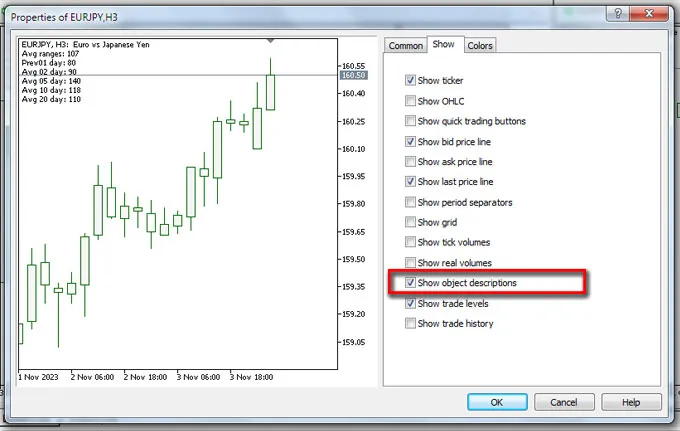
The number displayed inside the rectangle represents the Average Daily Range (ADR). This is calculated using the range of the previous day along with averages for 2-day, 5-day, 10-day, and 20-day periods. Don’t forget to enable the 'Show object description' option in your MT5 Chart Properties for a complete view!
If you’re feeling bullish and want to estimate how far the price might move today, set the 'Estimated Today’s Price Zone' to 'Room_up.' In this case, the rectangle will indicate the lowest expected price for the day while using the ADR to set the highest price point.
In summary, this indicator is a powerful tool that helps you forecast potential price movements based on 20 days of historical data and current market conditions. Depending on your chosen anchor (Room_up or Room_down), you’ll see potential levels for profit-taking or entry/exit points for trades. The visual representation makes it much easier to make informed trading decisions.
Version History:
----------------
v2.23: Initial release




Comments 0