
If you're looking to get a clearer picture of your trading account’s performance, the LifeHack Balance Equity indicator for MetaTrader 5 is a game-changer. This handy tool displays both your balance and equity in real-time, giving you the insights you need to make informed decisions.
This indicator shines particularly when used in the strategy tester. It effectively visualizes your balance and equity, allowing you to analyze your strategies more effectively:
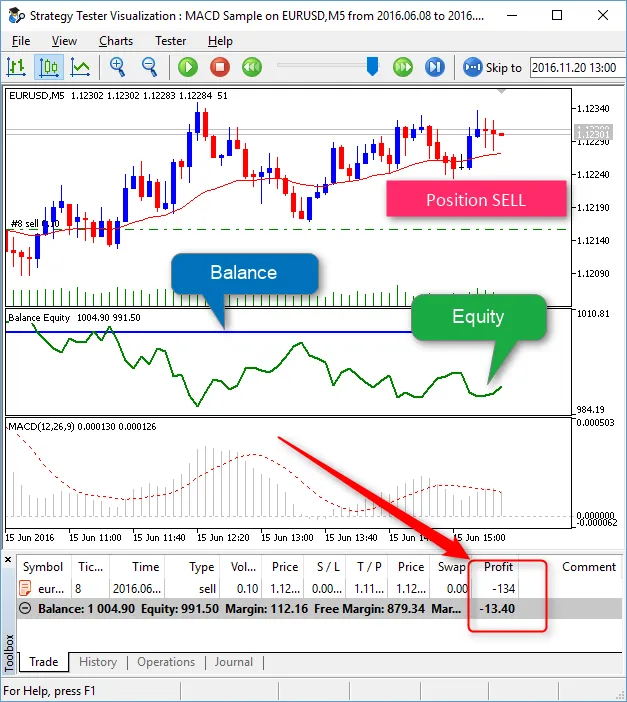
To get started with the LifeHack Balance Equity indicator in the strategy tester, you’ll need to include it in the tester template named "tester.tpl". Here's a quick guide on how to do this:
- Open any chart.
- Clear the chart of any unnecessary indicators, objects, and expert advisors (ideally everything).
- Drag the LifeHack Balance Equity indicator onto the chart.
- Right-click on the chart, select "Templates", then "Save Template...", and name it "tester.tpl".
Once you've done this, the LifeHack Balance Equity indicator will be integrated into your Tester chart, providing you with the crucial data you need to optimize your trading strategies.
Related Posts
- Unlocking the Power of Master Tools for MetaTrader 4
- Unlocking MetaCOT 2: Your Ultimate CFTC Indicator Toolkit for MT4
- Mastering the Open Range Breakout Indicator for MetaTrader 5
- ID Lite Info MA: A Comprehensive Indicator for MetaTrader 5
- Unlocking Trading Insights with Volume Profile + Range v6.0 for MetaTrader 5