
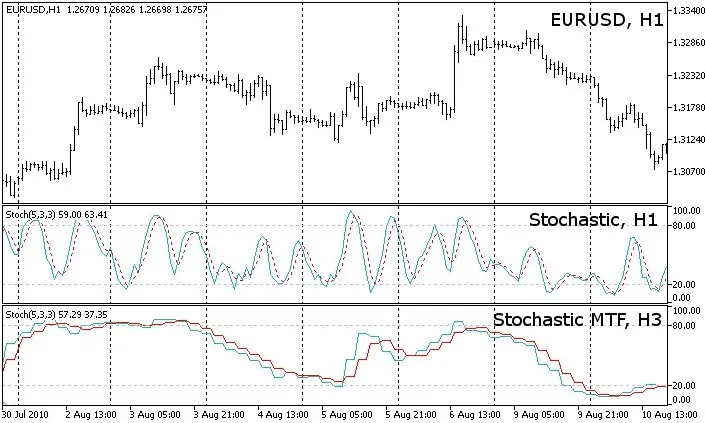
If you're looking to take your trading to the next level, the Stochastic multi-timeframe indicator for MetaTrader 5 is a game-changer. This tool can be applied across any timeframe, whether it's higher or lower than the one you're currently viewing.
You can utilize all the standard settings available with the built-in iStochastic indicator. The only additional parameter you'll need to set is the second timeframe that will feed into the calculations.
Keep in mind that when you're applying the indicator to a timeframe that's shorter than the one on your chart, it might not display all values. Depending on the price type you choose, it will adopt a different methodology to provide the most relevant value.
Here are a couple of examples to illustrate:
- Example 1: If you set timeframe_1 to 5 minutes and timeframe_2 to 1 minute, using the Close price series:
For each bar on the 5-minute timeframe, the indicator will reflect the latest available 1-minute bar that closed before or at the same time. This applies to both closed bars and the current bar that's still open.
- Example 2: If you set timeframe_1 to 5 minutes and timeframe_2 to 1 minute, using the Open price series:
Here, the indicator will show the last 1-minute bar that opened before or at the opening time of the 5-minute bar. This means that when a new 5-minute bar opens, you'll only have the opening price of the first of the five 1-minute bars constituting it, while the rest will be disregarded in the calculations.
Feel free to mix and match any timeframes, even if they don’t align perfectly. For instance, you can set timeframe_1 to 5 minutes and timeframe_2 to 12 minutes, and the indicator will ensure they stay in sync, operating on the same principles as outlined above.
For a more visual breakdown, check out the MACD Histogram MTF MC indicator, which provides an Excel overview.
Quick Tip: When switching between timeframes, give it a few seconds to load the price data. If the indicator doesn’t show up, try refreshing the chart manually.
To toggle error messages on or off for debugging, check out the source:
bool ShowErrorMessages=false // turn on/off error messages for debugging
Update History:
Version 04 (2010-09-26):
- Enhanced display of values on smaller timeframes;
- Adjusted buffers to EMPTY_VALUE instead of 0;
- Optimized code;
- Removed PLOT_DRAW_BEGIN from OnInit();
- Moved ArraySetAsSeries of buffers and arrays into OnInit();
Version 03 (2010-09-06):
- Fixed a bug with the Time[] array causing display issues;
Version 02 (2010-08-25):
- Initial publication of the indicator;
Related Posts
- Unlocking MetaCOT 2: Your Ultimate CFTC Indicator Toolkit for MT4
- Unlocking the Power of Master Tools for MetaTrader 4
- Unlock Trading Insights with Volume Profile + Range v6.0 for MetaTrader 5
- Maximize Your Trading Potential with the ColorX2MA_Alert Indicator for MetaTrader 5
- Unlocking the Power of ColorJFatl_Digit_Alert: Your Go-To MT5 Indicator