
The Relative Strength Index (RSI) is a popular momentum oscillator that moves between 0 and 100, helping traders gauge the strength of price movements.
When J. Welles Wilder first introduced the RSI, he recommended a 14-day period for calculation. Over time, shorter 9-day and longer 25-day versions have also gained traction among traders for different strategies.
One effective way to analyze the RSI is by looking for divergences. This occurs when the price reaches a new high, but the RSI fails to do so. Such divergences can signal an impending reversal. When the RSI starts to decline and drops below its recent low, this is known as a "failure swing," which can serve as confirmation of a potential reversal.
Here are some key ways to utilize the RSI in your chart analysis:
Tops and Bottoms
The RSI typically peaks above 70 and troughs below 30. These levels often signal tops and bottoms before they appear on the price chart.Chart Formations
The RSI can form recognizable patterns like head and shoulders or triangles, which may not be evident on the price chart.Failure Swing
This occurs when the RSI surpasses a previous high (peak) or dips below a recent low (trough), indicating potential support or resistance breakouts.Support and Resistance Levels
The RSI can reveal key support and resistance levels, sometimes more clearly than price action itself.Divergences
As mentioned, divergences happen when prices make new highs or lows that aren’t mirrored by the RSI. Typically, prices will correct towards the direction indicated by the RSI.
How to Calculate RSI
RSI = 100 - (100 / (1 + U/D))
Where:
- U — the average number of positive price changes;
- D — the average number of negative price changes.
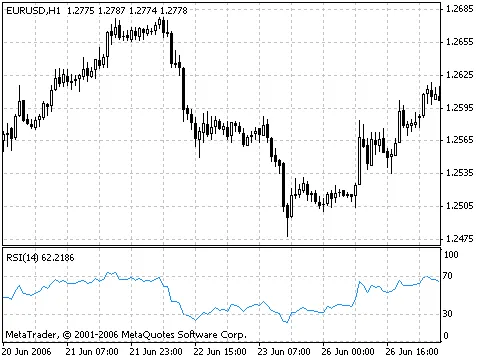
For a detailed breakdown of the RSI, check out the Technical analysis: Relative Strength Index.




Comments 0