
Unleash the Power of the Point-and-Figure Indicator on MetaTrader 5! This nifty tool allows you to plot a point-and-figure chart right in the main window of your usual MT5 chart setup. You can customize all the parameters of the point-and-figure method—like box size and reversal distance—just the way you like it. Plus, you have full control over the display settings for your PnF chart. And don't worry, this indicator supports all kinds of alerts and is based on real tick data, making it exclusive to MT5.
So, what’s the deal with point-and-figure charting? Well, it’s an alternative way to visualize price changes that skips the clock and focuses solely on significant shifts in exchange rates. The term “significant” is totally up to you, depending on your trading goals and strategies.
Input Parameters
- BoxSize (default = 60) — This is the box size in points. For a new X or O to appear on the chart, the price must exceed this value.
- Reversal (default = 3) — This refers to the number of boxes needed for a reversal. The price must reverse by this number of box sizes before the chart switches from X's to O's or the other way around.
- Days (default = 1) — This sets the number of days for gathering real tick data to create the initial point-and-figure chart. More days mean more data but also require more computing power.
- PriceToUse (default = Bid) — This determines which price to use for building the point-and-figure chart:
- Bid — The chart is based on the Bid price.
- Ask — The chart uses the Ask price.
- Midprice — This is the average between the Bid and Ask prices.
- Bid/Ask — X's are based on the Bid price, while O's come from the Ask price.
- AlertOnXO (default = false) — If set to true, alerts will be triggered whenever a new X or O is printed.
- AlertOnReversal (default = false) — If true, alerts will be sent when the point-and-figure chart reverses from a column of X's to O's or vice versa.
- EnableNativeAlerts (default = false) — If true, a native MetaTrader popup alert will be triggered for the above conditions.
- EnableEmailAlerts (default = false) — If true, an email will be sent for alerts. Make sure your email settings are configured in MetaTrader under Tools->Options->Email.
- EnablePushAlerts (default = false) — If true, notifications will be sent for alerts. Ensure your notification settings are done in MetaTrader under Tools->Options->Notifications.
- ColorUp (default = clrGreen) — This color is for the rising point-and-figure symbols (X's).
- ColorDown (default = clrRed) — This color represents the declining point-and-figure symbols (O's).
- FontSize (default = 15) — This sets the font size for the chart symbols (X's and O's).
- Font (default = "Arial") — This is the font used for the chart symbols.
- X (default = "x") — The symbol used to indicate rising price levels.
- O (default = "o") — The symbol used to indicate declining price levels.
- SilentMode (default = true) — If false, details about each printed X and O will appear in the Experts tab of the Toolbox subwindow.
- MaxObjects (default = 10000) — This sets the maximum number of chart objects (X's and O's) the indicator can create. Use this to prevent overloading your platform with incorrect settings.
- ObjectPrefix (default = "PNF-") — This is a prefix for chart objects for compatibility with other indicators.
Example
Check out the image below, which illustrates 4 days of EUR/USD price action condensed into 47 columns of X's and O's with the Point-and-Figure indicator in MT5. The box size is set to 60 points (or 6 pips) with a reversal of 3.
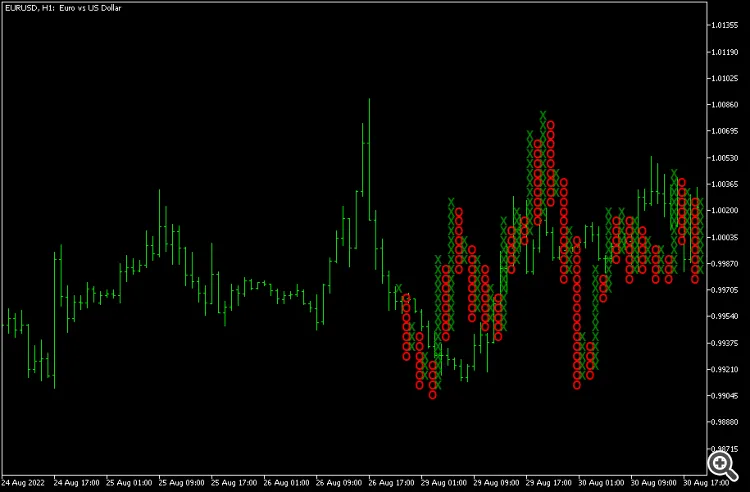
Point-and-figure charts still allow for classic support and resistance and trendline analysis. Some traders even dive into PnF chart patterns, like pennants, triangles, and double tops and bottoms.
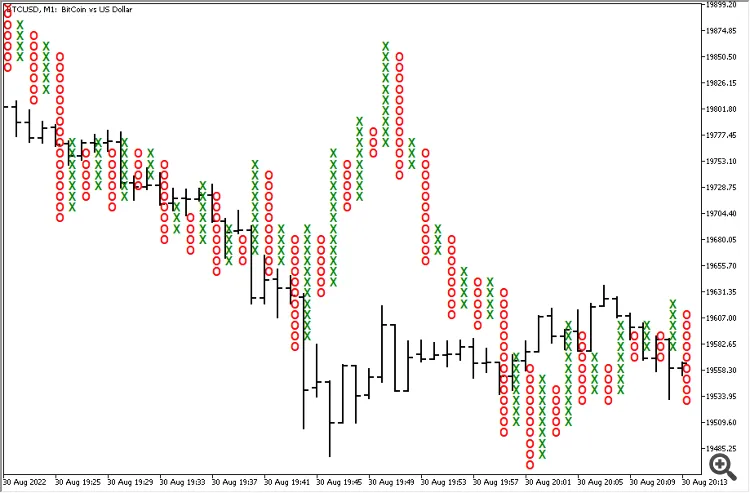
Here’s a quick video showing the Point-and-Figure MT5 indicator plotting a chart for the BTC/USD pair using a $10 (1000 points) box size and a reversal value set to 3:




Comments 0