
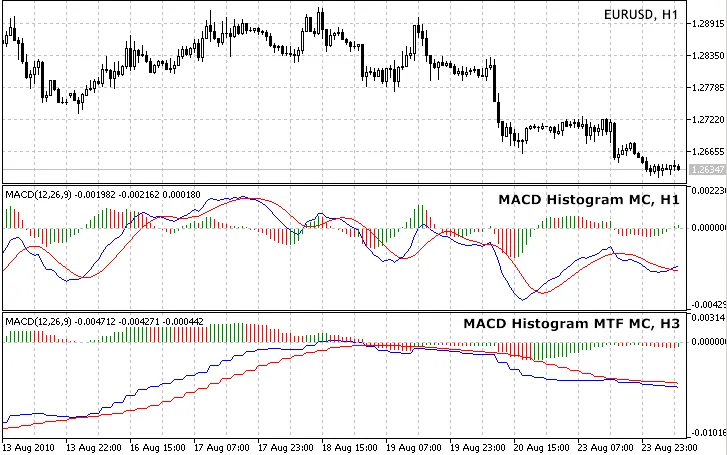
If you're looking to enhance your trading strategy, the MACD Histogram is a versatile tool that you can apply across various timeframes, whether you're dealing with short or long-term charts.
This indicator calculates values based on the common price types. However, when using it on a shorter timeframe than the current chart's timeframe, not all values can be displayed. Instead, depending on your chosen price type, the indicator adapts to provide the most relevant information.
Here are two scenarios to illustrate this:
- Scenario 1: timeframe_1 = 5 minutes, timeframe_2 = 1 minute, calculations based on Close price series:
For each bar on timeframe_1, the indicator will show the most recent bar from timeframe_2 that has a Close time equal to or earlier than the Close time of the bar on timeframe_1. This applies to both closed bars and the currently open bar.
- Scenario 2: timeframe_1 = 5 minutes, timeframe_2 = 1 minute, calculations based on Open price series:
In this case, the indicator will display the latest bar from timeframe_2 that has an opening time equal to or before the Open time of the bar on timeframe_1. This logic assumes that if you're calculating indicators based on the Open time, you likely trade when a new bar opens. So, at the start of a new 5-minute bar, you'll only see the Open of the first of the five 1-minute bars that make it up, ignoring the Opens of the remaining bars.
Feel free to mix and match different timeframes, even if they don't align, such as timeframe_1 = 5 minutes and timeframe_2 = 12 minutes. The indicator seamlessly keeps everything in sync, using similar logic as discussed above.
To help you get a clearer picture, I’ve attached an Excel sheet (Conversion between timeframes.zip) that outlines all possible combinations along with a visual explanation. Don't forget to check out the source code for additional insights, which should help you create your own multi-timeframe indicators.
Pro Tip: When switching between timeframes, allow a few seconds for the price data to load. If the indicator doesn’t display immediately, just refresh the chart manually.
Requirements:
- MovingAverages.mqh (this is a default file located in terminal_data_folder\MQL5\Include)
- MACD_Histogram_MC (also available on mql5.com)
Make sure to place both MACD Histogram_MTF_MC.mq5 and MACD_Histogram_MC.mq5 in the terminal_data_folder\MQL5\Indicators for the indicator to function properly.
You can also check the source code to enable or disable error messages for debugging purposes:
bool ShowErrorMessages=false; // turn on/off error messages for debugging
Update History:
2010 09 26: v03
- Improved value display on smaller timeframes;
- Set buffers to EMPTY_VALUE instead of zero after: if(convertedTime<tempTimeArray_TF2[0]);
- Optimized code for better performance;
- Removed PLOT_DRAW_BEGIN from OnInit() - an inherited feature from single timeframe indicators;
- Moved ArraySetAsSeries of buffers and arrays into OnInit();
- Added MODE_SMMA and MODE_LWMA as MA methods for the Signal line;
- Adjusted ENUM_APPLIED_PRICE to be the last input parameter on the list;
2010 08 28: v02B
- Indicator was first published;
Related Posts
- Mastering the MACD Candle Indicator for MetaTrader 4
- Unlocking MetaCOT 2: Your Ultimate CFTC Indicator Toolkit for MT4
- Unlocking the Power of Master Tools for MetaTrader 4
- Unlock Trading Insights with Volume Profile + Range v6.0 for MetaTrader 5
- Unlock Trading Success with Custom MACD: Real-Time Alerts for Your Phone