
If you're trading on MetaTrader 4, you might have heard about the Level Indicator. This handy tool can enhance your trading strategy by sending you alerts when price levels are crossed. Let’s break down how it works and how you can make the most of it.
How the Level Indicator Works
The Level Indicator allows you to set a trigger level (referred to as trigLv) in the settings. When the price crosses this level, the indicator will notify you via a push notification on your mobile device, provided you have enabled the notification parameter. Additionally, if the alert option is turned on, it will play an alert sound to grab your attention.
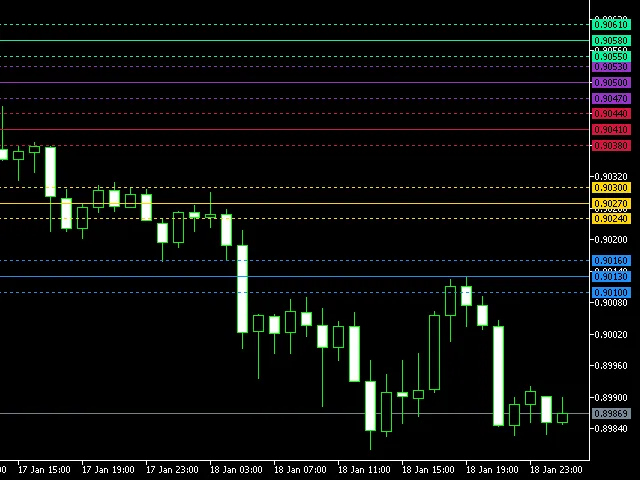
The trigLv and the specified deviation limits are visually represented on your chart with horizontal lines. You can customize the style, color, and thickness of these lines in the settings. This means you can add multiple instances of the indicator at different levels, allowing you to receive signals based on their intersections.
A Key Feature: One Trigger per Bar
One of the standout features of this indicator is that it only triggers once per bar. This design helps prevent the annoyance of too many alerts firing on every tick, ensuring that your notifications are meaningful and not overwhelming.
Getting Started with the Level Indicator
To integrate the Level Indicator into your trading routine, follow these simple steps:
- Install the Level Indicator on your MetaTrader 4 platform.
- Configure the trigLv to your desired price level.
- Set the deviation to define how close the price needs to be to trigger the alert.
- Customize the visual settings to suit your trading style.
In summary, the Level Indicator can be a game changer for your trading strategy on MetaTrader 4. With its customizable alerts and visual cues, it enhances your awareness of market movements, helping you make informed trading decisions.




Comments 0