
Updated Version.
Let’s dive right in!
If you’re a fan of the Cross Moving Average and, as a fellow trader, you’re always on the lookout for the simplest solutions, you might have heard that "there's no magic setting for cross MA." This indicator takes a good look at a range of settings every time the time frame, symbol, or even each new candle changes. It operates by analyzing the last 100 candles or so and selects the settings that show the most promise. Essentially, it measures the distance between a short and a long signal, as if anyone were trading this without a stop loss, and it factors in the spread too.
The lower window displays the distance between the short and long Moving Averages; positive values indicate long trades, while negative values signal short trades measured in pips. With the help of the "Profit Oscillator," you can close a trade in profit by checking if the short/long trades have reached a maximum difference and then exiting just before that peak.
The upper line indicates "Profit today with MA 5/19 is 60 pips." The indicator, or you as the user, have chosen 5 for the fast MA and 19 for the slow MA. The next field showcases the results from yesterday, followed by a signal to go Long or Short. Many traders find it helpful to overlay two moving averages on their charts and set them to these specified values.
I’m continuously exploring various MA recommendations in literature.
Parameters
- PeriodShort=6;
Fast MA period. Ignore if optimization is true. - PeriodLong=40;
Slow MA period. Ignore if optimization is true. - Method=0;
Method for iMA. - Optimize=true;
The indicator automatically selects values for the fast and slow MAs. - DrawTriangles=true;
Draw triangles on the chart. - MinShortMA=2;
MaxShortMA=20;
MaxLongMA=100;
Minimum and maximum values for optimization; it will test values between 2 and 20 for the fast MA and 7 to 100 for the slow MA. - StepLongMA=5;
StepShortMA=5;
To speed up the search, it tests every third value. - CountOptimize=200;
Analyzes 200 candles from the past. The more candles analyzed, the slower it gets; a bigger number may also yield less reliable results. - OptimizeOnNewCandle=false;
Start optimization on each new candle. Note: Optimization can take time and may slow down your terminal. - Alarm=true;
Alerts you when a new signal arises.
Next on my agenda is to create an Expert Advisor (EA) based on this, but I’m still figuring out how to detect sideways trends, which shouldn’t be traded with the Cross MA. So far, my EA has had its ups and downs; sometimes it makes fantastic gains, only to lose them the next day.
New Features
The indicator now draws moving averages directly onto the chart, while the "Profit Oscillator" resides in a different indicator (MAProfit2), and both communicate using global variables.
It also supports MA Channels (check out the eBook at www.vnchanger.org). The slow moving average is divided into two lines, one for low and one for high values, helping mitigate losses in sideways markets.
Instead of testing every combination, it can now test specific MA ranges based on literature. To do this, set OptimizeAll to false and OptimizeSystems to true.
You can add or modify the systems table, but make sure to terminate it with 0,0,0,0,0,0.
extern bool OptimizeAll=false;
extern bool OptimizeSystems=true;
int Systems[] = {PRICE_MEDIAN,MODE_SMA,50, PRICE_MEDIAN,MODE_SMA,200,
PRICE_MEDIAN,MODE_SMA,50, PRICE_MEDIAN,MODE_SMA,100, // Death Cross
PRICE_MEDIAN,MODE_SMA,10, PRICE_MEDIAN,MODE_SMA,40,
PRICE_MEDIAN,MODE_SMA,13, PRICE_MEDIAN,MODE_SMA,26,
PRICE_MEDIAN,MODE_SMA,5, PRICE_MEDIAN,MODE_SMA,10,
PRICE_CLOSE, MODE_EMA,5, PRICE_OPEN, MODE_EMA,6,
PRICE_MEDIAN,MODE_SMA,3, PRICE_MEDIAN,MODE_SMA,8,
0,0,0,0,0,0};
New alerts can now be set as voice notifications. To use this feature, you’ll need to download gSpeak, which you can find at https://www.mql5.com/en/code/8621.
If you’d rather not use voice alerts, you’ll need to modify the code by removing the lines from #import "speak.dll" until #import and uncommenting the gSpeak function. A big shoutout to the author for this fantastic DLL!
void gRate(int rate);
void gVolume(int rate);
void gPitch(int rate);
void gSpeak(string text);
#import
// If you don’t have (or want) the speak.dll, uncomment this
/*
void gSpeak(string x)
{
}
*/
Be warned: If you keep the voice alerts, you might just find yourself loving “Uncle Sam’s” voice after a few profitable trades!
On the first run or whenever parameters change, the indicator remembers the candle on the first trade, which helps prevent repainting old trades with new ones.
The triangles now come in three colors: Green for long trades, Red for short trades, and Violet for trades that incurred a loss (whether long or short). You can modify the colors in the source code:
int ColorShortTrade = Red;
int ColorBadTrade = Violet;
The steps in MA Optimization have been set to 5, and the internal name of this indicator has been changed to SMA (Smart Ass ... it shows how you should have traded afterward).
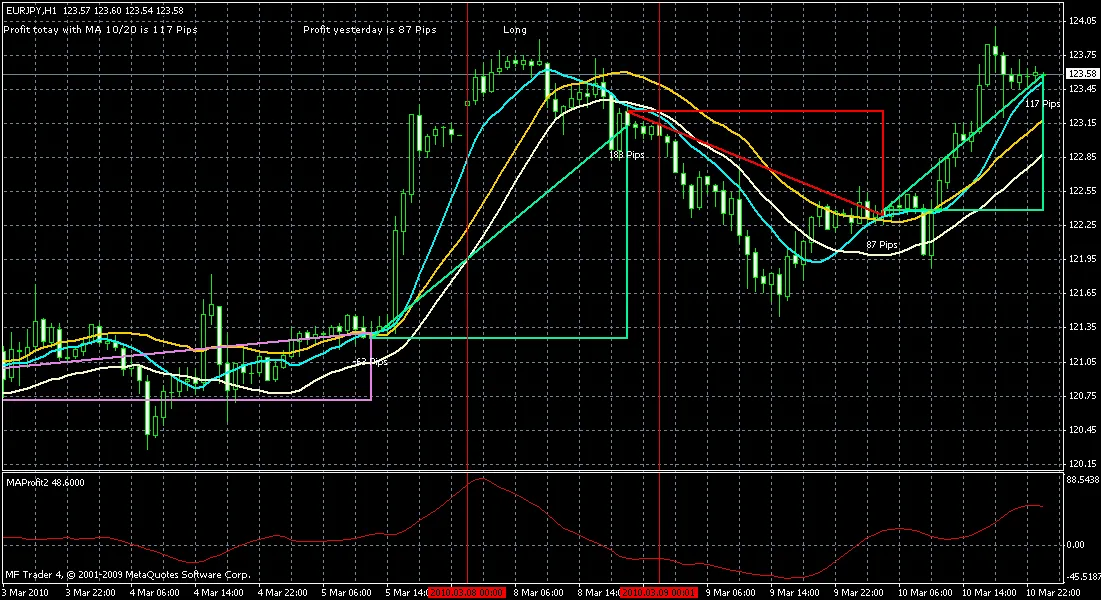
MA Optimizer
Related Posts
- Unlocking MetaCOT 2: Your Ultimate CFTC Indicator Toolkit for MT4
- Unlocking the Power of Master Tools for MetaTrader 4
- Mastering the Open Range Breakout Indicator for MetaTrader 5
- Unlock Trading Insights with Volume Profile + Range v6.0 for MetaTrader 5
- ID Lite Info MA: A Comprehensive Indicator for MetaTrader 5