
Understanding the BMA Indicator in MetaTrader
The Band Moving Average (BMA) indicator, designed for MetaTrader 4 (MT4) and MetaTrader 5 (MT5), is a handy tool that combines the classic moving average with an innovative twist inspired by our trading community. This indicator features three lines on your chart: the central line represents the standard moving average (which can be simple, exponential, or weighted), the upper line is set 2% above the central line, and the lower line is set 2% below. These additional lines act as key support and resistance levels, guiding your trading decisions.
Input Parameters
- MA_Period (default = 49) — This sets the period for the central moving average.
- MA_Shift (default = 0) — This adjusts the horizontal placement of all lines on the chart.
- MA_Method (default = Simple) — Choose your preferred method for drawing the moving average.
- Percentage (default = 2) — This determines how far the upper and lower bands are shifted vertically from the central line.
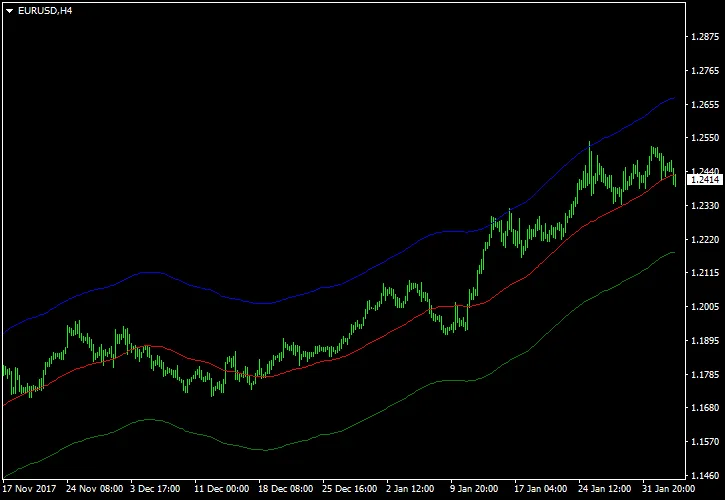
For optimal results, apply the BMA indicator to the EUR/USD H4 chart. A good strategy is to sell when the price hits the upper band and buy when it reaches the lower band. Just a heads up, it's wise to set a moderate stop-loss level in both scenarios, as prices can sometimes breach these levels or the lines may change direction unexpectedly.




Comments 0