
If you're into trading, you've probably heard of the ZigZag indicator. It's a solid foundation for automating your technical analysis. Today, let’s dive into the ZZLevels indicator, which takes the Simple ZigZag a step further by identifying flat boundaries and support and resistance levels.
The automation of graphical constructions, whether they’re straightforward like channels or more complex like Fibonacci grids, hinges on defining what we call a "refined movement." This means tracking price movements from local minimums to local maximums and vice versa.
I previously introduced a simple algorithm for identifying local highs and lows, which you can find in my Simple ZigZag post. The beauty of the Simple ZigZag lies in its straightforward and fast algorithm, plus it features just one key parameter: the typical correction depth.
The ZZLevels indicator builds on this concept, automating the analytical ZigZag constructions. Specifically, it implements a user-friendly algorithm that pinpoints trading range borders and key support and resistance levels.
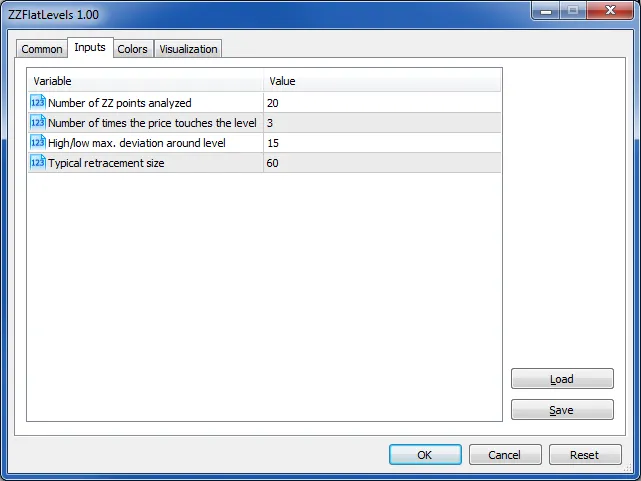
Here are the main inputs you'll want to adjust:
- Number of ZZ points analyzed: This refers to the count of non-zero values from the Simple ZigZag indicator buffer that the algorithm analyzes. Essentially, it gauges how deep into the historical data the indicator will search for levels. Use this to find long-lasting levels.
- Number of times the price touches the level: This parameter tracks how often the price interacts with a given level. Remember, the more frequently the price touches a level, the more significant it is in terms of technical analysis.
- High/Low max deviation around level: This controls the precision of the level detection. Since prices can occasionally "pierce" a level or bounce off just before hitting it, you’ll want to set this parameter to help the indicator accurately monitor level touches.
- Typical retracement size: This is inherited from the parent indicator, the Simple ZigZag.
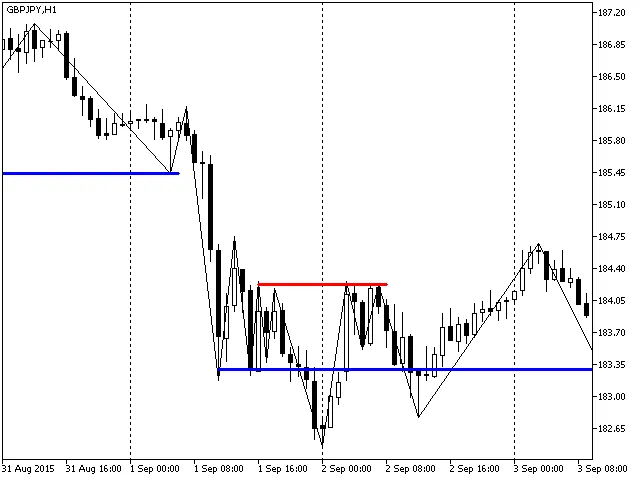
As it stands, the ZZLevels indicator isn't quite ready for automated trading just yet. However, it does a fantastic job illustrating how we can automate graphic plots for technical analysis with some simple algorithms focused on identifying local highs and lows. Plus, it’s a handy tool for finding range borders and support/resistance levels when you're trading manually.
Related Posts
- Unlocking MetaCOT 2: Your Ultimate CFTC Indicator Toolkit for MT4
- Unlocking the Power of Master Tools for MetaTrader 4
- Unlock Trading Insights with Volume Profile + Range v6.0 for MetaTrader 5
- Mastering the Open Range Breakout Indicator for MetaTrader 5
- Unlocking the Professional ZigZag Indicator for MetaTrader 5