
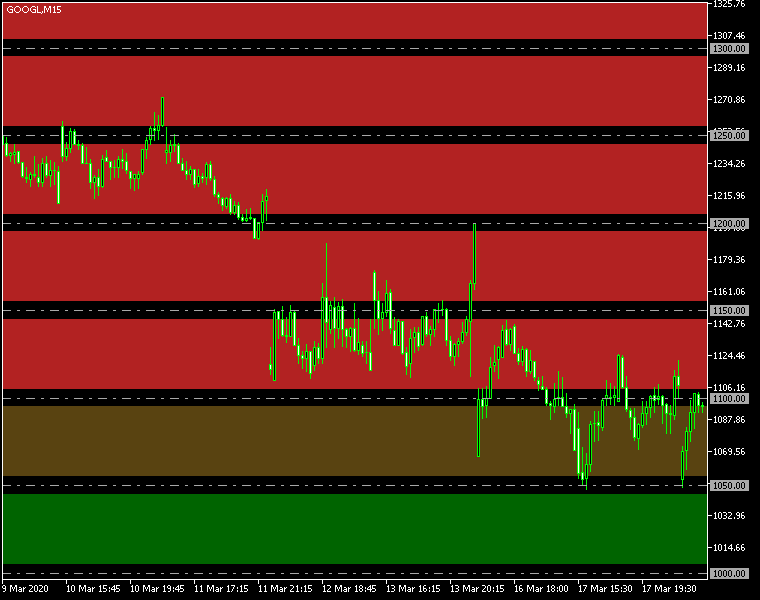
Unlock Your Trading Potential with the Round Levels Indicator for MetaTrader 5 – This handy tool is designed to help you identify key round levels and the zones surrounding them, perfectly tailored to your trading strategy. Understanding these psychological support and resistance levels can give you an edge in your trades. Plus, it can send you alerts when the price hits these crucial zones, ensuring you never miss a trading opportunity!
Input Parameters You Need to Know
- Levels (default = 5) — This sets the number of round levels the indicator will analyze in both upward and downward directions.
- Interval (default = 50) — This determines the spacing in points between round levels. So, with a default of 50, you'll see a level drawn every 50 points.
- Zone Width (default = 10) — This controls the width of the zone in points, giving you a clear visual of the area around each round level.
- Color Up (default = clrFireBrick) — This sets the color for the round level zones above the current price, making it easy to spot potential resistance areas.
- Color Down (default = clrDarkGreen) — This sets the color for the zones below the current price, marking potential support areas.
- Invert Zones (default = false) — When enabled, this option highlights areas outside the zone boundaries, giving you a different perspective on market movements.
- Zones As Background (default = true) — If activated, the round number zones will be displayed behind your chart, allowing for a cleaner view of your price action.
- Draw Lines (default = false) — Enable this to draw lines at each round level, in addition to the zones, for added clarity.
- Line Color (default = clrDarkGray) — This sets the color for the lines representing the round levels.
- Line Width (default = 1) — This controls the thickness of the round level lines for better visibility.
- Line Style (default = STYLE_DASHDOT) — Choose the style of the round level lines to suit your preferences.
- Lines as Background (default = false) — If set to true, the round number lines will appear behind your chart plot.
- Show Line Labels (default = false) — Enabling this option will display labels indicating the price level of each line.
- Line Label Color (default = clrWhite) — This sets the color for the line labels, ensuring they stand out against your chart.
- Object Prefix (default = 'RoundLevels') — This prefix is added to the names of the chart objects. Change it only if there's a conflict with other indicators.
- Enable Notify (default = false) — When true, the indicator will send notifications when the price enters a zone.
- Send Alert (default = true) — If notifications are enabled, this allows the indicator to generate built-in popup alerts.
- Send App (default = false) — This option allows for push notifications to be sent to your mobile device if enabled.
- Send Email (default = false) — Enable this to receive email alerts when the price hits the zones.
- Alert Delay (default = 5) — This sets the time delay in seconds between consecutive alerts for better management.




Comments 0