
Description
The CMomentumOnRingBuffer class is crafted for calculating the technical indicator Momentum using the ring buffer algorithm. This tool is a game changer for traders looking to enhance their technical analysis.
Declaration
class CMomentumOnRingBuffer : public CArrayRing
Title
#include <IncOnRingBuffer\CMomentumOnRingBuffer.mqh>Make sure to place the CMomentumOnRingBuffer.mqh file in the IncOnRingBuffer folder located in MQL5\Include\. Two example files using this class are also included in the folder description. Don’t forget to have the ring buffer class in the same directory.
Class Methods
//--- initialization method:
bool Init(                  // returns false on error, true if successful
   int  period      = 14,   // Momentum period
   int  size_buffer = 256,  // Size of the ring buffer
   bool as_series   = false // true if time series, otherwise false
   );
//--- calculation method based on a time series or indicator buffer:
int MainOnArray(                  // returns number of processed elements
   const int     rates_total,     // size of the array
   const int     prev_calculated, // processed elements on previous call
   const double& array[],         // input data array
   );
//--- calculation method based on separate series elements of the array
double MainOnValue(              // returns Momentum value for the set element
   const int    rates_total,      // size of the array
   const int    prev_calculated,  // processed elements
   const int    begin,            // starting point of significant data
   const long   value,           // element value of the array
   const int    index             // element index
   );
//--- data access methods:
int                 BarsRequired(); // Returns necessary bars to draw the indicator
string              Name();         // Returns indicator name
int                 Period();       // Returns period
int                 Size();         // Returns size of the ring buffer
You can retrieve the indicator’s calculated data from the ring buffer just like a regular array. For example:
//--- class with Momentum calculation methods:
#include <IncOnRingBuffer\CMomentumOnRingBuffer.mqh>
CMomentumOnRingBuffer momentum;

...
//+------------------------------------------------------------------+
//| Custom indicator iteration function                              |
//+------------------------------------------------------------------+
int OnCalculate (const int rates_total,      // size of the price array
                 const int prev_calculated,  // processed bars on previous call
                 const int begin,            // starting point of significant data
                 const double& price[])      // array for calculation
  {
//--- indicator calculation based on time series:
   momentum.MainOnArray(rates_total,prev_calculated,price);

...
//--- use the data from the "momentum" ring buffer,
//    for example, copy the data to the indicator buffer:
   for(int i=start;i<rates_total && !IsStopped();i++)
      Momentum_Buffer[i] = momentum[rates_total-1-i]; // the indicator line

...
//--- return value of prev_calculated for next call:
   return(rates_total);
  }
Keep in mind, indexing in the ring buffer works the same way as in time series.
Examples
- The
Test_Momentum_OnArrayRB.mq5file calculates the indicator based on the price time series, showcasing theMainOnArray()method. - The
Test_Momentum_OnValueRB.mq5file demonstrates theMainOnValue()method. Initially, the Momentum indicator is calculated and displayed, followed by another Momentum indicator drawn based on the first ring buffer.
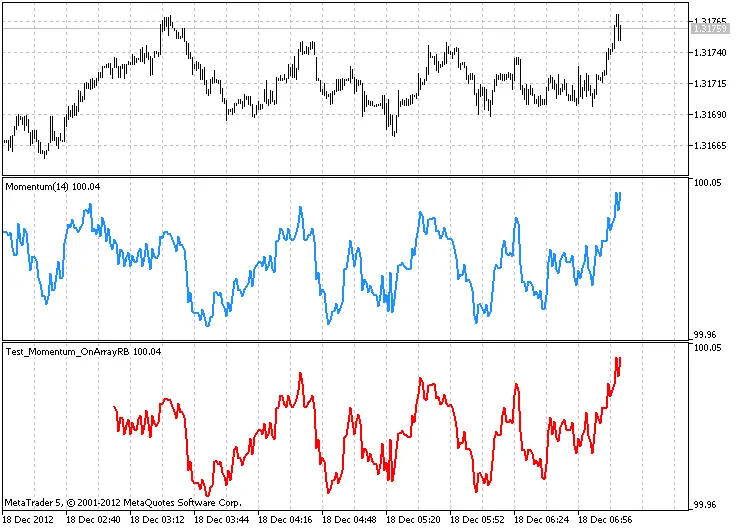
Output from the Test_Momentum_OnArrayRB.mq5 with a ring buffer size of 256 elements

Output from the Test_Momentum_OnValueRB.mq5 with a ring buffer size of 256 elements
In crafting this code, contributions from MetaQuotes Software Corp., Integer, and GODZILLA were utilized.
Related Posts
- Hourly Buffers for Data Collection in MetaTrader 5: A Simple Guide
- Unlocking MetaCOT 2: Your Ultimate CFTC Indicator Toolkit for MT4
- Mastering the MACD Candle Indicator for MetaTrader 4
- Unlocking the Power of Master Tools for MetaTrader 4
- Unlock Trading Insights with Volume Profile + Range v6.0 for MetaTrader 5