
Main Features
Candle Filtering:The Candle Filter indicator is a game-changer for your trading strategy. It lets you focus only on the candles that matter to you by filtering them based on specific criteria:
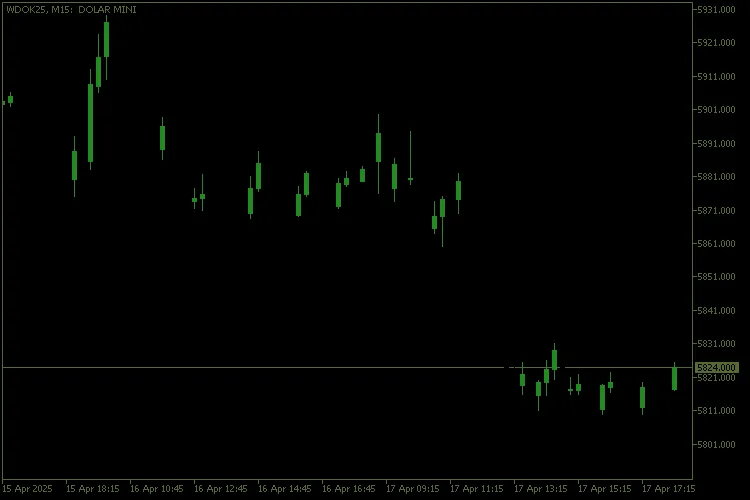
- Bullish: Only shows bullish candles.
- Bearish: Only shows bearish candles.
- Doji: Displays only Doji candles.
- All: Shows all candles in their respective colors.
Doji Candle Detection:
The Doji candle detection is driven by a customizable threshold (`InpDojiThreshold`). This setting defines the ratio between the candle's body and its overall range, ensuring you accurately spot those neutral candles.
Candle Color Customization:
As a trader, you can tailor the colors of each candle type to suit your preferences:
- Bullish: Default is green (`clrForestGreen`).
- Bearish: Default is dark red (`clrDarkRed`).
- Doji: Default is gold (`clrGold`).
- Background: Default is black (`clrBlack`).
Chart Cleaning:
The indicator cleans up your chart by removing unnecessary visual clutter, like grids and volume indicators. This helps you focus on the analysis without distractions.
How It Works:
1. Initialization (`OnInit`):
Buffers are set up to store Open, High, Low, Close (OHLC) values along with corresponding colors.
Custom colors are assigned to the indicator's color indices.
The chart is cleaned by removing any visual elements that could distract you.
2. Main Calculation (`OnCalculate`):
For each candle on the chart, the indicator checks if it meets your selected criteria (`InpCandleShow`).
Candles that don’t meet the criteria are shown in the background color (`InpBackgroundColor`).
Candles that do meet the criteria are highlighted with your custom colors.
3. Deinitialization (`OnDeinit`):
When you remove the indicator, it restores the original chart settings, bringing your trading environment back to its default state.
Usage Examples:
- Trend Analysis: Set `InpCandleShow` to `ShowBullish` or `ShowBearish` to focus on candles indicating an uptrend or downtrend.
- Identifying Neutral Zones: Use `ShowDoji` to highlight Doji candles and pinpoint potential reversal or consolidation areas.
- Full Visualization: Select `ShowAllCandle` to display every candle in its respective color for a comprehensive view of market behavior.
Improvements Implemented:
- Accurate Doji Detection: The configurable threshold (`InpDojiThreshold`) ensures that only genuine neutral candles are classified as Doji.
- Full Customization: You have complete control over the colors and background of your chart.
- Automatic Cleaning: The indicator removes unnecessary elements, enhancing chart readability.




Comments 0