
Author: Alejandro Galindo
Hey traders! If you’re looking to optimize your trading day, the TimeZones indicator for MetaTrader 5 is an absolute must-have. This handy tool draws four vertical colored lines on your chart every day, helping you visualize key trading sessions. Let’s dive into how you can customize it to fit your strategy.
Customizing Your TimeZones Indicator
You can easily adjust the line parameters in the settings to match your trading style. Here’s a quick rundown of the input parameters:
//+----------------------------------------------+
//| Indicator Input Parameters                  |
//+----------------------------------------------+
//--- Common Settings
input string LinesSirname="TimeZones";   // Line name
input uint WeeklyTotal=4;         // Number of weeks in the history
input uint FutureTotal=1;         // The number of lines in the future
//--- Day Bars Settings
input color Line_Color_D=clrRed;         // Color of the day line
input STYLE Line_Style_D=SOLID_;         // Style of the day line
input ENUM_WIDTH Line_Width_D=w_3;         // Width of the day line
input bool SetBackground_D=true;         // Background for day lines
//--- Intraday Bars GMT Settings
input Hour GMT=H02; //
input color Line_Color_D1=clrDodgerBlue; // Color of the GMT line
input STYLE Line_Style_D1=SOLID_;        // GMT line style
input ENUM_WIDTH Line_Width_D1=w_2;      // GMT line width
input bool SetBackground_D1=true;        // Background for GMT line
//--- Intraday Bars MST Settings
input Hour MST=H06; //
input color Line_Color_D2=clrLime       // Color of the MST line
input STYLE Line_Style_D2=SOLID_;        // Style of the MST line
input ENUM_WIDTH Line_Width_D2=w_2;      // Width of the MST line
input bool SetBackground_D2=true        // Background for MST line
//--- Intraday Bars EST Settings
input Hour EST=H07; //
input color Line_Color_D3=clrDarkOrchid; // Color of the EST line
input STYLE Line_Style_D3=SOLID_;        // Style of the EST line
input ENUM_WIDTH Line_Width_D3=w_2;      // Width of the EST line
input bool SetBackground_D3=true        // Background for EST line
Getting Started with TimeZones
Originally developed in MQL4, this indicator was first introduced in the Code Base on mql4.com back on September 28, 2007. It’s been a favorite among traders ever since!
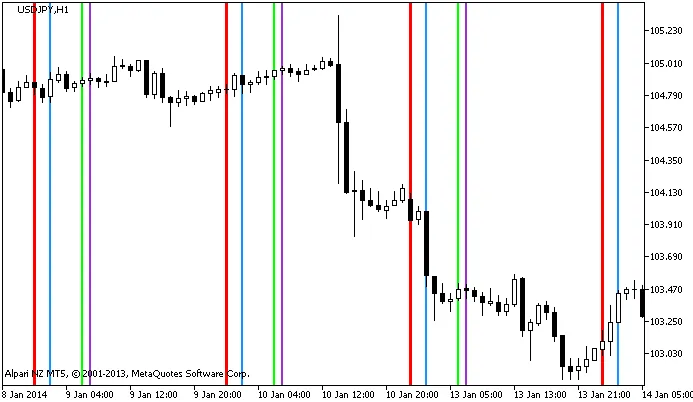
Figure 1. The TimeZones indicator
By integrating the TimeZones indicator into your trading strategy, you'll not only enhance your market awareness but also fine-tune your entry and exit points. Happy trading!
Related Posts
- Unlocking the Power of Master Tools for MetaTrader 4
- Unlocking MetaCOT 2: Your Ultimate CFTC Indicator Toolkit for MT4
- Mastering the Open Range Breakout Indicator for MetaTrader 5
- Unlock Trading Insights with Volume Profile + Range v6.0 for MetaTrader 5
- Unlocking Trading Insights with Volume Profile + Range v6.0 for MetaTrader 5