
Hey fellow traders! Today, I want to dive into a powerful Expert Advisor (EA) that combines two independent trading systems: SilverTrend_V2 and ColorJFatl_Digit. This EA is designed to adjust the size of future trades based on the outcomes of previous ones, allowing for smarter trading decisions.
The signals for opening trades are generated as a bar closes, especially when there's a trend change indicated by a shift in the color of either of these indicators.
Managing Trade Volumes
To help manage position sizes, we’ve included adjustable settings in the EA. For instance, when using the SilverTrend indicator:
inputuint A_BuyLossMMTriger=2; // Number of losing Buy positions to reduce MMinputuint A_SellLossMMTriger=2;// Number of losing Sell positions to reduce MMinputdouble A_SmallMM=0.01 // Share of the deposit in a deal when losinginputdouble A_MM=0.1 // Share of the deposit in a deal for normal trading
With these settings, if the last two trades were in the same direction, the EA will open the next trade in that direction with a lot size as low as 0.01. If at least one of those trades is profitable, the position volume will increase to 0.1.
Identical Settings for ColorJFatl_Digit
The inputs for the trading system utilizing ColorJFatl_Digit are set up similarly:
inputuint B_BuyLossMMTriger=2 // Number of losing Buy positions to reduce MMinputuint B_SellLossMMTriger=2;// Number of losing Sell positions to reduce MMinputdouble B_SmallMM=0.01 // Share of the deposit in a deal when losinginputdouble B_MM=0.01 // Share of the deposit in a deal when losing
For the EA to function properly, make sure that the compiled files SilverTrend.ex5 and ColorJFatl_Digit.ex5 are located in your <terminal_data_directory>\MQL5\Indicators folder.
Testing Insights
In the tests shown below, we used the EA's default inputs along with stop-losses.
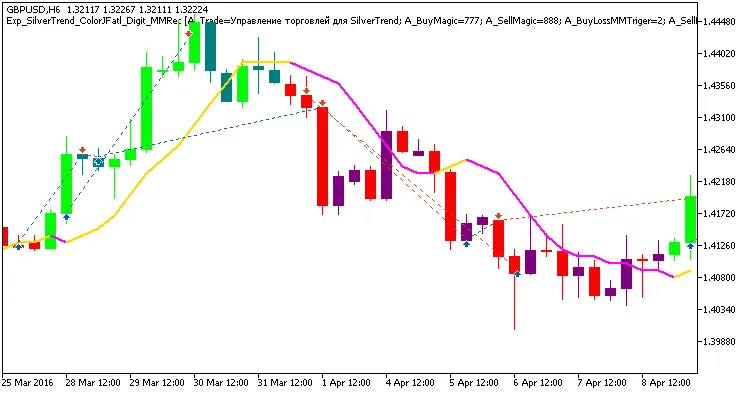
Fig 1. Exemplary trades in the chart
Here are the testing results for GBPUSD on H6 for the year 2016:
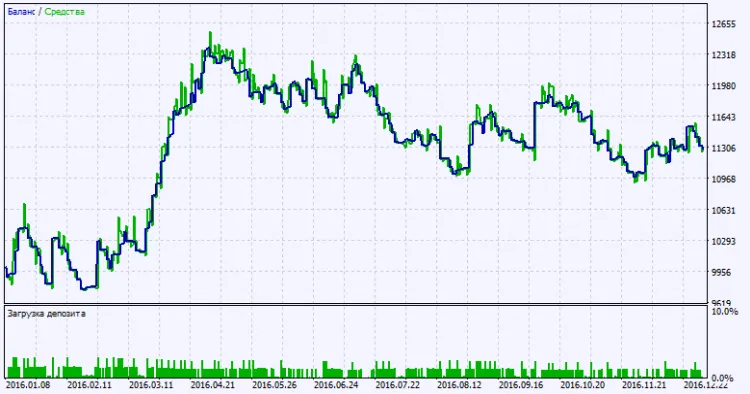
Fig. 2. Testing results chart




Comments 0