
If you're looking to ride the trend waves, the Exp_XPeriodCandle_X2 trading system is here to help. Built on the signals from two key indicators, XPeriodCandle, this system is designed to identify when to enter the market with precision.
The first indicator gives you the lay of the land by determining the direction of the slow trend based on the color of the most recent candlestick. Meanwhile, the second indicator signals the perfect moment to make your trade when there's a color change in the candlestick. You'll get a solid signal when the following two conditions align:
- The signals from both the fast and slow trends agree.
- The direction of the fast trend shifts.
Input Parameters for the EA
//+-------------------------------------------------+//| Input parameters of the EA indicator |//+-------------------------------------------------+sinputstring Trade="Trade Management"; //+============== TRADE MANAGEMENT ==============+inputdouble MM=0.1; //Share of deposit in a tradeinput MarginMode MMMode=LOT; //Method for determining lot valuesinputuint StopLoss_=1000; //Stop Loss in pointsinputuint TakeProfit_=2000; //Take Profit in pointssinputstring MustTrade="Trade Permissions"; //+============== TRADE PERMISSIONS ==============+inputint Deviation_=10; //Max price deviation in pointsinputbool BuyPosOpen=true; //Permission to open long positionsinputbool SellPosOpen=true; //Permission to open short positions//+-------------------------------------------------+//| Input parameters for the filter indicator |//+-------------------------------------------------+sinputstring Filter="SLOW TREND PARAMETERS"; //+============== TREND PARAMETERS ==============+inputENUM_TIMEFRAMES TimeFrame=PERIOD_H6; //Chart period for the trendinputuint Cperiod=5; //Candlestick calculation periodinputint MA_Length=3; //Smoothing depthinputint MA_Phase=100; //Smoothing parameterinputuint SignalBar=1; //Bar number to receive the entry signalinputbool BuyPosClose=true; //Permission to close long positions by trendinputbool SellPosClose=true; //Permission to close short positions by trend//+-------------------------------------------------+//| Input parameters of the entry indicator |//+-------------------------------------------------+sinputstring Input="ENTRY PARAMETERS"; //+=============== ENTRY PARAMETERS ===============+inputENUM_TIMEFRAMES TimeFrame_=PERIOD_M30; //Chart period for entryinputuint Cperiod_=5; //Candlestick calculation periodinputint MA_Length_=3; //Smoothing depthinputint MA_Phase_=100; //Smoothing parameterinputuint SignalBar_=1; //Bar number to receive an entry signalinputbool BuyPosClose_=false; //Permission to close long positions by signalinputbool SellPosClose_=false; //Permission to close short positions by signal//+-------------------------------------------------+
The string parameters in the input settings help enhance the user experience and make navigating the EA easier.
The indicators XPeriodCandle_HTF used in the EA are solely for convenient trend visualization during backtesting and won't operate in any other mode.
To ensure your EA runs smoothly, make sure that the compiled indicator files XPeriodCandle.ex5 and XPeriodCandle_HTF.ex5 are located in the <terminal_data_directory>\MQL5\Indicators folder.
Also, don't forget that the TradeAlgorithms.mqh library file enables the use of Expert Advisors with brokers offering nonzero spreads and allows you to set Stop Loss and Take Profit simultaneously with position opening.
The testing results below were based on the default input parameters of the Expert Advisor. During these tests, Stop Loss and Take Profit were not applied.
Here's a look at the performance on XAUUSD for the year 2016, utilizing a slow trend on Daily and entering via a fast trend on H1:
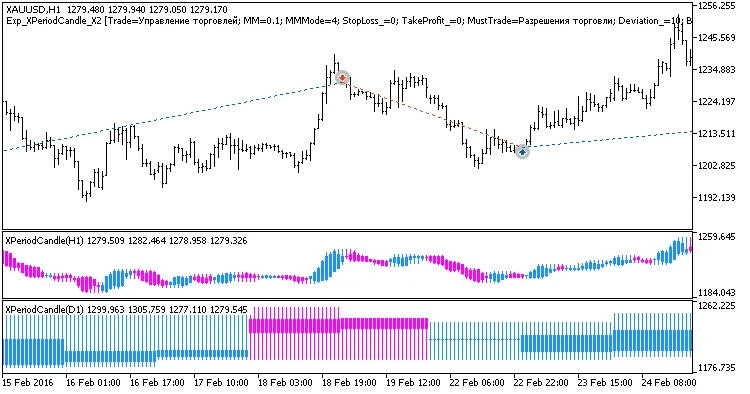
Fig 1. Examples of deals on the chart
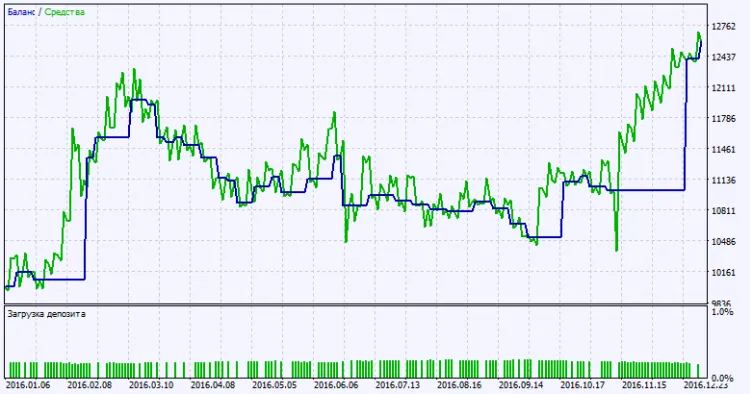
Fig. 2. Testing results chart




Comments 0