
Trading Strategy
Let’s dive into the RSI Dual Cloud EA, a nifty tool designed for MetaTrader 5. This Expert Advisor (EA) harnesses a custom indicator known as RSI Dual Cloud. It generates four key types of signals:
- Entry into the zone
- Staying in the zone
- Exiting the zone
- Crossing lines
For 'BUY' signals, the trading zone is established below the levels of RSI Fast and Slow: Level DOWN. Conversely, 'SELL' signals are triggered above the RSI Fast and Slow: Level UP.
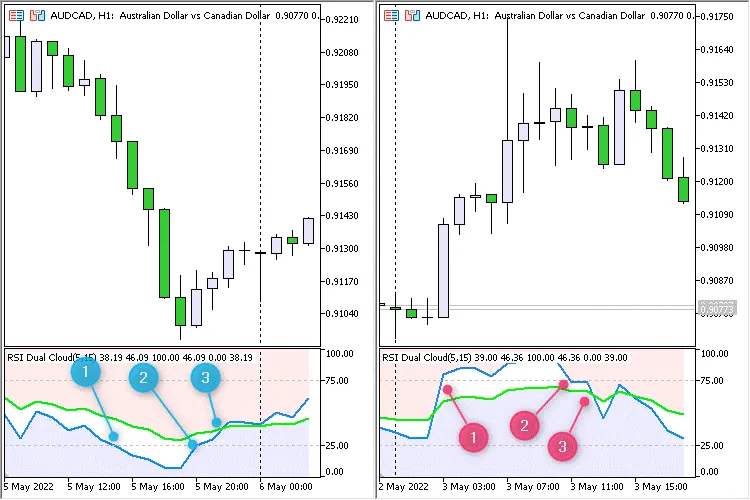
Figure 1: RSI Dual Cloud EA
Parameter Groups Overview
Trading Settings
This EA is highly customizable! You can optimize it using the Working Timeframe parameter, which determines the timeframe for the bar #1 (on a new bar) mode. Stop Loss (SL) and Take Profit (TP) are measured in Points; set either to '0' to disable. The trailing and signal search modes can operate in two ways: bar #0 (at every tick) for tick-based trading, or bar #1 (on a new bar) for new bar signals. The Maximum Number of Positions allows you to cap the number of open positions, while Minimum Step of Positions sets the required distance between positions in Points, regardless of the type of position.
Signals
Four distinct signals from the custom indicator can be toggled on or off as needed.
Trailing
In the Trailing section, all parameters are set in Points. Trailing functionality activates ONLY for profitable positions! The Trailing activate if profit is >= parameter acts as a breakeven point, also measured in Points. To disable trailing, simply set the Trailing Stop parameter to '0'.
Position Size Management (Lot Calculation)
Your lot size can be either fixed (set Money Management to Constant Lot and specify the lot size) or dynamic (using a percentage risk per trade by setting Money Management to Risk in Percent for a Deal and defining the risk percentage). You can even set a constant lot equal to the minimum lot by adjusting Money Management to Lots Min.
Trade Mode
This setting determines the permissible trading direction and can be set to Only BUY positions allowed, Only SELL positions allowed, or Both BUY and SELL positions allowed.
Time Control
This feature sets a specific time range for signal searches. Activate it via Use Time Control and define your signal search interval between Start Hour:Start Minute and End Hour:End Minute. This time range can span across the day and won't affect trailing.
Additional Features
Enabling the flag Positions: Only one (set to true) restricts the EA to just one position in the market.
WARNING: Setting Positions: Only one to true will not override Positions: Close opposite set to true! This means that any opposite position(s) will be closed first.
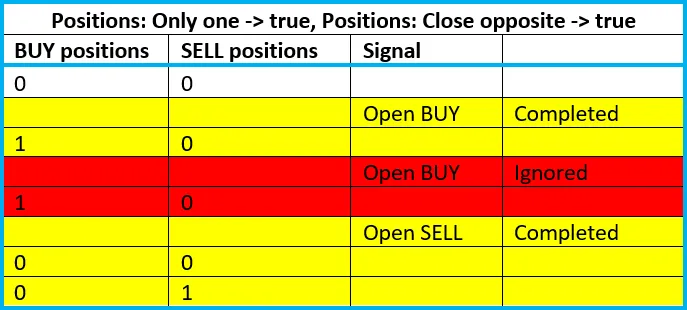
The Positions: Reverse flag manages signal reversals. The Positions: Close opposite flag ensures that any opposite positions are closed before opening a new one when set to true. The Print Log option provides a detailed log of all actions taken. Additionally, the Freeze and StopsLevels Coefficient parameter adjusts the coefficient for stop and freeze levels if they are equal to zero; the recommended value is '3'.




Comments 0