
Hey traders! If you're looking to boost your trading game, let me introduce you to the Exp_ColorZerolagMomentum_X2—a fantastic trend trading system that leverages signals from two ColorZerolagMomentum indicators. This system is designed to help you identify market trends and make informed trading decisions.
How It Works
The first ColorZerolagMomentum indicator helps determine the direction of the slow trend by analyzing the positions of the main and signal lines. The second indicator signals the perfect moment to open a trade, which occurs when these lines cross or touch.
This system generates a signal at the close of a bar, provided two key conditions are met:
- Signals from both the fast and slow trends align.
- The direction of the fast trend has changed.
Input Parameters for the Expert Advisor
Here's a quick rundown of the input parameters you can customize:
//| Input parameters of the EA indicator |
//+-------------------------------------------------+
inputstring Trade="Trade management"; inputdouble MM=0.1; // Share of deposit per trade
input MarginMode MMMode=LOT; // Lot size detection method
inputuint StopLoss_=1000; // Stop Loss in points
inputuint TakeProfit_=2000; // Take Profit in points
inputstring MustTrade="Trade permissions"; inputint Deviation_=10; // Max price deviation in points
inputbool BuyPosOpen=true; // Permission to open long position
inputbool SellPosOpen=true; // Permission to open short position
//+-------------------------------------------------+
Visualizing Trends with ColorZerolagMomentum Indicators
The ColorZerolagMomentum_HTF indicators included in this EA are primarily for visualizing trends in the strategy tester. They won't be active in other modes, so keep that in mind.
To get started, make sure you place ColorZerolagMomentum.ex5 and ColorZerolagMomentum_HTF.ex5 in the <terminal_data_folder>\MQL5\Indicators directory.
Once compiled, the Exp_ColorZerolagMomentum.ex5 file will contain these indicators as resources, meaning you don’t need to keep them in the terminal folder for the EA to function properly!
Testing Results
Below are the testing results for 2015 using GBPJPY, where the slow trend was analyzed on H6 and entry was based on the fast trend on M30:
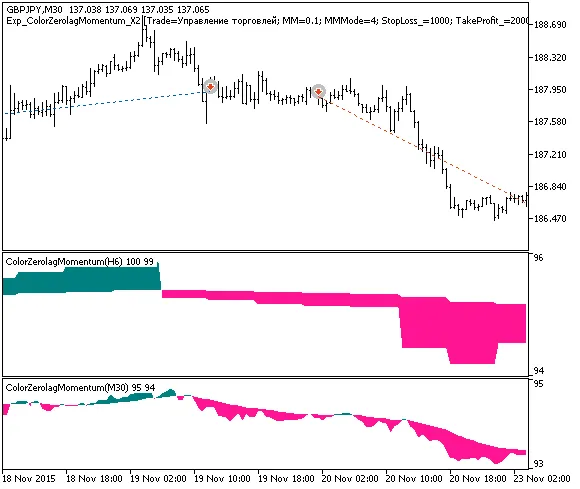
Fig. 1. Examples of deals on the chart
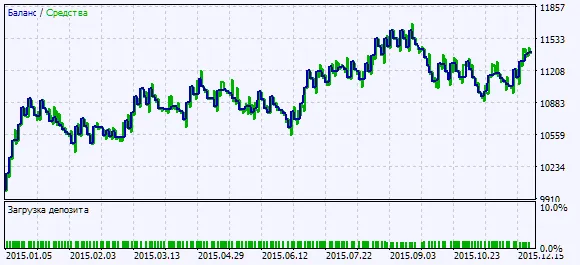
Fig. 2. Chart of testing results
Remember, the default input parameters were used during testing, and no Stop Loss or Take Profit settings were applied. If you're serious about taking your trading to the next level, give this EA a shot!




Comments 0