
Hey fellow traders! Today, I want to introduce you to a handy tool that can give your trading strategy a real boost: the Stalin_HTF_Signal Indicator. This powerful indicator helps you visualize trend directions and signals right on your MetaTrader 5 platform, providing clear graphical cues on your chart.
So, what does it do? Essentially, the Stalin_HTF_Signal shows you the trend direction at your chosen bar with color-coded indicators. If the trend continues, you'll see a star graphic in the corresponding color. However, if the trend shifts, it alerts you with a diagonal arrow that matches the new deal direction. Plus, it can trigger alerts and even play audio signals, ensuring you never miss a trading opportunity!
Input Parameters Breakdown
The input parameters for the Stalin_HTF_Signal can be categorized into three main groups:
- Indicator Settings:
inputstring Symbol_="";                   // Financial assetinputENUM_TIMEFRAMES Timeframe=PERIOD_H6; // Timeframe for calculating the indicatorinputENUM_MA_METHOD MAMethod=MODE_EMA;
inputint    MAShift=0;
inputint    Fast=14;
inputint    Slow=21;
inputint    RSI=17;
inputint    Confirm=0.0;
inputint    Flat=0.0;
- Visualization Settings:
//---- indicator display settingsinputuint SignalBar=0; // The bar number to get a signal (0 - current bar)inputstring Symbols_Sirname=INDICATOR_NAME"_Label_"; // Indicator labels nameinputcolor UpSymbol_Color=clrLime; // Uptrend symbol colorinputcolor DnSymbol_Color=clrRed; // Downtrend symbol colorinputcolor IndName_Color=clrDarkOrchid; // Indicator name colorinputuint Symbols_Size=60; // Signal symbols sizeinputuint Font_Size=10; // Indicator name font sizeinputint X_1=5; // Horizontal name offsetinputint Y_1=-15; // Vertical name offsetinputbool ShowIndName=true; // Display the indicator nameinputENUM_BASE_CORNER WhatCorner=CORNER_RIGHT_UPPER; // Location cornerinputuint X_=0; // Horizontal offsetinputuint Y_=20 // Vertical offset
- Alert and Audio Settings:
//---- Alert Settingsinput ENUM_ALERT_MODE alert_mode=OnlySound; // Triggering optioninputuint AlertCount=0; // Number of alerts
If you’re using multiple Stalin_HTF_Signal indicators on one chart, make sure each one has a unique Symbols_Sirname to avoid any confusion.
To get started, ensure that the compiled version of the indicator, Stalin.mq5, is saved in your terminal_data_folder\MQL5\Indicators\ directory.
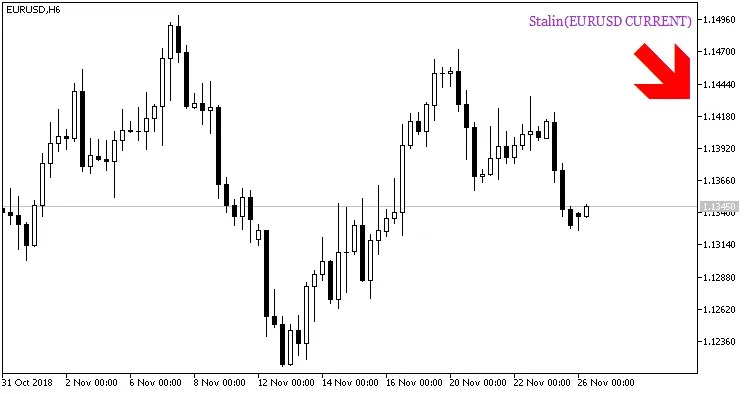
Fig. 1. Indicator Stalin_HTF_Signal. Signal to open a position.
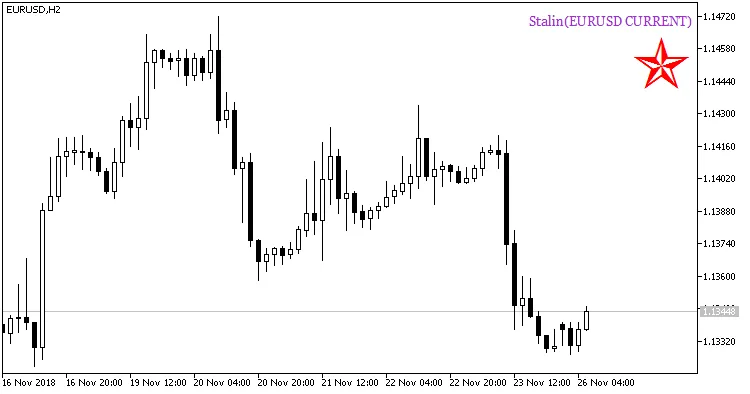
Fig. 2. Indicator Stalin_HTF_Signal. Signal of trend continuation.




Comments 0