
If you’re looking to enhance your trading strategies, the MQL5 Wizard is a game-changer. It lets you whip up Expert Advisors (EAs) based on the Standard Library classes that come with your MetaTrader 5 terminal. This means you can quickly test your trading ideas without diving deep into complex coding. All you need is to create your own trading signals class, and you can refer to the article on Creating a Module of Trading Signals for guidance.
Here's the gist: you derive your trading signals class from CExpertSignal. Then, you just need to override the LongCondition() and ShortCondition() methods with your own logic.
There’s a fantastic book titled "Strategies of Best Traders" that dives into various trading strategies, focusing on reversal candlestick patterns confirmed by indicators like Stochastic, CCI, MFI, and RSI.
To effectively check for candlestick patterns, it's best to create a separate class derived from CExpertSignal. You can also derive from CCandlePattern for confirmation of signals generated by these patterns, adding features like oscillator confirmations.
Today, we'll zero in on the "Bullish Harami" and "Bearish Harami" reversal candlestick patterns, confirmed by the Market Facilitation Index (MFI). This module is built on the CCandlePattern class, providing a straightforward example of how to create trade signals using candlestick patterns.
1. Understanding Bullish and Bearish Harami Patterns
1.1. Bullish Harami
The Bullish Harami pattern appears during a downtrend and consists of a large bearish candle followed by a smaller bullish candle, entirely contained within the larger candle's body. This suggests that the downtrend may be reversing, signaling a great opportunity to enter a long position. Note that the second candle typically opens with a gap up.
The smaller the second (bullish) candle, the more likely a reversal is to occur.

Fig. 1. Bullish Harami candlestick pattern
The recognition of the Bullish Harami pattern is implemented in the CheckPatternBullishHarami() method of CCandlePattern class:
//+------------------------------------------------------------------+//| Checks formation of Bullish Harami candlestick pattern |//+------------------------------------------------------------------+bool CCandlePattern::CheckPatternBullishHarami()
  {
//--- Bullish Harami
   if((Close(1)>Open(1))
     ((Open(2)-Close(2)>AvgBody(1))
     ((Close(1)<Open(2))
      (Open(1)>Close(2))
      (MidPoint(2)<CloseAvg(2)))
      return(true);
//---
   return(false);
  }
The CheckCandlestickPattern(CANDLE_PATTERN_BULLISH_HARAMI) method of CCandlePattern class is utilized to check the formation of the Bullish Harami candlestick pattern.
1.2. Bearish Harami
Conversely, the Bearish Harami pattern occurs during an uptrend when a large bullish candle is followed by a smaller bearish candle, which is also contained within the larger candle's body. This indicates a potential reversal of the uptrend, suggesting it's time to consider entering a short position. The second candle typically opens with a gap down.
Again, the smaller the second (bearish) candle, the more likely the reversal.
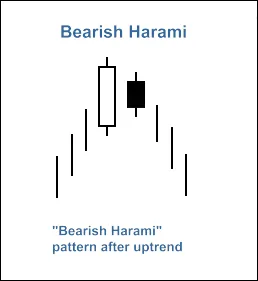
Fig. 2. Bearish Harami candlestick pattern
The recognition of the Bearish Harami pattern is implemented in the CheckPatternBearishHarami() method of CCandlePattern class:
//+------------------------------------------------------------------+//| Checks formation of Bearish Harami candlestick pattern |//+------------------------------------------------------------------+bool CCandlePattern::CheckPatternBearishHarami()
  {
//--- Bearish Harami
   if((Close(1)<Open(1))
     ((Close(2)-Open(2)>AvgBody(1))
     ((Close(1)>Open(2))
      (Open(1)<Close(2))
      (MidPoint(2)>CloseAvg(2)))
      return(true);
//---
   return(false);
  }
The CheckCandlestickPattern(CANDLE_PATTERN_BEARISH_HARAMI) method of CCandlePattern class is used to check the formation of the Bearish Harami candlestick pattern.
2. Trade Signals Confirmed by MFI Indicator
For successful trade entries, our signals to open long or short positions must be confirmed by the MFI indicator. Specifically, the MFI value should be below 40 for long positions or above 60 for short positions.
When it comes to closing open positions, this depends on the MFI indicator values. You can close positions in two scenarios:
- When MFI hits the opposite critical level (70 for long positions and 30 for short positions).
- If the reversal signal isn’t confirmed (MFI reaching the levels of 30 for long positions and 70 for short positions).

Fig. 3. Bullish Harami pattern confirmed by MFI indicator
- int CBH_BH_MFI::LongCondition() - checks conditions to open a long position (returns 80) and close the short position (returns 40);
- int CBH_BH_MFI::ShortCondition() - checks conditions to open a short position (returns 80) and close the long position (returns 40).
2.1. Opening Long Position / Closing Short Position
The Bullish Harami pattern’s formation must be confirmed by the MFI indicator: MFI(1) < 40 (the last completed bar’s MFI must be below 40).
The short position should be closed if the MFI indicator crosses upwards through critical levels (70 or 30).
//+------------------------------------------------------------------+//| Checks conditions for entry and exit from market |//| 1) Market entry (open long position, result=80) |//| 2) Market exit (close short position, result=40) |//+------------------------------------------------------------------+int CBH_BH_MFI::LongCondition()
  {
   int result=0;
//--- checking conditions to open long position//--- formation of Bullish Harami pattern and MFI<40
  if(CheckCandlestickPattern(CANDLE_PATTERN_BULLISH_HARAMI) && (MFI(1)<40))
     result=80;
//--- checking conditions to close short position//--- signal line crossover of overbought/oversold levels (upward 30, upward 70)
  if(((MFI(1)>30) && (MFI(2)<30)) || ((MFI(1)>70) && (MFI(2)<70)))
     result=40;
//--- return result
   return(result);
  }
2.2. Opening Short Position / Closing Long Position
The Bearish Harami pattern’s formation must be confirmed by the MFI indicator: MFI(1) > 60 (the last completed bar’s MFI must be above 60).
The long position should be closed if the MFI indicator crosses upwards through critical levels (70 or 30).
//+------------------------------------------------------------------+//| Checks conditions for entry and exit from market |//| 1) Market entry (open short position, result=80) |//| 2) Market exit (close long position, result=40) |//+------------------------------------------------------------------+int CBH_BH_MFI::ShortCondition()
  {
   int result=0;
//--- checking conditions to open short position//--- formation of Bearish Harami pattern and MFI>60
  if(CheckCandlestickPattern(CANDLE_PATTERN_BEARISH_HARAMI) && (MFI(1)>60))
     result=80;
//--- checking conditions to close long position//--- signal line crossover of overbought/oversold levels (upward 70, downward 30)
   if(((MFI(1)>70) && (MFI(2)<70)) || ((MFI(1)<30) && (MFI(2)>30)))
     result=40;
//--- return result
   return(result);
  }
2.3. Creating Your Expert Advisor with MQL5 Wizard
The CBH_BH_MFI class isn't part of the Standard Library, so you'll first need to download the abh_bh_mfi.mqh file (check the attachments) and save it to the client_terminal_data\MQL5\Include\Expert\Signal\MySignals folder. Repeat this with the acandlepatterns.mqh file. After restarting MetaEditor, you can then use it in MQL5 Wizard.
To create your Expert Advisor, just fire up the MQL5 Wizard:
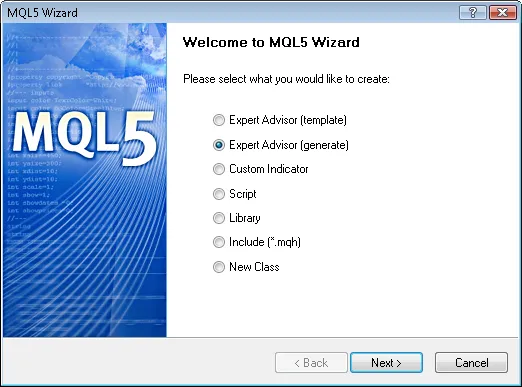
Fig. 4. Creating Expert Advisor using MQL5 Wizard
Start by specifying the name of your Expert Advisor:
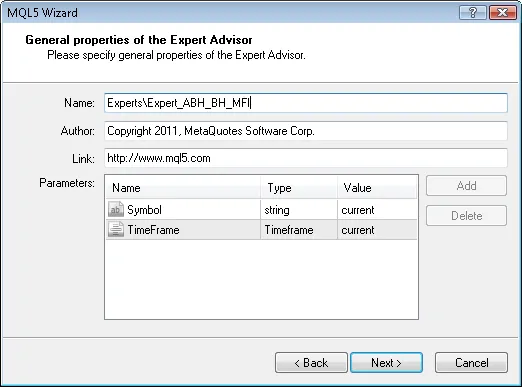
Fig. 5. General properties of the Expert Advisor
Next, select the trade signal modules you want to use.
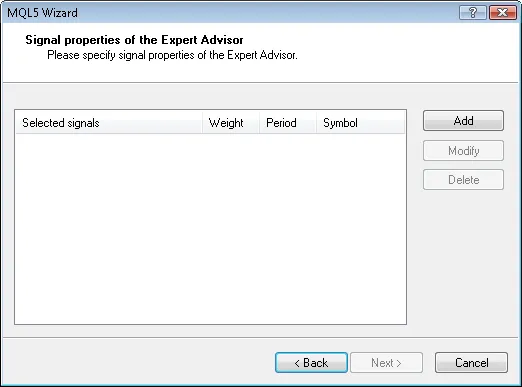
Fig. 6. Signal properties of the Expert Advisor
In our case, we’ll only need one module for trade signals:
Add the Signals based on Bullish Harami/Bearish Harami confirmed by MFI trading signals module:
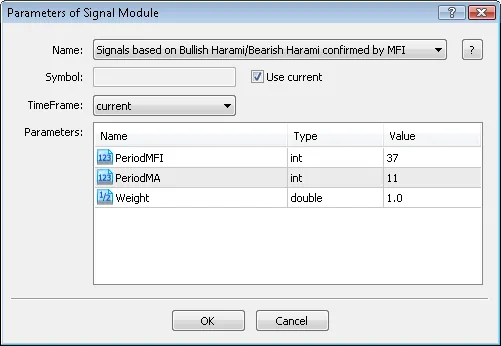
Fig. 7. Signal properties of the Expert Advisor
Module of trade signals added:
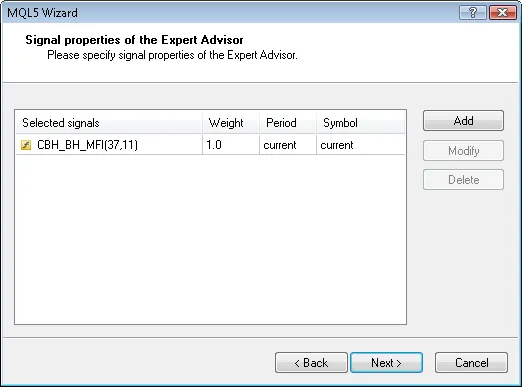
Fig. 8. Signal properties of the Expert Advisor
You can choose any trailing properties, but we’ll select




Comments 0