
Hey there, fellow traders! Today, we're diving into the world of MQL5 Wizard and how it can help you whip up some effective Expert Advisors (EAs). If you’re looking to enhance your trading strategies, especially those using the reversal patterns of 3 Black Crows and 3 White Soldiers, you’ve landed in the right spot!
The MQL5 Wizard streamlines the creation of EAs, allowing you to quickly check your trading ideas. All you need is to build your own trading signals class, which is straightforward if you follow the structure laid out in the MQL5 Wizard: How to Create a Module of Trading Signals.
Understanding Trading Signals Classes
The core concept is simple: create a trading signals class that extends from CExpertSignal. You’ll need to override the LongCondition() and ShortCondition() methods with your own logic.
A great resource is the book Strategies of Best Traders, where various strategies are explored—particularly the reversal candlestick patterns confirmed by indicators like Stochastic, CCI, MFI, and RSI.
Spotting the Patterns
1. The 3 Black Crows and 3 White Soldiers Patterns
1.1. 3 Black Crows
This bearish pattern signals a potential reversal in an uptrend and consists of three consecutive long-bodied candles that close lower than the previous day’s close, with each opening within the previous candle’s body.
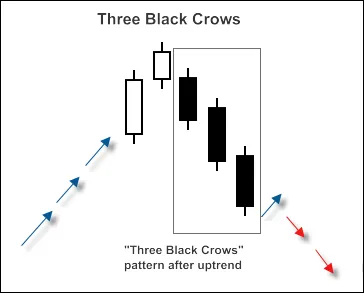
Fig. 1. 3 Black Crows Candlestick Pattern
To recognize this pattern, you can implement the CheckPatternThreeBlackCrows method in the CCandlePattern class.
bool CCandlePattern::CheckPatternThreeBlackCrows()
{
// Check for 3 Black Crows pattern
if ((Open(3) - Close(3) > AvgBody(1)) &&
(Open(2) - Close(2) > AvgBody(1)) &&
(Open(1) - Close(1) > AvgBody(1)) &&
(MidPoint(2)
1.2. 3 White Soldiers
This bullish counterpart predicts a reversal from a downtrend, consisting of three long-bodied candles that close higher than the previous day’s close. Each opening occurs within the prior candle’s body.
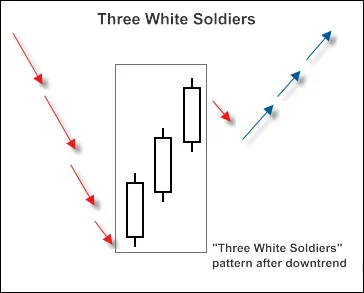
Fig. 2. 3 White Soldiers Candlestick Pattern
You can use a similar method, CheckPatternThreeWhiteSoldiers, to identify this pattern:
bool CCandlePattern::CheckPatternThreeWhiteSoldiers()
{
// Check for 3 White Soldiers pattern
if ((Close(3) - Open(3) > AvgBody(1)) &&
(Close(2) - Open(2) > AvgBody(1)) &&
(Close(1) - Open(1) > AvgBody(1)) &&
(MidPoint(2) > MidPoint(3)) &&
(MidPoint(1) > MidPoint(2)))
return true;
return false;
}Confirming Signals with CCI
The trade signals for opening long or short positions need confirmation from the CCI indicator. For long positions, CCI should be below -50, while for short positions, it should be above 50.
Closing positions depends on CCI values, triggered in two scenarios:
- If CCI reaches the opposite critical level (80 for long and -80 for short).
- If the reverse signal isn't confirmed (CCI hitting -80 for long and 80 for short).
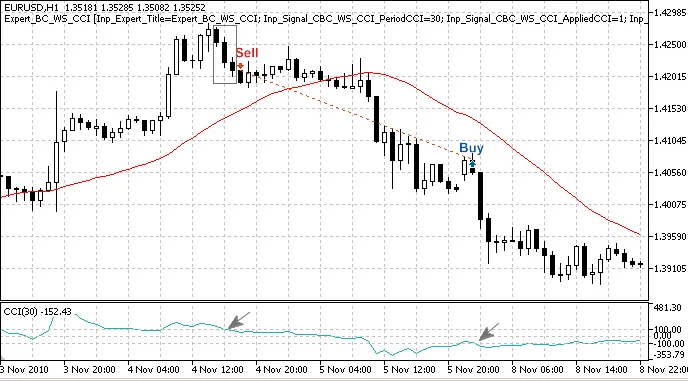
Fig. 3. 3 Black Crows Pattern Confirmed by CCI Indicator
2.1. Opening Long Positions
- The formation of the 3 Black Crows pattern must be confirmed by CCI:
CCI(1) . - Close short positions when CCI crosses above -80 or below 80.
int CBC_WS_CCI::LongCondition()
{
    int result = 0;
    if (CheckCandlestickPattern(CANDLE_PATTERN_THREE_WHITE_SOLDIERS) && (CCI(1)  80) && (CCI(2)  -80)))
        result = 40;
    return result;
}
2.2. Opening Short Positions
- Confirm the 3 White Soldiers pattern with CCI:
CCI(1) > 50. - Close long positions if CCI crosses below -80 or above 80.
int CBC_WS_CCI::ShortCondition()
{
int result = 0;
if (CheckCandlestickPattern(CANDLE_PATTERN_THREE_BLACK_CROWS) && (CCI(1) > 50))
result = 80;
if (((CCI(1) 80)) || ((CCI(1) > -80) && (CCI(2)
Building Your EA with MQL5 Wizard
To create your Expert Advisor, fire up the MQL5 Wizard. Here’s a step-by-step:
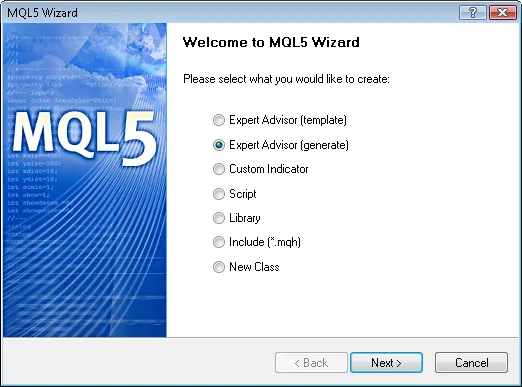
Fig. 4. Creating Expert Advisor with MQL5 Wizard
1. Specify the name for your Expert Advisor.
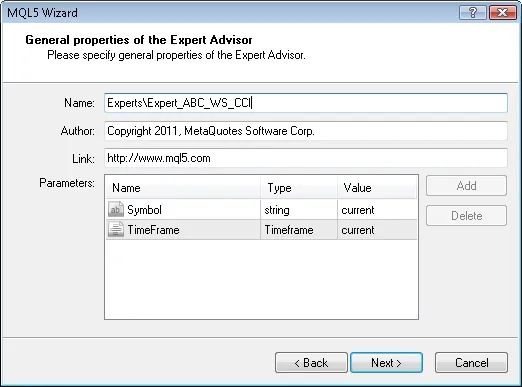
Fig. 5. General Properties of the Expert Advisor
2. Select the trading signal modules used.
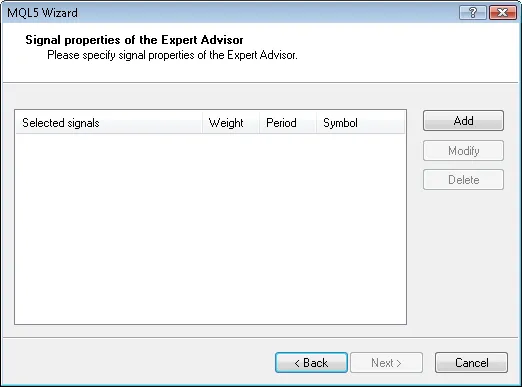
Fig. 6. Signal Properties of the Expert Advisor
3. We’ll only use the module based on 3 Black Crows and 3 White Soldiers confirmed by CCI.
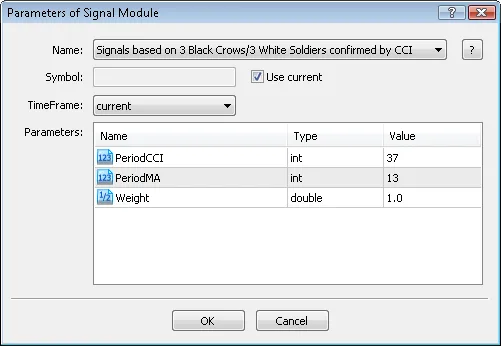
Fig. 7. Signal Properties of the Expert Advisor
4. Add the module for trading signals.
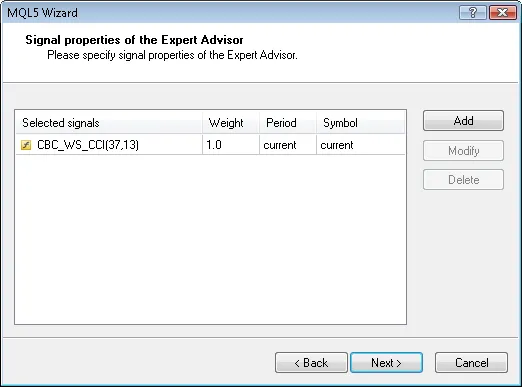
Fig. 8. Signal Properties of the Expert Advisor
5. Set your trailing properties. We'll go with no trailing stop.
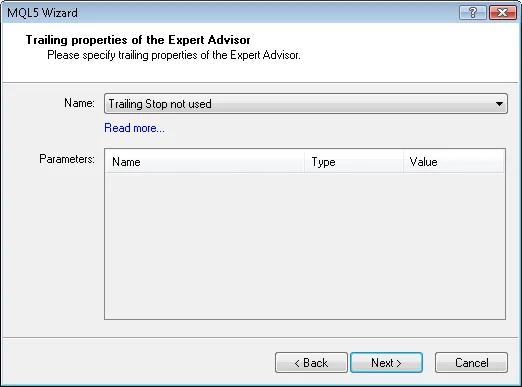
Fig. 9. Trailing Properties of the Expert Advisor
6. For money management, we will use fixed trade volume.
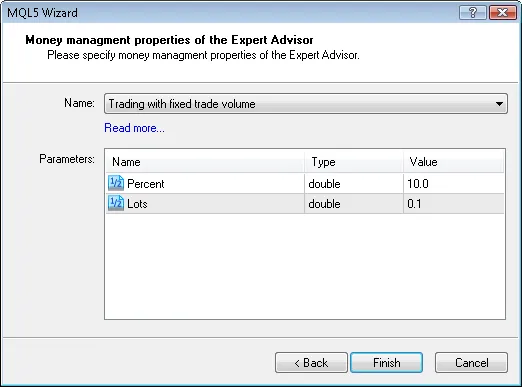
Fig. 10. Money Management Properties of the Expert Advisor
7. Hit the "Finish" button, and your EA code will be generated and saved in terminal_data_folder/MQL5/Experts/.
The default parameters will look something like this:
//--- inputs for main signal
input int Signal_ThresholdOpen = 10; // Threshold for opening
input int Signal_ThresholdClose = 10; // Threshold for closing
input double Signal_PriceLevel = 0.0; // Price level to execute
input double Signal_StopLevel = 50.0; // Stop Loss level
input double Signal_TakeLevel = 50.0; // Take Profit level
Adjust these as necessary based on your trading strategy. For example, you might want to set the open threshold to 40 and the close threshold to 20.
The generated EA will utilize "votes" from the trading signals module to make decisions. The averaging of these votes will also play a crucial role in determining when to enter or exit trades.
Backtesting Your Strategy
Lastly, let's take a look at backtesting results. Using historical data for EURUSD on the H1 chart from January 1, 2010, to March 16, 2011, you can assess how well your EA performs.
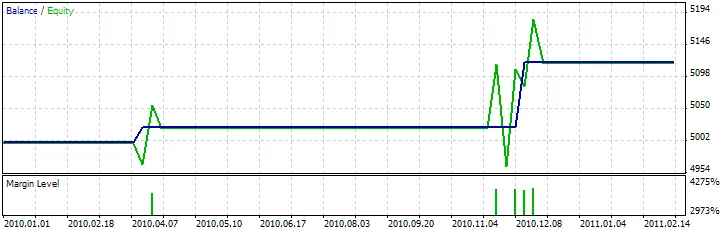
Fig. 11. Backtesting Results of the Expert Advisor
You can find the best set of parameters using the Strategy Tester in MetaTrader 5.
And there you have it! With the MQL5 Wizard, you can create, refine, and backtest your trading strategies based on reliable candlestick patterns. Happy trading!




Comments 0