
If you're looking to enhance your trading game with a reliable system, look no further than the Omni_Trend indicator. This trading system generates signals that trigger at the close of a bar, specifically when a large colored dot appears on the indicator.
To get started, you'll need to install the compiled indicator file, Omni_Trend.ex5. Simply save it in your <terminal_data_folder>\MQL5\Indicators directory to ensure everything runs smoothly.
One of the best features of this system is its compatibility with the TradeAlgorithms.mqh library. This allows you to use Expert Advisors with brokers that offer non-zero spreads, and you can set your Stop Loss and Take Profit levels right when you open a position. For more options, you can download additional versions of the library here: Trade Algorithms.
During the testing phase, we utilized the default input parameters for the Expert Advisor. It's worth noting that neither Stop Loss nor Take Profit was applied during these tests.
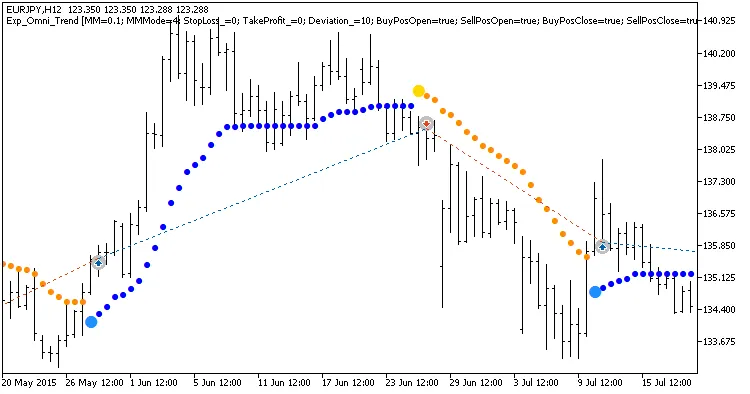
Fig. 1. Examples of deals on the chart
Here are the testing results for 2015 on the EURJPY H12 timeframe:
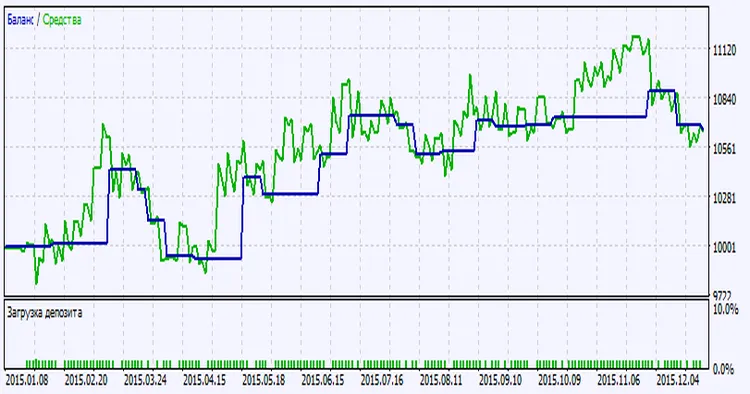
Fig. 2. Testing results chart




Comments 0