
If you're looking to ride the trends in trading, the Exp_X2MA_Digit_DM_361 is a game-changer for your MetaTrader 5 setup. This trend-following system leverages the strengths of the ColorX2MA_Digit and ColorDM_361 indicators. The ColorX2MA_Digit helps to identify the slow trend direction, while the ColorDM_361 pinpoints your entry point as the fast trend shifts.
How It Works
An entry signal is triggered at the close of a bar when two key conditions align:
- Fast and slow trend signals agree.
- The fast trend reverses direction.
Parameters You Should Know
Here’s a sneak peek at the EA's input parameters:
//| Input parameters of the EA indicator |
//+-------------------------------------------------+
inputstring Trade="Trade management";
inputdouble MM=0.1;
// Share of deposit in a deal
input MarginMode MMMode=LOT;
// Lot value detection method
inputuint StopLoss_=1000;
// Stop loss in points
inputuint TakeProfit_=2000;
// Take profit in points
inputstring MustTrade="Trading permissions";
//+============== TRADING PERMISSIONS ==============+
inputint Deviation_=10;
// Max price deviation in points
inputbool BuyPosOpen=true;
// Permission to open long positions
inputbool SellPosOpen=true;
// Permission to open short positions
//+-------------------------------------------------+
Setting Up Your EA
To ensure everything runs smoothly, make sure to place the compiled files for ColorX2MA_Digit, ColorX2MA_Digit_HTF, ColorDM_361, and ColorDM_361_HTF in your <terminal_data_folder>\MQL5\Indicators directory.
Also, keep in mind that the TradeAlgorithms.mqh library file is essential for using EAs with brokers that offer nonzero spreads and allow for setting Stop Loss and Take Profit during position opening. You can grab more versions of the library here.
Test Results
The default input parameters were utilized during testing, where Stop Loss and Take Profit were not included. Here’s a glimpse of the test results for 2015 on GBPUSD, using a slow trend on H4 and fast trend entries on M30:
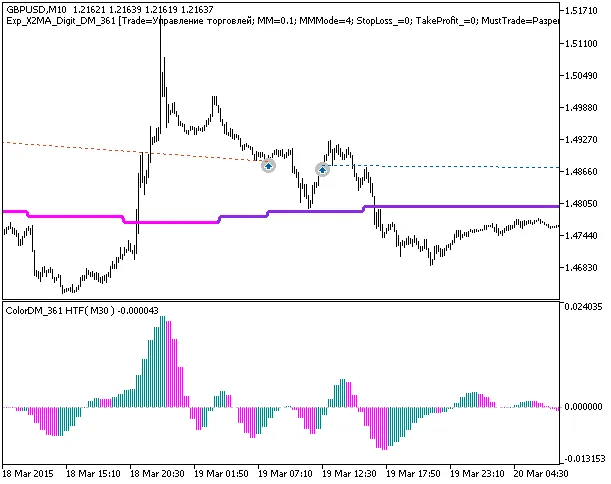
Fig. 1. Examples of trades on the chart
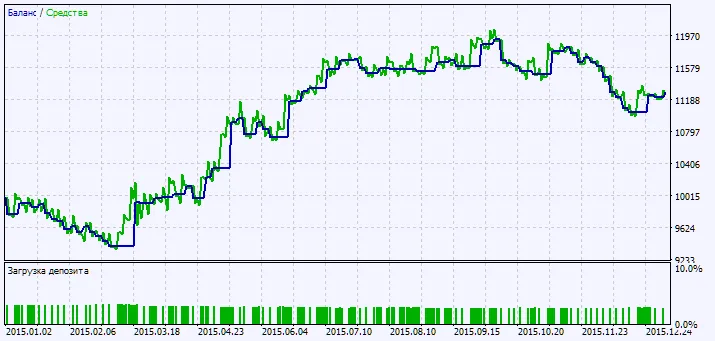
Fig. 2. Testing results chart




Comments 0